
Resources
- Technical
- Infrastructure Explain : https://www.youtube.com/watch?v=aria5gmElSc&t=77s
- SMTP codes : https://serversmtp.com/smtp-error/
- Offensive
- By tahirgozuacik : https://medium.com/@tahirgozuacik/understand-enumerate-and-exploit-smtp-with-thm-example-34e3eb3806b6
- By hackingarticles : https://www.hackingarticles.in/4-ways-smtp-enumeration/
- By luemmelsec : https://luemmelsec.github.io/Pentest-Everything-SMTP/
- By swlh : https://medium.com/swlh/internal-information-disclosure-using-hidden-ntlm-authentication-18de17675666
- Examples
- By hackerone : https://hackerone.com/reports/2264982
Cheat Sheet
- viperone : https://viperone.gitbook.io/pentest-everything/everything/ports/25-smtp
- secybr : https://secybr.com/posts/smtp-pentesting-best-practices/#smtp-spoofing
- snovvcrassh : https://ppn.snovvcra.sh/pentest/perimeter/smtp
Commands
- Enumeration
- Discovery
nmap 10.129.14.128 -sC -sV -p25 - Banner
telnet 10.129.14.128 25 nc -nv 10.129.192.136 25 - SSL
# Test implicit SSL/TLS on port 465 openssl s_client -crlf -connect smtp.mailgun.org:465 # Test STARTTLS on port 587 openssl s_client -starttls smtp -crlf -connect smtp.mailgun.org:587 # Get the mx server dig +short mx google.com - SMTP Commands
nmap -p25 --script smtp-commands 10.129.192.136
- Discovery
- Open Relay
- Nmap
nmap 10.129.14.128 -p25 --script smtp-open-relay -v
- Nmap
- Bruteforcing
- hydra
hydra -l root -P passwords.txt [-t 32] <IP> ssh - ncrack
ncrack -p 22 --user root -P passwords.txt <IP> [-T 5] - medusa
medusa -u root -P 500-worst-passwords.txt -h <IP> -M ssh
- hydra
- NTLM Authentication
- Manually
> HELO test > AUTH NTLM > TlRMTVNTUAABAAAAB4IIAAAAAAAAAAAAAAAAAAAAAAA= - Use an Nmap script to gather NTLM information.
nmap -sS -v --script=*-ntlm-info --script-timeout=60s 10.129.192.136 - SMTP Commands
#HELO
It’s the first SMTP command: is starts the conversation identifying the sender server and is generally followed by its domain name.
#EHLO
An alternative command to start the conversation, underlying that the server is using the Extended SMTP protocol.
#MAIL FROM
With this SMTP command the operations begin: the sender states the source email address in the “From” field and actually starts the email transfer.
#RCPT TO
It identifies the recipient of the email; if there are more than one, the command is simply repeated address by address.
#SIZE
This SMTP command informs the remote server about the estimated size (in terms of bytes) of the attached email. It can also be used to report the maximum size of a message to be accepted by the server.
#DATA
With the DATA command the email content begins to be transferred; it’s generally followed by a 354 reply code given by the server, giving the permission to start the actual transmission.
#VRFY
The server is asked to verify whether a particular email address or username actually exists.
#TURN
This command is used to invert roles between the client and the server, without the need to run a new connaction.
#AUTH
With the AUTH command, the client authenticates itself to the server, giving its username and password. It’s another layer of security to guarantee a proper transmission.
#RSET
It communicates the server that the ongoing email transmission is going to be terminated, though the SMTP conversation won’t be closed (like in the case of QUIT).
#EXPN
This SMTP command asks for a confirmation about the identification of a mailing list.
#HELP
It’s a client’s request for some information that can be useful for the a successful transfer of the email.
#QUIT
It terminates the SMTP conversation.
- Manually
Notes
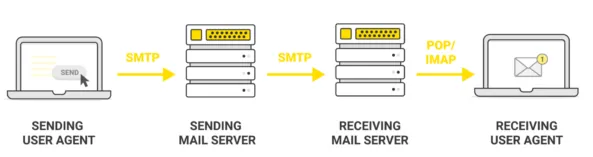
Working SMTP Flow Diagram
graph TD
    subgraph You
        A(["MUA (You / Email Client)"])
    end

    subgraph Your Company's Server
        B["MSA (Mail Submission Agent)"]
        C["MTA (Mail Transfer Agent)"]
    end

    subgraph Internet
        D["DNS Server"]
        E["Recipient's Mail Server"]
    end

    A -- "User hits 'Send'" --> B
    B -- "Checks credentials (SMTP-Auth)" --> C
    C -- "Looks up recipient's address" --> D
    D -- "Returns IP address" --> C
    C -- "Transfers email" --> E

    style A fill:#cde4ff
    style E fill:#d5f5d5
Configration file : /etc/postfix/main.cf