Notes
Bitdefender GravityZone Plans & Features
Bitdefender GravityZone Plans & Features
Core Features Across Most GravityZone Plans
Most Bitdefender GravityZone plans share a foundational set of powerful security features. Think of these as the essential building blocks of their endpoint protection:
- Antimalware: Utilizes machine learning, heuristics, and signatures to block malware.
- Advanced Threat Control: Continuously monitors running processes for malicious behavior.
- Advanced Anti-Exploit: Proactively protects against attacks that target software vulnerabilities.
- Firewall: Controls network traffic to and from endpoints.
- Content Control: Blocks access to malicious or inappropriate websites.
- Device Control: Manages the use of external devices like USB drives.
- Ransomware Mitigation: Helps protect against ransomware attacks and can restore encrypted files.
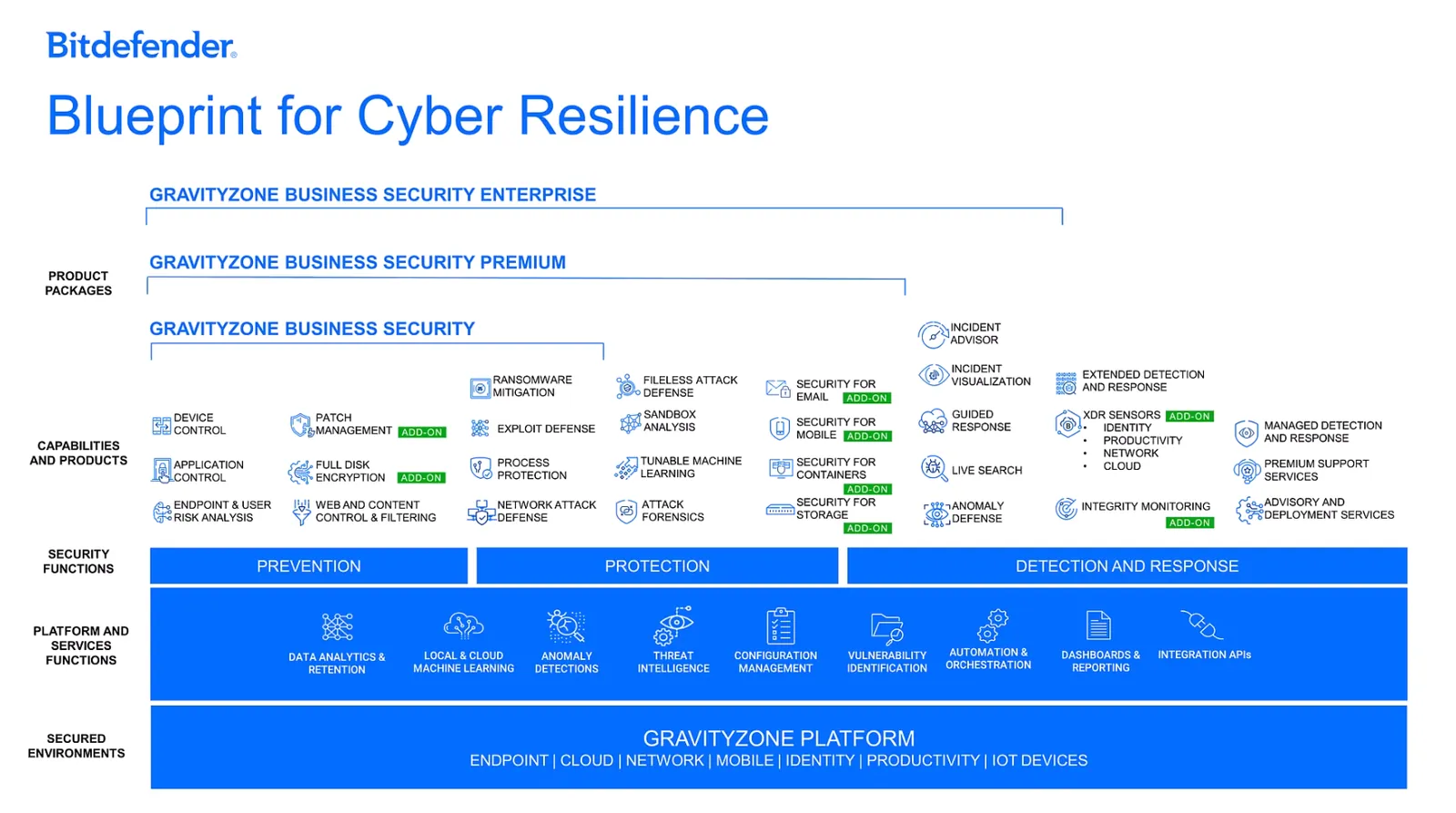
1. GravityZone Business Security
This is the entry-level plan, ideal for small and medium-sized businesses that need solid endpoint protection without some of the more advanced threat hunting and response capabilities.
Key Features
- All the Core Features listed above.
- Web-based security console: Manage all endpoints from a single, cloud-hosted or on-premises console.
- Protection for desktops, laptops, and servers: Covers physical and virtual machines.
- Network Attack Defense: Provides an additional layer of security against network-based threats.
- Endpoint Risk Management: Helps identify and remediate endpoint weaknesses and misconfigurations.
Who is it for? Businesses that need robust, multi-layered endpoint protection and centralized management but don’t require advanced incident investigation tools.
2. GravityZone Business Security Premium
This plan builds on the Business Security offering by adding more advanced prevention, detection, and visibility features.
Key Features
- Everything in Business Security, plus:
- HyperDetect™: Uses tunable machine learning to block advanced and file-less attacks.
- Sandbox Analyzer: Automatically sends suspicious files to a cloud sandbox for detonation and analysis.
- Attack Forensics and Visualization: Provides a graphical representation of the attack chain.
- Human Risk Analytics: Identifies user behaviors that could pose a security risk.
- Application Control: Create whitelists and blacklists of applications.
Who is it for? Companies that need deeper visibility into threats and more proactive protection against advanced and evasive attacks.
3. GravityZone Business Security Enterprise
This is Bitdefender’s top-tier endpoint protection platform (EPP) and includes Endpoint Detection and Response (EDR) capabilities.
Key Features
- Everything in Business Security Premium, plus:
- Endpoint Detection and Response (EDR): Provides deep visibility into endpoint and user activities. This includes:
- Cross-Endpoint Correlation
- Root Cause Analysis
- Threat Hunting
- Live Search
- Anomaly Detection: Identifies unusual behavior on endpoints that could indicate a threat.
Who is it for? Larger organizations or those with mature security operations that require advanced threat hunting and incident response capabilities.
Add-on Features
Bitdefender also offers several key security features as optional add-ons:
- Patch Management
- Full Disk Encryption
- Security for Email
- Security for Mobile
Managed Services: MDR and XDR
- Bitdefender MDR: A fully managed service where Bitdefender’s team of security experts monitors your environment 24/7, hunts for threats, and responds to incidents.
- Bitdefender GravityZone XDR: Extends detection and response capabilities beyond the endpoint to include network, cloud, and email for a more holistic view.
Feature Comparison Table
Feature Business Security Business Security Premium Business Security Enterprise Antimalware & Anti-Exploit ✔ ✔ ✔ Firewall, Content & Device Control ✔ ✔ ✔ Network Attack Defense ✔ ✔ ✔ Endpoint Risk Management ✔ ✔ ✔ Application Control ✔ ✔ Human Risk Analytics ✔ ✔ HyperDetect™ ✔ ✔ Sandbox Analyzer ✔ ✔ Attack Forensics ✔ ✔ Endpoint Detection & Response (EDR) ✔ Anomaly Detection ✔ Patch Management Add-on Add-on Add-on Full Disk Encryption Add-on Add-on Add-on Email Security Add-on Add-on Add-on Mobile Security Add-on Add-on Add-on
Resources
- Bitdefender Official Business Website: Main portal for all GravityZone products.
- GravityZone Business Security Enterprise Page: Specific details about the top-tier plan.
- GravityZone Business Security Premium Page: Details on the mid-tier plan’s features.
- Bitdefender Product Comparison Datasheet (PDF): Side-by-side feature comparison.
- Bitdefender Managed Detection and Response (MDR) Page: Information about managed services.
Bitdefender GravityZone: Deep Dive on Features
Bitdefender GravityZone Feature Deep Dive
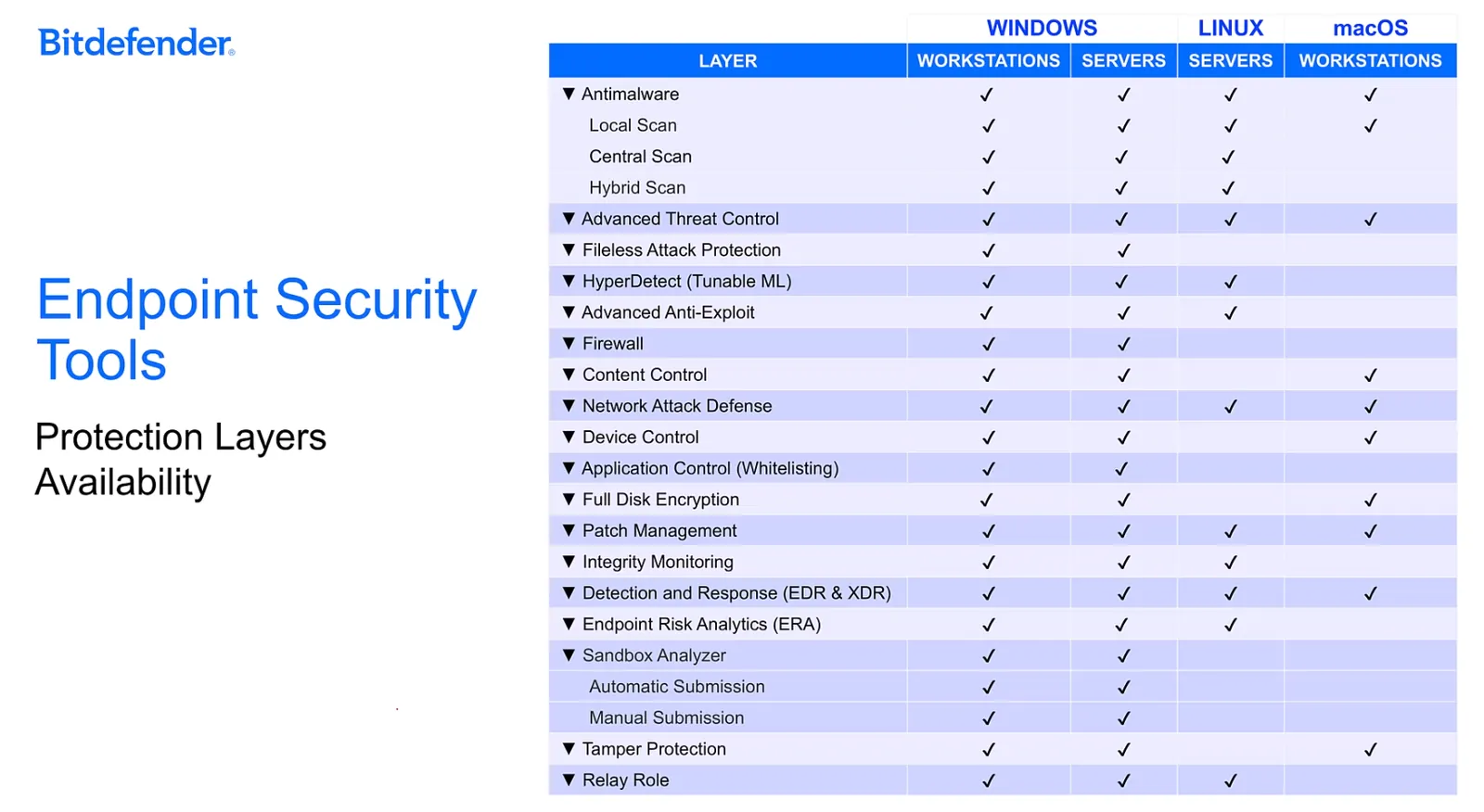
This note details the features, functionalities, and infrastructure roles of the Bitdefender Endpoint Security Tools (BEST) client, which is the cornerstone of the GravityZone ecosystem.
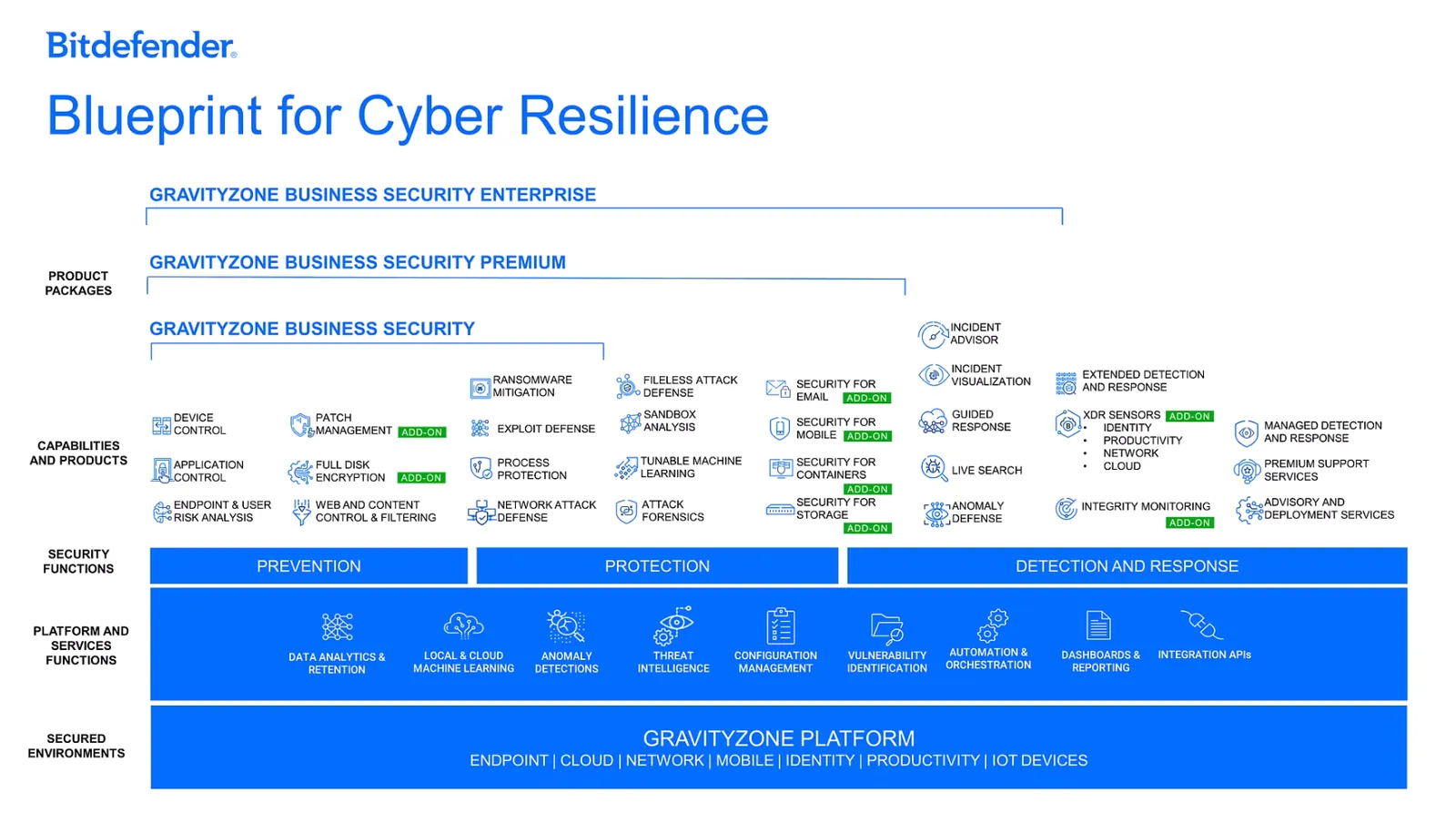
I. Prevention Layer Features
The Prevention Layer focuses on stopping threats before they enter a system, thereby reducing the attack surface.
- Patch Management: Keeps operating systems and applications up-to-date with a comprehensive view of the patch status across all managed endpoints.
- Full Disk Encryption (FDE): An add-on that manages BitLocker (Windows) and FileVault (macOS) to encrypt boot and non-boot volumes with minimal user interaction. GravityZone securely stores the recovery keys.
- Device Control: Prevents data leakage and malware infections from external devices (like USB drives) by enforcing blocking rules.
- Application Control: Delivers application blacklisting capabilities through the GravityZone Cloud to prevent unauthorized software from running.
- Web and Content Control: Allows administrators to block or allow internet access and specific website categories during set time intervals.
- Endpoint Risk Analytics (ERRA): Assesses and helps harden endpoint security configurations against industry best practices to minimize weaknesses.
II. Protection Layer Features
The Protection Layer deals with threats that have already entered a system, focusing on preventing their execution and spread.
- Tunable Machine Learning (Hyperdetect): A powerful, customizable machine learning technology that detects sophisticated attacks right as they attempt to execute.
- Fileless Attack Protection: Detects and blocks malware that operates directly in memory, such as malicious PowerShell scripts or code injection attempts.
- Advanced Anti-Exploit: A proactive, machine learning-powered technology that stops zero-day attacks targeting software vulnerabilities.
- Ransomware Mitigation: Detects abnormal encryption attempts, blocks the malicious process, and automatically restores the original files from backup copies.
- Process Protection (Advanced Threat Control): Continuously monitors all running processes for suspicious behaviors (e.g., hiding, replicating, dropping files). It terminates the process if a malicious behavior threshold is reached.
- Network Attack Defense: Detects and blocks network-based attacks like brute-force attempts, network exploits, and password stealers.
- Sandbox Analyzer: Automatically executes suspicious files in a secure, isolated cloud environment to analyze their behavior for malicious intent before allowing them to run on the endpoint.
III. Detection and Response Layer
The Detection and Response Layer is critical for identifying and mitigating threats that have bypassed the initial prevention and protection layers.
- Endpoint Detection and Response (EDR): Provides the deep visibility and tools needed for security analysts to investigate, hunt for, and respond to the most elusive and advanced attacks.
- eXtended Detection and Response (XDR): Broadens the scope of EDR by correlating security data from multiple sources (endpoints, network, cloud, email) to provide a complete picture of a security incident.
IV. Endpoint Scanning Engines
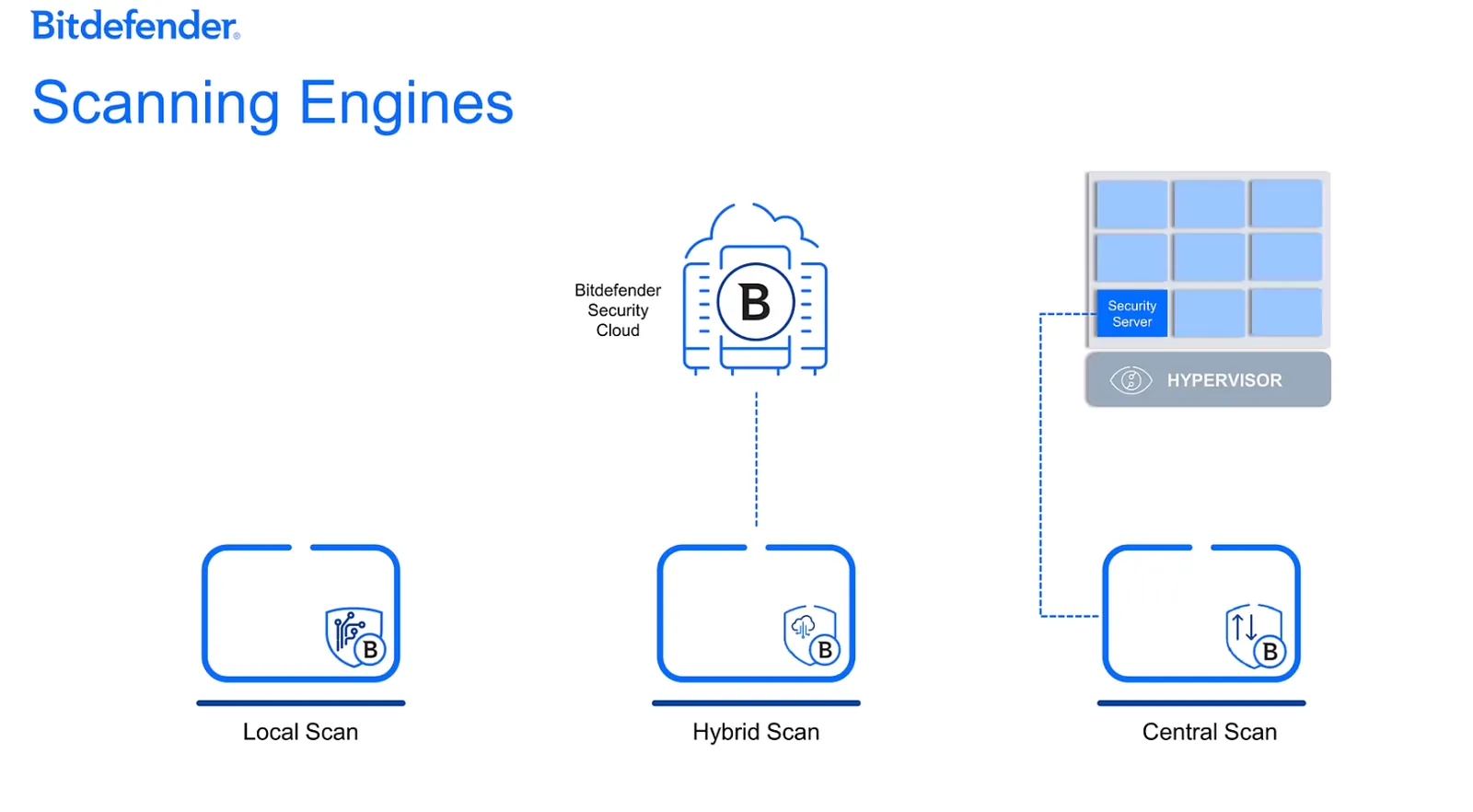
BEST can use different scanning engines to optimize performance and protection based on the endpoint’s resources and environment.
Local Scan: All scanning engines and signatures are stored on the local machine. Ideal for powerful endpoints with ample resources.
Hybrid Scan: A balanced approach where scanning is performed using a combination of local signatures and cloud-based checks.
Central Scan: A lightweight mode that offloads all scanning tasks to a dedicated Security Virtual Appliance (SVA), minimizing the resource impact on individual endpoints. Highly efficient for virtualized environments.
Dual-Engine & Fallback: To ensure continuous protection, Central Scan can be configured with a fallback option (either Local or Hybrid Scan) in case the SVA becomes unavailable.
Choose the best for the resources also
V. The Relay Server Role
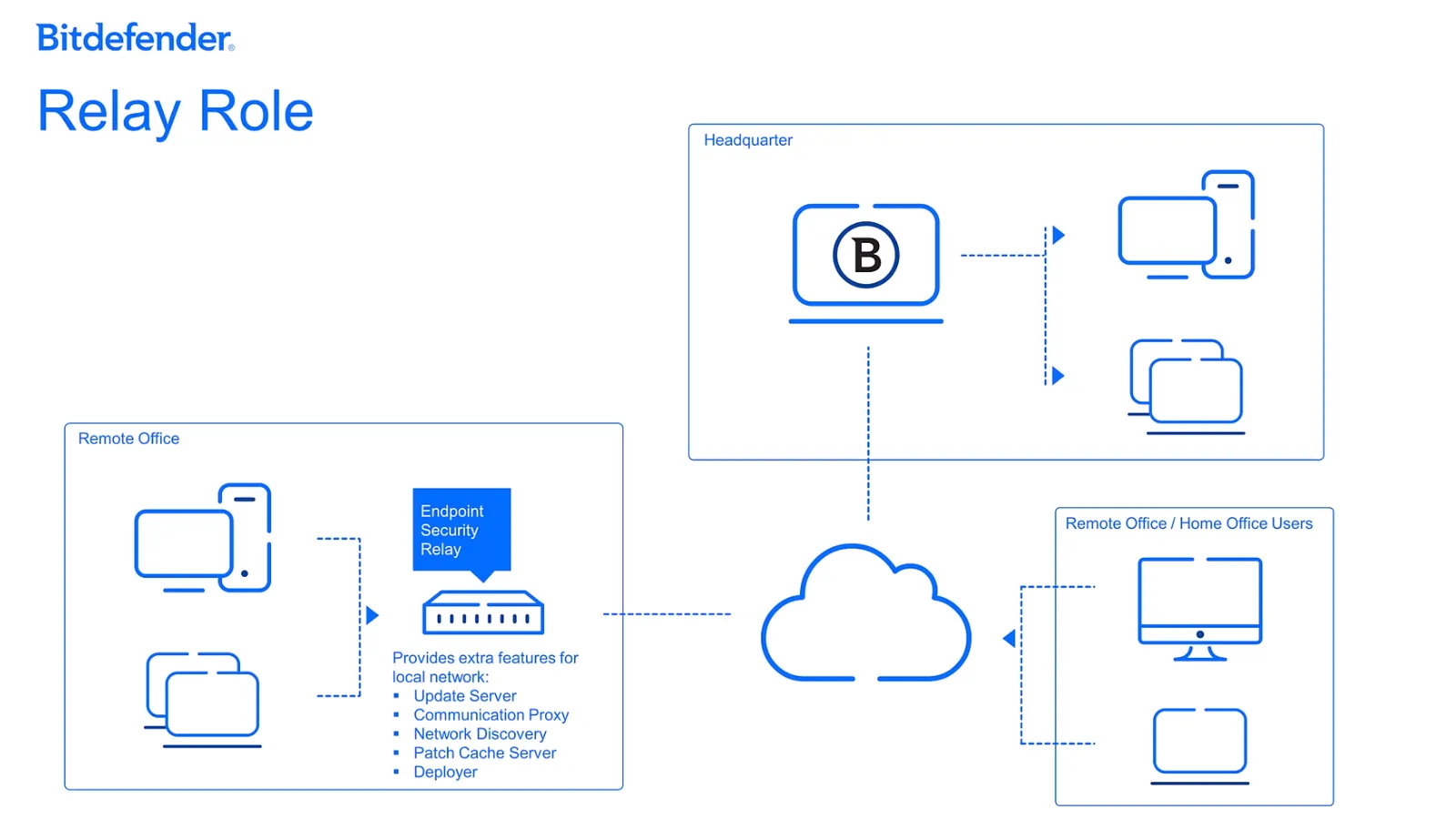
Endpoints with the Relay Role enabled act as a local proxy and update server, optimizing network traffic and improving manageability in distributed networks.
- Communication Proxy: Centralizes communication between local endpoints and the GravityZone Control Center, reducing external traffic.
- Update Server: Caches and distributes security and product updates to other endpoints in the same network segment.
- Network Discovery: Automatically identifies unmanaged endpoints on the local network, making it easy to deploy security agents.
- Patch Cache Server: Stores and distributes software patches to other endpoints, significantly saving internet bandwidth.
- Deployer: Stores installation packages and assists with the remote deployment of the BEST agent onto new devices.
Bitdefender EDR and XDR: The Complete Guide
Bitdefender EDR and XDR: The Complete Guide
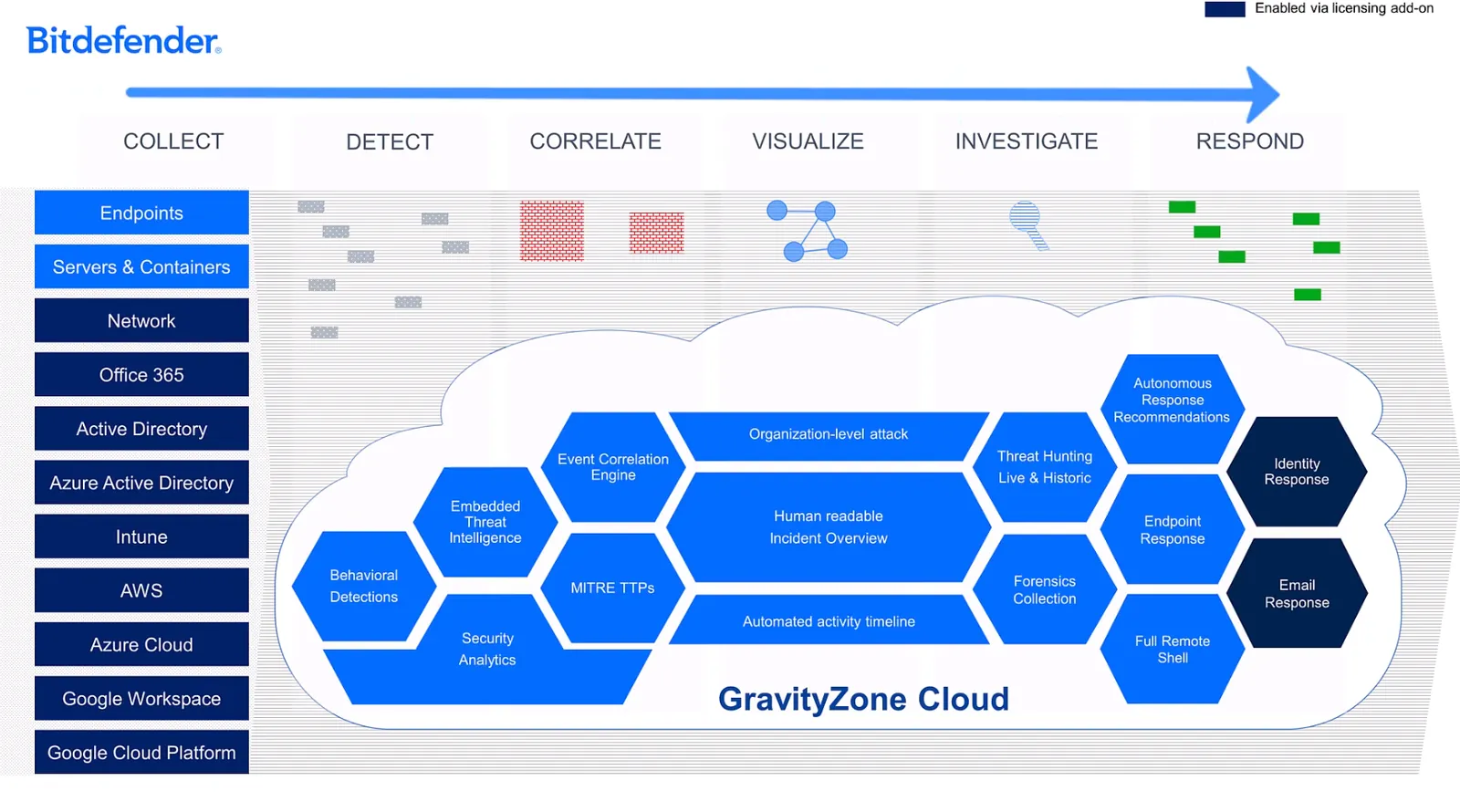
Bitdefender’s detection and response strategy is a convergence of Endpoint Detection and Response (EDR) with Extended Detection and Response (XDR). Think of EDR as a high-powered microscope for your endpoints, providing incredibly detailed visibility. XDR is like connecting all your microscopes and security cameras into a single security hub, correlating events from your entire infrastructure (network, cloud, identity, etc.) for a truly holistic and proactive approach to threat hunting.
I. Licensing and Core Functionality
- Primary Availability: EDR is a core feature included in the GravityZone Business Security Enterprise plan.
- Alternative Licensing: For other plans, organizations can use All-At-Once licensing combined with a specific EDR add-on to get these capabilities for certain endpoint types (like just workstations or just servers).
- Core Sensor: The Bitdefender Endpoint Security Tools (BEST) client with the EDR module installed on endpoints (workstations, servers, containers) acts as the primary data sensor.
- Data Retention: When activating EDR, an optional Data Retention add-on is available. This allows raw event data to be stored for a set period (e.g., 90, 180, or 365 days) for compliance and long-term investigation.
II. XDR Data Sources (Sensors)
The power of XDR comes from integrating data from a wide variety of sensors. Some advanced sensors may require an additional license.
Category Sensor Data Monitored Productivity Office 365 Accesses the unified audit log, capturing details from email content, user operations, and admin actions. Google Workspace Monitors all activities and data usage across Google Workspace accounts and services. Identity On-premises Active Directory Captures user login data. Azure AD Monitors sign-in activities and configuration changes for users and groups. Microsoft Intune Processes all device-related data and activities. Cloud Amazon Web Services (AWS) Captures configurations, user actions, and all AWS service activities. Azure Processes cloud activity data for a secure cloud space. Google Cloud Retrieves audit details specific to your Google Cloud project. Network Bitdefender Network Sensor Enriches security data by capturing and processing network events from all managed and unmanaged devices.
III. EDR/XDR Feature Set
The GravityZone platform provides a robust set of tools for managing the entire incident lifecycle, from initial analysis to final response.
A. Incident Analysis and Overview
These tools are designed to turn raw data into clear, understandable intelligence.
- Incident Adviser: A central correlation engine that sifts through massive amounts of data to identify real threats and provide a holistic overview.
- Incident Summary: A concise, human-readable snapshot of the event, detailing everything from the root cause to the specific alerts triggered.
- Root Cause Analysis: Pinpoints the catalyst of the incident, explaining not only what happened but also the vulnerabilities that made it possible.
- Organization Impact: Offers a comprehensive view of every affected asset, including endpoints, servers, users, or compromising emails.
- Highlights: Emphasizes the most critical areas of concern within an incident, allowing for a rapid assessment of the situation’s gravity.
- MITRE ATT&CK® Integration: Aligns all findings with the globally recognized MITRE ATT&CK framework, providing valuable context on adversary tactics and techniques.
- Incident Graph: A dynamic visual representation of the attack’s evolution. It’s like a detective’s corkboard, showing the attacker’s entry point, all involved assets, and potential exit points, with real-time alerts on significant turns.
B. Investigation and Threat Hunting Tools
These features equip security analysts with powerful capabilities for deep-dive forensics.
- Historical Search: Allows for deep investigation into past security events using the powerful XDR query language, with advanced filtering and multi-source data integration.
- Live Search (Oquery): Facilitates real-time queries across all online endpoints (Windows, Linux, and Mac) to get immediate information on live events and system statistics.
- Investigation Package & Forensics Tools: A suite of tools that accelerates the forensic evidence gathering process by allowing granular exploration of threats without needing direct, manual interaction with the endpoint.
- Full Remote Shell: An interactive tool providing a direct, secure command-line connection to an affected endpoint (Windows, Linux, and Mac). This is crucial for instant threat mitigation or advanced data collection.
C. Response and Mitigation
These tools empower analysts to take decisive and efficient action to neutralize threats.
- Response Recommendation Framework: Furnishes precise, incident-specific response suggestions based on what was detected. It can even provide autonomous recommendations for swift action.
- Identity Sensor Actions: Allows an analyst to instantly disable an Active Directory user account or enforce a password reset.
- Office 365 Sensor Actions: Enables the deletion of malicious emails or the suspension of a compromised Office 365 account directly from the console.
- Endpoint Specific Actions: Allows for targeted response actions (like isolating a device or killing a process) to be triggered directly on an endpoint.
- Audit Trail: Meticulously logs all response actions taken by analysts in a clear timeline, ensuring transparency and accountability for every step taken.
IV. Managed Detection and Response (MDR)
For organizations that need additional security expertise, Bitdefender offers MDR and MDR Plus services. This provides access to a 24/7/365 Security Operations Center (SOC) team that can either augment an existing security team or completely manage the detection and response lifecycle on your behalf.
Bitdefender Security for Virtualized Environments (SVE): The Complete Guide
Bitdefender Security for Virtualized Environments (SVE)
Bitdefender’s Security for Virtualized Environments (SVE) is a specialized solution designed to protect virtual machines (VMs) and virtual desktops (VDI) running Windows and Linux. It replaces traditional, resource-heavy antivirus agents with a highly efficient, centralized scanning model. This approach is hypervisor-agnostic, meaning it works with nearly any virtualization platform (like VMware, Hyper-V, Citrix, Nutanix, etc.) and is designed to maximize VM density and performance.
I. Architecture and Core Components
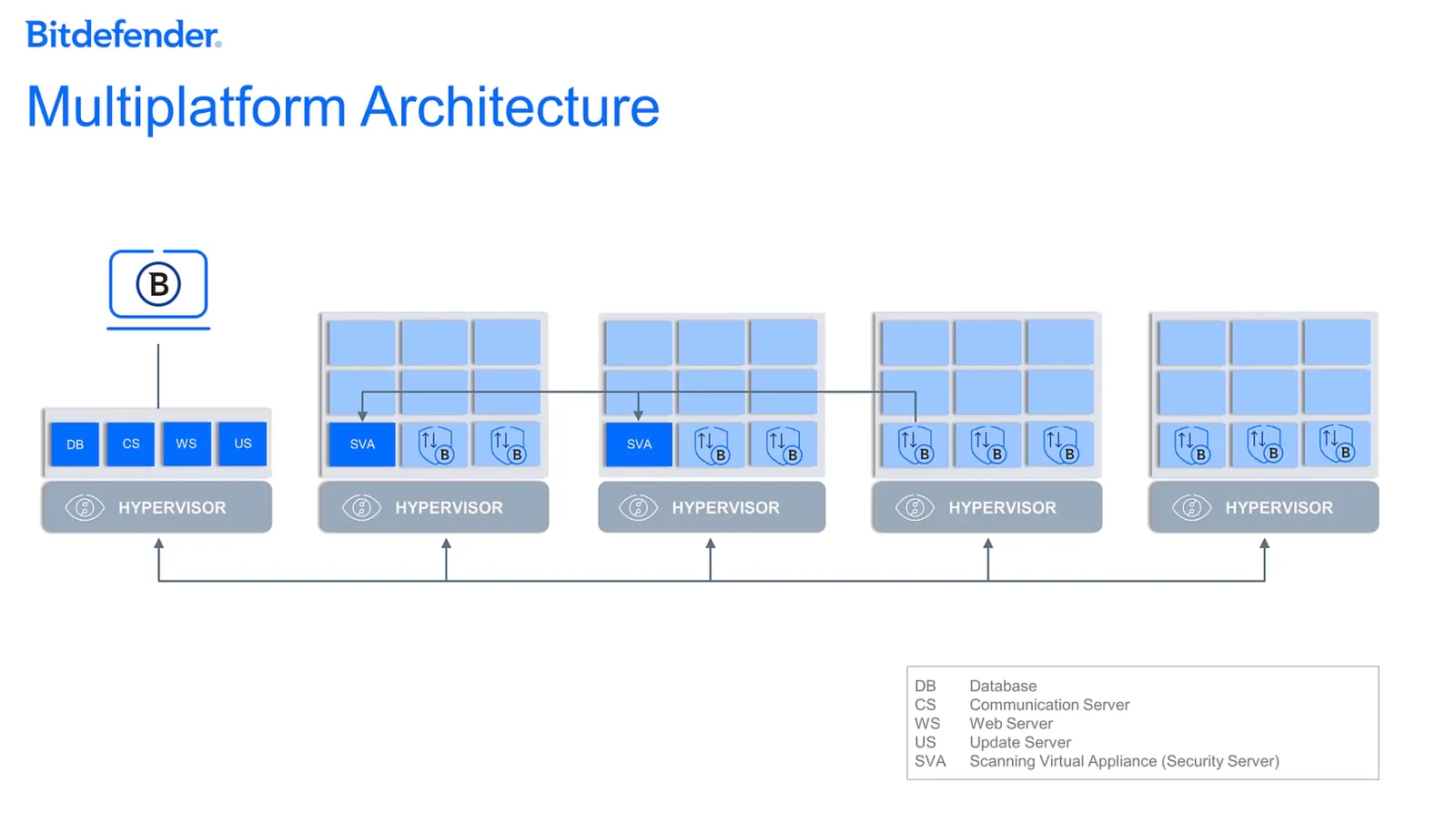
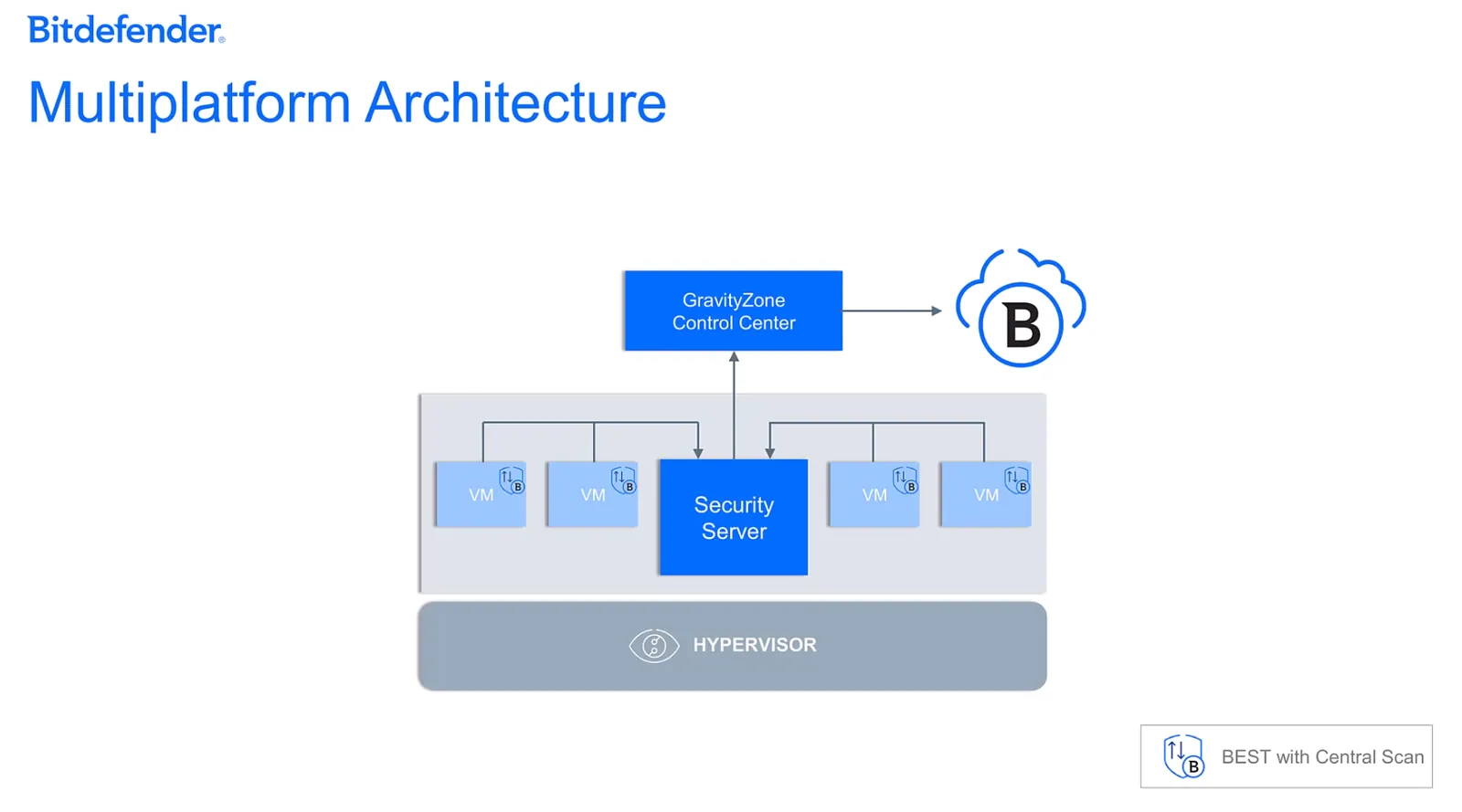
The SVE architecture is built on a client-server model that shifts the security workload from guest VMs to a dedicated virtual appliance. This design ensures flexibility and high availability.
1. Security Server (SVA - Scan Server Virtual Appliance)
The SVA is the central brain of the entire security operation.
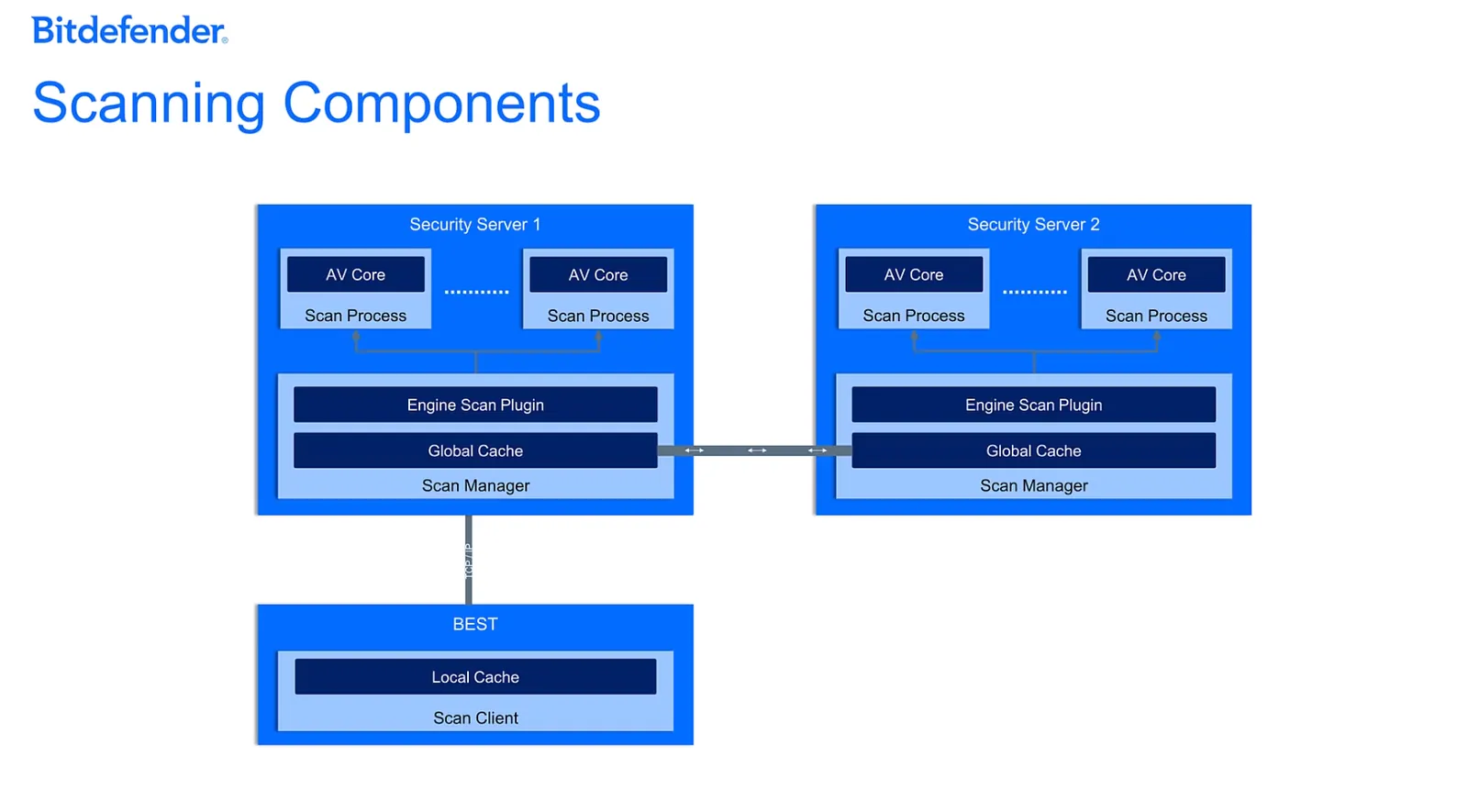
- Function: It’s a hardened, Linux-based virtual appliance that contains all the Bitdefender scanning engines and threat intelligence. It centralizes the anti-malware workload for all protected VMs.
- Types of Security Server: Bitdefender offers different SVA versions tailored to specific environments:
- Security Server for VMware NSX
- Security Server for VMware vShield Endpoint
- Security Server Multi-Platform (for Hyper-V, Citrix, Nutanix, etc.)
- Global Cache: The SVA maintains a global cache of scan results. This acts as a collective knowledge base; if a file has been scanned and deemed safe anywhere in the environment, all other VMs benefit from that knowledge instantly, avoiding redundant scans.
- Decoupling & Flexibility: The architecture is not constrained to a 1:1 deployment of one SVA per physical host. BEST clients on VMs across different hosts can all offload scans to a single, centrally located SVA.
The SVA (Security Server) is a single, central server that you install inside your own virtual network; it's not on every machine and it's not in the Bitdefender cloud. You deploy the SVA (Security Server) as just another virtual machine inside your own virtualization platform (like VMware vSphere or Microsoft Hyper-V). You might deploy a few of them for backup (high availability), but you definitely do not install one on every single VM.
- Is it on every machine? No.
- Is it in the Bitdefender cloud? No, it’s inside your own network.
2. BEST with Central Scan
This is the lightweight agent installed on each virtual machine you want to protect.
- Function: The Bitdefender Endpoint Security Tools (BEST) client is installed in a special “Central Scan” mode. It acts as a file activity monitor and offloads the actual scanning task to the Security Server using the TCP/IP protocol.
- Lightweight Footprint: The agent is incredibly lightweight because it does not store the full security content (signatures and engines) locally. This dramatically reduces its impact on VM resources (CPU, RAM, I/O).
- Local Cache: Each BEST client maintains its own local cache, which prepopulates based on environmental variables. This is a first line of defense that stores scan results for files already seen on that specific VM, providing the fastest possible response.
High Availability and Resilience
The architecture is designed for non-stop protection. Multiple Security Servers can be deployed across different physical hosts. If one SVA goes down, the BEST clients on the affected VMs will automatically redirect their scanning requests to another available SVA, ensuring continuous security coverage.
II. The Step-by-Step Scanning Workflow
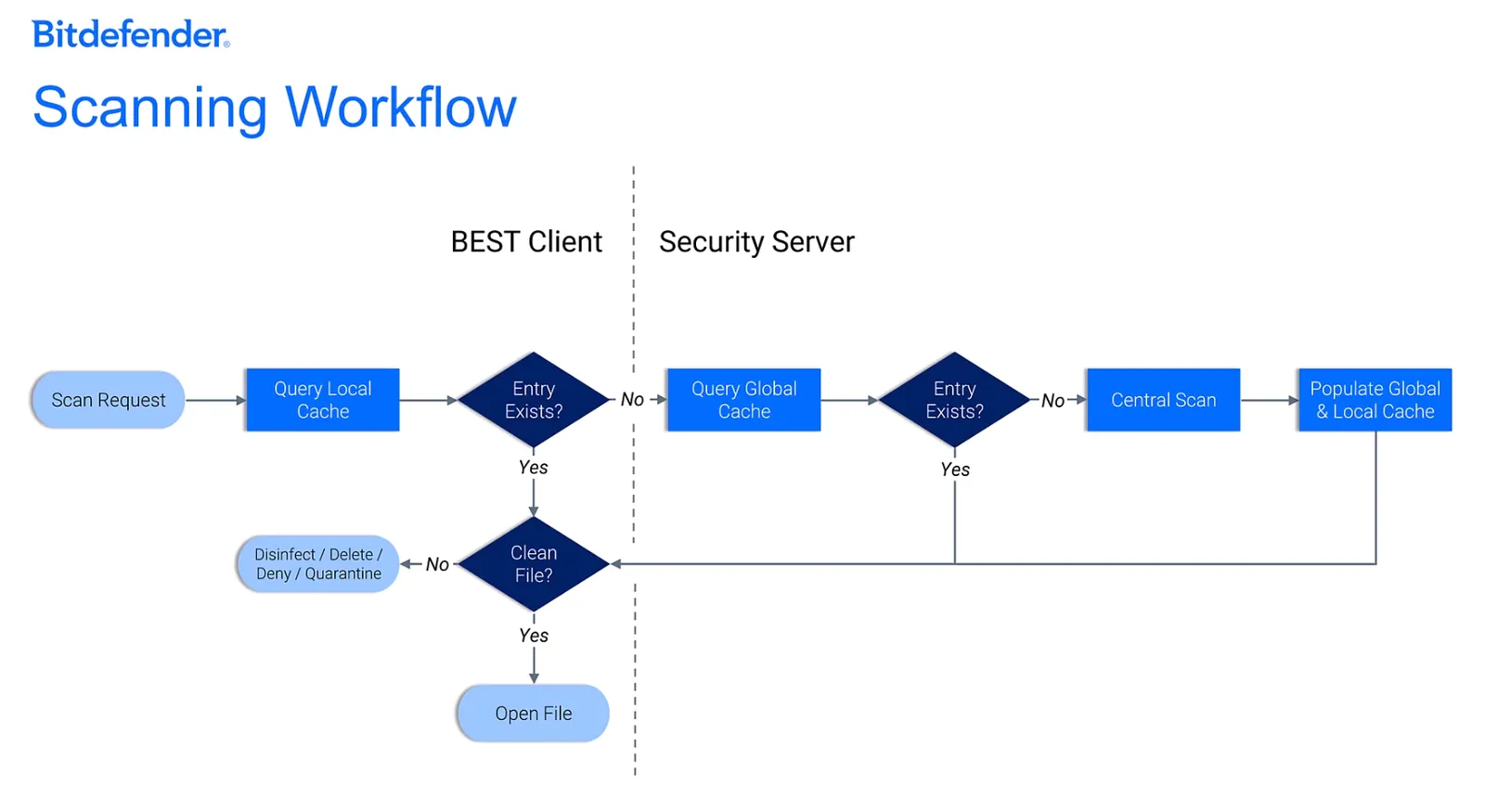
When a file is accessed on a protected VM, a highly efficient, multi-tiered process begins to ensure security with minimal delay.
Step Action Purpose & Outcome 1. Local Cache Check The BEST client on the VM checks its own local cache. Instantaneous Check. If the file’s hash is in the local cache as “clean,” access is granted immediately. This handles the majority of routine file operations. 2. Global Cache Query If not in the local cache, BEST queries the Security Server’s global cache. Environment-Wide Check. If the file has been scanned and cleared anywhere else in the virtual environment, the SVA returns a “clean” verdict, and access is granted. The local cache is also updated. 3. Central Scan Execution If the file is completely new to the environment (not in any cache), a central scan is triggered. Deep Analysis. The BEST client sends only the file’s critical chunks (the parts most likely to contain malware) to the SVA for a full, rigorous scan. 4. Cache Update & Action The scan result is used to update both the global cache on the SVA and the local cache on the requesting VM. Shared Intelligence. The entire environment now knows the status of this new file. If clean, access is granted. If malicious, the file is immediately disinfected, quarantined, or deleted based on the security policy.
III. Advanced Virtualization Protection Layers
Beyond centralized scanning, GravityZone offers specialized technologies for modern datacenters.
Security for Containers
This service is specifically designed to safeguard container workloads. It protects against Linux-native threats using AI-driven threat prevention, anti-exploit technologies, and provides context-aware Endpoint Detection and Response (EDR) for containers.
Hypervisor Memory Introspection (HVI)
HVI is a revolutionary, agentless security technology that provides unparalleled protection against advanced, stealthy attacks like zero-days and rootkits.
- Availability: This technology is exclusively available for virtual machines running on Citrix XenServer hypervisors.
- Mechanism: HVI operates at the hypervisor level, which is completely isolated from the guest OS of the VM. It directly monitors the raw memory of a running VM. Because it sits outside the VM, it’s invisible to attackers and cannot be disabled or tampered with by malware inside the guest OS. This allows it to detect malicious memory modifications that are the hallmark of sophisticated, in-memory attacks.
- Components:
- A Security Server must be installed on each Citrix Xen host.
- An HVI Supplemental Pack is installed to create the link between the hypervisor and the Security Server, enabling the memory introspection.
- Policy Actions: When HVI detects a memory violation, administrators can configure policies to take immediate action:
- Log: Simply record the violation for investigation.
- Deny: Block the malicious memory access attempt.
- Shut Down Machine: Immediately power off the compromised VM to prevent any further damage or lateral movement.